

Trading Tools
Exness Economic Calendar: Complete Guide for Traders
Master market-moving events with real-time data and customizable alerts on the Exness platform.

Forex Analyst
Forex Analyst specializing in currency markets, market trends, technical and fundamental analysis, and providing clear insights to help traders make informed decisions.
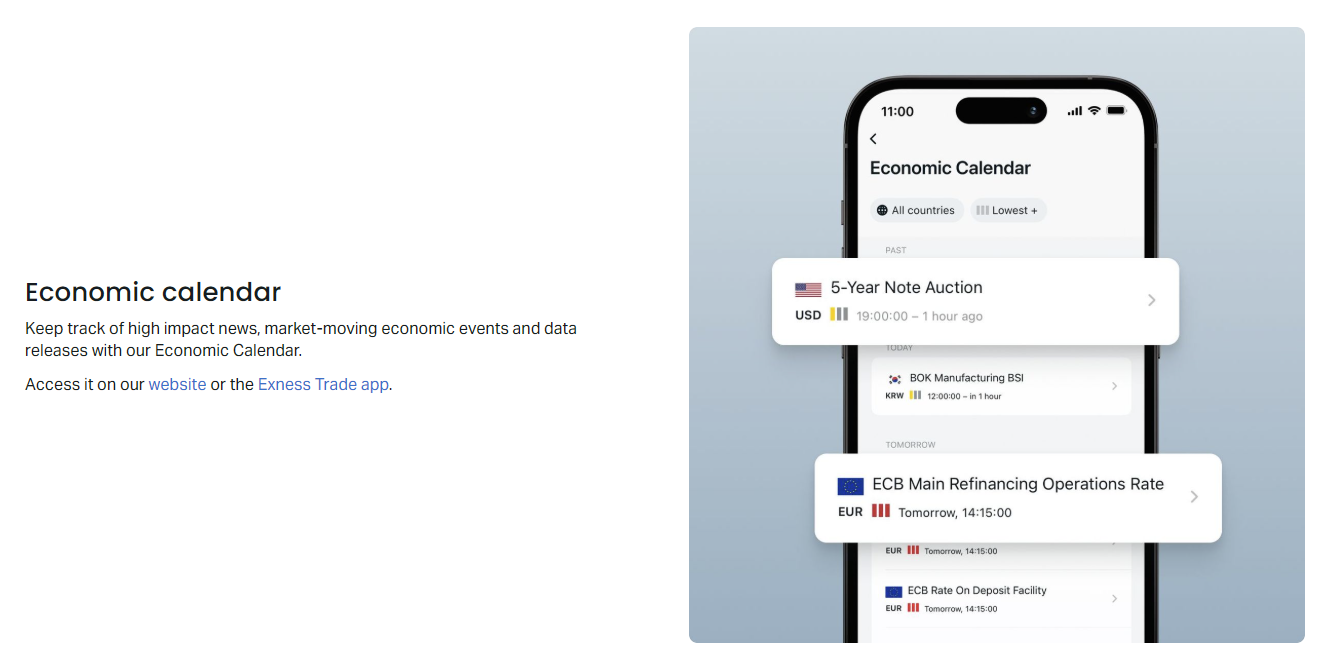
The Exness Economic Calendar serves as a central hub for traders who need timely information about macroeconomic releases, central bank decisions, and geopolitical developments that move currency markets. Unlike generic calendars found on financial news websites, this tool integrates directly with the Exness trading ecosystem, allowing users to act on data without switching platforms. Understanding how to read, filter, and apply this information can significantly improve decision-making for both short-term scalpers and longer-term position traders.
Contents
- Understanding the Exness Economic Calendar
- Key Features and Functionality
- Navigating the Calendar Interface
- Filtering Events by Impact and Currency
- Integrating Calendar Data into Trading Strategies
- Real-Time Updates and Notification Settings
- Comparing Exness Calendar with Alternative Sources
- Practical Tips for News-Based Trading
- Risk Management During High-Impact Events
- Advanced Calendar Strategies for Experienced Traders
- Customizing the Calendar for Regional Trading Sessions
- Using Historical Data for Backtesting and Analysis
- Mobile Trading with the Economic Calendar
- Final Assessment of Exness Economic Calendar
Economic calendars have evolved from simple date lists into sophisticated analytical instruments. The Exness version reflects this evolution by offering real-time updates, customizable impact filters, historical data comparison, and alert systems that notify traders before high-volatility events. These features matter because modern forex markets react within milliseconds to surprises in employment reports, inflation readings, or monetary policy statements. Traders who anticipate these reactions gain an edge over those who rely solely on technical analysis.
This guide explores every aspect of the Exness Economic Calendar, from basic navigation to advanced strategy integration. We cover how to interpret impact ratings, customize views for specific currency pairs, set up push notifications for critical releases, and combine fundamental data with technical setups. Whether you trade major pairs like EURUSD during European Central Bank meetings or exotic crosses during emerging market GDP prints, mastering this calendar transforms raw data into actionable trading intelligence.
The following sections break down each component systematically. We begin with core functionality, move through practical configuration, examine strategic applications, and conclude with risk management considerations specific to news-driven volatility. Each section builds on the previous one, creating a complete framework for incorporating economic calendar analysis into daily trading routines.
Understanding the Exness Economic Calendar
The Exness Economic Calendar aggregates scheduled economic events from over 40 countries, covering major economies like the United States, Eurozone, United Kingdom, Japan, Canada, Australia, and Switzerland, alongside emerging markets that influence regional currency pairs. Each event entry includes the release time in the trader's local timezone, the affected currency, the event name, previous value, forecast consensus, and actual result once published. This standardized format allows quick comparison across different indicators and timeframes.
Events are categorized by expected market impact using a three-tier system: low, medium, and high. High-impact events typically include central bank interest rate decisions, non-farm payrolls, consumer price index releases, gross domestic product reports, and purchasing managers' index surveys. These releases frequently trigger significant price movements, widened spreads, and increased slippage. Medium-impact events cover secondary indicators like retail sales, industrial production, and housing data. Low-impact events include less market-sensitive reports such as minor sentiment surveys or secondary labor market metrics.
The calendar displays data in a chronological table format with color-coded impact indicators. Red typically denotes high impact, orange for medium, and yellow or gray for low. Actual results appear in green when they exceed forecasts, red when they miss, and black when they match expectations. This visual coding enables rapid scanning during busy trading sessions when multiple events release simultaneously across different time zones.
- Central bank rate decisions and policy statements
- Employment reports including non-farm payrolls and unemployment rates
- Inflation metrics such as CPI, PPI, and core variants
- GDP growth figures for quarterly and annual periods
- Manufacturing and services PMI surveys
- Retail sales and consumer spending data
- Trade balance and current account reports
- Consumer and business confidence indices
Beyond the standard event list, the calendar provides historical charts for each indicator, showing how actual results have trended relative to forecasts over months or years. This historical perspective helps traders identify patterns — for instance, whether a particular central bank consistently surprises markets or whether certain indicators tend to revise significantly in subsequent months. Such insights inform position sizing and risk parameters ahead of known events.
Key Features and Functionality
The Exness Economic Calendar distinguishes itself through several platform-specific features designed for active traders. Real-time data feeds ensure that actual results appear within seconds of official releases, eliminating the delay common on free public calendars. This speed matters most during high-impact events where price discovery occurs in the first few seconds. The calendar also integrates with Exness trading terminals, allowing one-click access from MetaTrader 4, MetaTrader 5, and the Exness Web Terminal without navigating away from chart analysis.
Customizable alert systems represent another critical feature. Traders can configure notifications for specific events, currencies, or impact levels. Alerts trigger at user-defined intervals — for example, 15 minutes before a Federal Reserve rate decision or 5 minutes before a Bank of England inflation report. Notifications appear as push alerts on mobile devices, desktop pop-ups, or within the trading platform itself. This ensures traders never miss critical releases even when focused on other analysis tasks.
The calendar supports multiple time zone configurations, automatically converting event times to the trader's local setting or to server time (GMT+2/GMT+3 depending on daylight saving). This eliminates conversion errors that cause missed events. Additionally, users can filter by country, currency, impact level, and date range, creating personalized views that match their trading focus. A day trader specializing in GBP pairs might display only UK high and medium impact events, while a swing trader monitoring global macro trends might enable all major economy releases.
- Real-time actual results within seconds of release
- Integration with MT4, MT5, and Exness Web Terminal
- Customizable push and in-platform notifications
- Automatic time zone conversion to local or server time
- Multi-dimensional filtering by country, currency, impact
- Historical charts with forecast vs actual visualization
- Revision tracking for previously released data
- Export functionality for offline analysis
A notable advanced feature is the revision tracker. Many economic indicators undergo revisions in subsequent months — for example, US non-farm payrolls are revised twice after the initial release. The Exness calendar flags revised values and displays both original and updated figures, helping traders assess whether market reactions to initial prints were justified or based on data later corrected. This feature supports more accurate backtesting of news-based strategies.
Navigating the Calendar Interface
The calendar interface opens with a default view showing the current week's events across all major economies. The top toolbar contains date navigation controls — previous/next week buttons, a date picker for jumping to specific periods, and a today button for quick return. Below the toolbar, filter panels allow selection by country checkboxes, currency dropdowns, impact level toggles, and a search field for finding specific indicators by name. The main display area presents events in a responsive table that adjusts column visibility based on screen width.
Each event row expands on click to reveal detailed information including the indicator's definition, source agency, calculation methodology, and historical chart. The expansion also shows consensus forecast distribution when available — not just the median forecast but the range of analyst estimates. This distribution reveals market uncertainty; a wide range suggests disagreement among economists and potential for larger surprises. The detail view also links to related news articles and Exness analyst commentary when available.
Mobile users access a streamlined version optimized for smaller screens. The mobile interface collapses filter panels into a slide-out drawer, uses swipe gestures for date navigation, and prioritizes high-impact events at the top of each day. Push notification settings are accessible from a dedicated menu. Despite the compact layout, all core functionality remains available, including event expansion, historical charts, and alert configuration.
Keyboard shortcuts enhance efficiency for desktop power users. Arrow keys navigate between events, Enter expands details, Escape collapses, and number keys 1-3 filter by impact level. These shortcuts allow rapid scanning during high-velocity news sessions like the first Friday of each month when US employment data, Canadian jobs, and European PMI releases cluster within hours. Traders who master these shortcuts gain precious seconds when evaluating simultaneous releases.
Filtering Events by Impact and Currency
Effective filtering transforms the calendar from an overwhelming data dump into a focused decision-support tool. The impact filter operates on three levels, but experienced traders often customize further by creating saved filter presets. A preset for Asian session trading might include only JPY, AUD, NZD, and CNY high-impact events. A European session preset adds EUR, GBP, CHF, and SEK. An American session preset focuses on USD, CAD, and MXN. These presets switch with one click as trading sessions transition.
Currency-based filtering works at the pair level rather than individual currency level. Selecting EURUSD displays events for both EUR and USD, while selecting EURJPY shows EUR and JPY events. This pair-centric approach aligns with how forex traders actually analyze markets — they care about the differential between two economies, not isolated data points. The calendar also supports cross-filtering: selecting multiple pairs simultaneously shows the union of relevant events, useful for correlation analysis or basket trading strategies.
Advanced filters include event category selection (employment, inflation, growth, monetary policy, sentiment) and volatility expectation tags. Some events carry implied volatility forecasts derived from options markets, indicating how much the market expects prices to move. Traders can filter for events with implied volatility above a threshold, focusing only on releases likely to generate tradable moves. This feature bridges fundamental calendar data with options market intelligence.
Scroll horizontally to see all columns
| Trading Style | Currencies | Impact Levels | Event Categories |
|---|---|---|---|
| Scalper (Asian Session) | JPY, AUD, NZD | High, Medium | Monetary Policy, Employment, Inflation |
| Day Trader (London Session) | EUR, GBP, CHF | High, Medium | All Categories |
| Swing Trader (Global Macro) | All Majors | High Only | Monetary Policy, GDP, Inflation |
| News Specialist (Event-Driven) | Event-Specific | High Only | Central Bank Decisions, NFP, CPI |
Saved filter configurations persist across sessions and devices when logged into an Exness account. This synchronization means a trader can configure filters on desktop, then open the mobile app during commute with identical views. The calendar also supports sharing filter presets via URL, enabling teams or signal groups to standardize their event monitoring. For educators and mentors, this simplifies guiding students toward relevant events for specific curriculum modules.
Integrating Calendar Data into Trading Strategies
The transition from calendar awareness to strategy integration requires systematic approaches. Three primary methodologies dominate: avoidance, positioning, and reaction. Avoidance strategies reduce exposure before high-impact events — closing positions, widening stops, or reducing leverage. Positioning strategies take directional bets based on forecast analysis, historical tendencies, or sentiment positioning. Reaction strategies wait for the actual release, then trade the immediate price action using predefined entry rules. Each approach suits different risk tolerances and time horizons.
Avoidance represents the most conservative integration. Traders using this method treat the calendar as a risk calendar, identifying periods when statistical edge degrades due to unpredictable volatility. Common rules include: no new positions 30 minutes before high-impact events, close existing positions 15 minutes before if not already profitable, and avoid holding through central bank rate decisions unless specifically trading the event. This approach preserves capital during periods where technical patterns frequently fail due to fundamental overrides.
Positioning strategies require deeper fundamental analysis. Traders compare consensus forecasts against their own models, alternative data sources, or contrarian indicators. For example, if CPI consensus expects 3.2% but leading indicators like commodity prices, supply chain surveys, and rental trends suggest 3.5%, a trader might position for an upside surprise by buying the currency ahead of release. This approach carries event risk — if the actual matches consensus, the positioned trade may reverse sharply as disappointed speculators exit.
- Pre-event positioning based on forecast deviation analysis
- Straddle orders bracketing current price before high-impact releases
- Fade strategies trading initial spike reversals after data release
- Trend continuation entries on pullbacks following directional moves
- Correlation plays using calendar events in one pair to trade another
- Volatility expansion trades using options or reduced position sizing
Reaction strategies dominate among short-term traders. These rely on speed of interpretation and execution. The Exness calendar's real-time actual results feed directly into this workflow — as soon as the number hits, the trader compares actual vs forecast vs previous, assesses deviation magnitude, and executes pre-planned rules. For instance: if NFP exceeds forecast by >50k, buy USDJPY on 1-minute chart break of pre-release high with 10-pip stop. Such rules must be backtested and paper-traded before live deployment.

Real-Time Updates and Notification Settings
Real-time performance distinguishes professional calendars from free alternatives. The Exness Economic Calendar connects to institutional-grade data feeds that receive releases directly from government statistical agencies and central banks via dedicated lines. This eliminates the 1-5 second delay typical of aggregated retail feeds. During events like FOMC decisions where algorithms execute thousands of orders per millisecond, even sub-second advantages compound across position entry, stop placement, and partial profit taking.
Notification configuration occurs in three layers. Global settings control default behavior — sound, vibration, desktop popup, in-platform banner. Per-event overrides allow customization for specific high-priority releases. For example, a trader might want silent notifications for medium-impact European PMI but loud alerts with custom sounds for FOMC rate decisions. Time-based rules add another dimension: suppress all notifications during sleep hours except for user-defined critical events like surprise central bank interventions.
The calendar supports webhook integration for algorithmic traders. Webhooks push event data — timestamp, currency, actual, forecast, previous, impact — to custom endpoints in JSON format. This enables automated systems to adjust risk parameters, flatten positions, or trigger entry algorithms without human intervention. Webhook payloads include unique event IDs for deduplication and revision flags for corrected data. Documentation and testing sandboxes are available in the Exness developer portal.
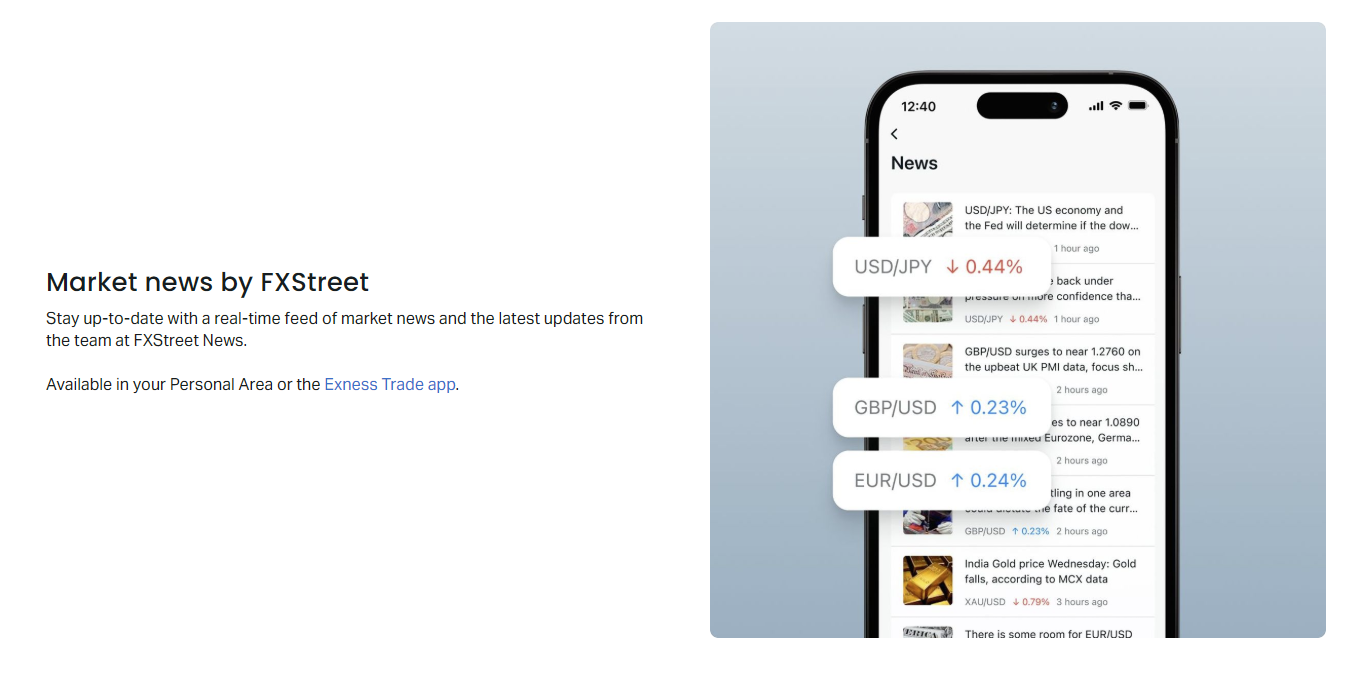
Mobile push notifications use Firebase Cloud Messaging (Android) and Apple Push Notification Service (iOS) with high-priority delivery flags. Testing shows median delivery latency under 200ms from server push to device display. Traders can verify notification reliability using the built-in test function that sends a sample alert. The mobile app also supports complication display on Apple Watch and Android Wear, showing next high-impact event countdown without unlocking the phone.
Comparing Exness Calendar with Alternative Sources
Traders often question whether broker-provided calendars match independent sources like Forex Factory, Investing.com, or Bloomberg terminals. The Exness calendar sources from the same primary data providers — national statistical offices, central banks, and licensed redistributors like Thomson Reuters and Bloomberg. The difference lies in delivery latency, integration depth, and feature set rather than raw data accuracy. All reputable calendars show identical previous, forecast, and actual values for major indicators because they originate from identical official releases.
Latency comparison favors integrated broker calendars. Independent websites add network hops: data provider → website server → CDN → user browser. Exness calendar data travels: data provider → Exness internal network → trading platform. This shorter path typically saves 200-800ms. For manual traders this difference rarely changes outcomes. For algorithmic systems executing on release spikes, it can determine fill quality. The Exness Web Terminal and mobile app maintain this low-latency path without requiring local software installation.
Feature comparison reveals trade-offs. Independent calendars often offer more extensive historical databases (20+ years vs 5-10 years), more exotic country coverage, and community features like forecast polls and comment threads. The Exness calendar counters with platform integration, one-click trading from event view, position-aware alerts (notify only if holding relevant positions), and synchronized settings across devices. Traders using multiple brokers may prefer independent calendars for unified monitoring; single-broker traders benefit from deeper integration.
Scroll horizontally to see all columns
| Feature | Exness Calendar | Forex Factory | Investing.com | Bloomberg Terminal |
|---|---|---|---|---|
| Data Latency | Sub-second | 1-3 seconds | 2-5 seconds | Real-time |
| Platform Integration | Native MT4/MT5/Web | None | Limited API | Full API |
| Historical Depth | 5-10 years | 15+ years | 20+ years | 30+ years |
| Custom Alerts | Advanced (webhook, mobile) | Basic email/push | Email/push | Programmable |
| Cost | Free with account | Free | Free/Premium | $24k+/year |
A practical approach uses the Exness calendar as primary execution tool while keeping an independent calendar open for supplementary features — historical research, community sentiment, or exotic currency coverage. This redundancy also guards against rare feed outages. During major events like US elections or pandemic policy announcements, having multiple confirmed sources prevents single-point-of-failure decisions.
Practical Tips for News-Based Trading
News-based trading demands discipline that differs from technical trend following. The calendar provides the schedule, but execution quality determines profitability. Preparation begins the night before or morning of trading sessions. Review all high and medium impact events for the session's active currencies. Note consensus forecasts, previous values, and any revisions. Identify events with asymmetric risk — where a surprise in one direction likely moves price more than a surprise in the opposite direction due to positioning or policy implications.
Pre-event routine should include checking current positioning via commitment of traders reports (for futures markets) or broker sentiment indicators. If 80% of retail traders are long EURUSD before ECB decision, a hawkish surprise may trigger limited upside as longs take profit, while a dovish surprise could cascade stops. The Exness platform provides client sentiment data for major pairs, accessible directly from the calendar event detail view. This context transforms raw data into probabilistic edge.
- Review next session events during prior session close
- Check sentiment positioning for affected pairs
- Identify key technical levels near current price
- Set alerts 30 and 10 minutes before high-impact events
- Prepare order templates for straddle or breakout entries
- Define maximum risk per event as percentage of equity
- Plan post-event re-entry criteria if stopped out
During the event, resist the urge to chase the initial spike. Algorithmic liquidity provision often creates sharp reversals within the first 30-60 seconds as market makers hedge inventory. Wait for the 1-minute or 5-minute candle close to confirm direction. Use the calendar's actual vs forecast deviation magnitude to gauge follow-through potential. Deviations exceeding 2 standard deviations of historical forecast errors frequently produce sustained moves; smaller surprises often reverse as noise traders exit.
Post-event analysis completes the cycle. Record actual result, initial reaction, 15-minute follow-through, and session close outcome. Tag trades with event name and deviation size. Over 50+ events, patterns emerge — certain indicators consistently trend after release, others reliably reverse. This personal database becomes more valuable than any generic backtest because it reflects your specific execution, broker conditions, and currency focus. The Exness calendar's export function facilitates this journaling workflow.
Risk Management During High-Impact Events
Risk management during scheduled high-impact events requires explicit rules that override normal trading plans. The calendar identifies when these rules activate. Standard risk parameters — 1-2% per trade, fixed stop distances, normal position sizing — assume relatively stable volatility distributions. Economic releases violate these assumptions, producing fat-tailed return distributions where 5-standard-deviation moves occur regularly. Traders who fail to adjust risk parameters for known event windows expose accounts to ruinous tail risk.
Three risk adjustment frameworks address this challenge. The reduction framework scales position size inversely to event impact: 50% normal size for medium impact, 25% for high impact, 0% for extreme events (FOMC, ECB, BOJ decisions). The avoidance framework eliminates exposure entirely during defined windows — flat 15 minutes before to 30 minutes after high-impact releases. The hedging framework maintains core positions but adds offsetting options or correlated pairs to neutralize directional event risk. Each framework suits different account sizes, strategies, and psychological profiles.
Spread widening and slippage represent hidden risks during events. The Exness calendar cannot predict exact spread expansion, but historical analysis shows typical multipliers: 2-3x normal for medium impact, 5-10x for high impact, 20-50x for surprise central bank actions. Stop orders may fill significantly beyond intended levels. Traders using mental stops instead of hard stops face additional execution risk during platform freezes or connectivity issues. The calendar's integration with Exness execution statistics helps quantify these costs retrospectively.
Account type influences event risk exposure. Exness Standard and Standard Cent accounts use market execution with variable spreads that widen significantly during news. Professional accounts (Raw Spread, Zero, Pro) offer tighter baseline spreads but still experience widening. Zero account commission structure means wider spreads directly increase round-trip cost. Traders on swap-free accounts should note that holding positions through Wednesday rollover during event weeks carries triple swap charges regardless of news outcomes.
Advanced Calendar Strategies for Experienced Traders
Experienced traders move beyond single-event trading to calendar-based portfolio strategies. One approach trades the calendar cycle itself — systematic positioning ahead of recurring event sequences. For example, the monthly employment cycle (ADP Wednesday, Jobless Claims Thursday, NFP Friday) creates predictable volatility patterns. Historical analysis shows USD tends to strengthen into NFP regardless of outcome due to hedging flows, then reverse post-release. A systematic strategy might buy USDJPY Monday-Thursday, reduce Friday morning, and flatten at NFP release.
Intermarket calendar strategies exploit lead-lag relationships between economic releases and asset classes. Oil inventory data (Wednesday 10:30 ET) often leads CAD pairs and energy sector equities. Chinese PMI (monthly, often weekend) leads AUD and commodity currencies Monday open. European flash PMIs (monthly, ~20th) lead EUR crosses and DAX futures. Traders monitoring the Exness calendar for these lead indicators position in lagging markets before the crowd reacts. This requires maintaining watchlists of cross-asset relationships and their typical lead times.
Volatility term structure strategies use the calendar to trade implied volatility curves. Options markets price elevated implied volatility for expiration dates coinciding with known high-impact events. By comparing calendar event dates with options expiry calendars, traders identify mispriced volatility — for instance, when a high-impact CPI release falls two days before monthly expiry but implied volatility hasn't fully priced the event risk. The Exness calendar's export function facilitates this analysis by providing machine-readable event schedules for quantitative models.
- Calendar cycle trading: systematic positioning around recurring event sequences
- Intermarket lead-lag: using leading indicators to trade lagging assets
- Volatility term structure: trading options IV around scheduled events
- Correlation breakdown: monitoring calendar-driven correlation shifts
- Carry trade adjustment: reducing leverage before central bank meetings
- Seasonal patterns: exploiting recurring calendar-date anomalies
Correlation breakdown strategies monitor how event surprises alter cross-pair relationships. During risk-off events (poor US data, geopolitical shocks), correlations converge toward 1 — all risk assets move together. During risk-on events (strong data, dovish policy), correlations diverge. The calendar helps anticipate correlation regime changes by flagging events historically associated with regime shifts. Traders then adjust portfolio construction — reducing correlated positions before convergence events, increasing diversification before divergence events.
Customizing the Calendar for Regional Trading Sessions
Global forex operates 24/5 but liquidity and volatility concentrate in three overlapping sessions: Asian (Tokyo/Sydney), European (London/Frankfurt), and American (New York). The Exness calendar supports session-aware customization that aligns event monitoring with liquidity conditions. Events released during their native session — Japanese data during Asian hours, European data during London hours, US data during New York hours — generate maximum reaction because local participants are active. Same events released off-hours often produce muted initial moves followed by catch-up during the relevant session.
Asian session traders focus on JPY, AUD, NZD, CNY, and SGD events. Key releases include Bank of Japan policy decisions, Tankan survey, Tokyo CPI, Australian employment and RBA minutes, New Zealand GDP and RBNZ decisions, Chinese PMI and trade balance. The calendar's country filter preset for Asia-Pacific reduces noise from European and American events that won't move Asian-session pairs significantly. However, major US events (FOMC, NFP) still warrant monitoring due to global USD influence.
European session traders — the highest liquidity window — monitor EUR, GBP, CHF, SEK, NOK, and PLN events. ECB decisions, Eurozone CPI and PMI, UK employment and BoE minutes, Swiss SNB policy, and Scandinavian central bank meetings dominate. The London-New York overlap (13:00-17:00 GMT) sees peak liquidity and most efficient price discovery. Events releasing during this window — typically US data at 13:30 or 15:00 GMT — produce cleanest technical follow-through. Calendar filters for this session should include both European and high-impact US events.
Scroll horizontally to see all columns
| Session | Primary Currencies | Key Events | Liquidity Profile |
|---|---|---|---|
| Asian (00:00-08:00 GMT) | JPY, AUD, NZD, CNY | BoJ, RBA, RBNZ, China PMI | Lower, range-bound |
| European (07:00-16:00 GMT) | EUR, GBP, CHF, SEK | ECB, BoE, Eurozone PMI/CPI | High, trending |
| American (13:00-21:00 GMT) | USD, CAD, MXN | FOMC, NFP, CPI, Fed Speakers | Highest, volatile |
| Overlap (13:00-16:00 GMT) | All Majors | Combined European + US Events | Peak Efficiency |
American session traders focus on USD, CAD, and MXN with FOMC decisions, non-farm payrolls, CPI/PCE inflation, ISM manufacturing/services, and Fed speaker commentary. Canadian events (BoC decisions, employment, CPI) often coincide with US releases, creating CAD cross volatility. Mexican peso reacts to Banxico decisions and US-Mexico trade data. The calendar's impact filter proves essential here — US high-impact events dominate global attention, but medium-impact Canadian data can move USDCAD significantly when US data is mixed.
Using Historical Data for Backtesting and Analysis
The Exness Economic Calendar's historical database enables rigorous backtesting of news-based strategies. Each event record stores timestamp, actual, forecast, previous, revised values, and impact classification. Traders can export this data for quantitative analysis in Python, R, or Excel. Common backtests include: measuring average pip movement in first 5/15/60 minutes post-release by deviation size, testing straddle profitability across event types, evaluating fade strategy win rates at various deviation thresholds, and assessing correlation between forecast errors and subsequent trend persistence.
Data quality considerations affect backtest validity. The calendar flags revised values, but backtests must decide whether to use initial actual (what markets reacted to) or revised actual (truer economic picture). For reaction strategies, initial actual is correct — markets trade the headline. For fundamental positioning strategies, revised actual may better represent underlying trends. The Exness calendar provides both, allowing strategy-specific selection. Survivorship bias is minimal since the calendar includes all scheduled events regardless of market outcome.
Seasonal analysis reveals recurring patterns tied to calendar structure. Certain months concentrate high-impact events — March/June/September/December for quarterly GDP, central bank quarterly forecasts, and fiscal policy announcements. August and December feature reduced liquidity amplifying event reactions. January often sees position rebalancing flows overriding data. The calendar's date-range export supports seasonal studies by allowing aggregation across years. Traders discovering statistically significant seasonal edges (p < 0.05 with sufficient sample) can incorporate them as strategy filters.
Machine learning practitioners can use the calendar's structured data as features for volatility forecasting models. Input features include: event type, country, impact level, forecast dispersion, previous surprise magnitude, days since last central bank meeting, and current volatility regime. Target variables: realized volatility over 1h/4h/1d horizons, directional move magnitude, or probability of exceeding ATR multiples. The calendar's consistent schema across years makes it suitable for rolling-window model training without feature engineering drift.
Mobile Trading with the Economic Calendar
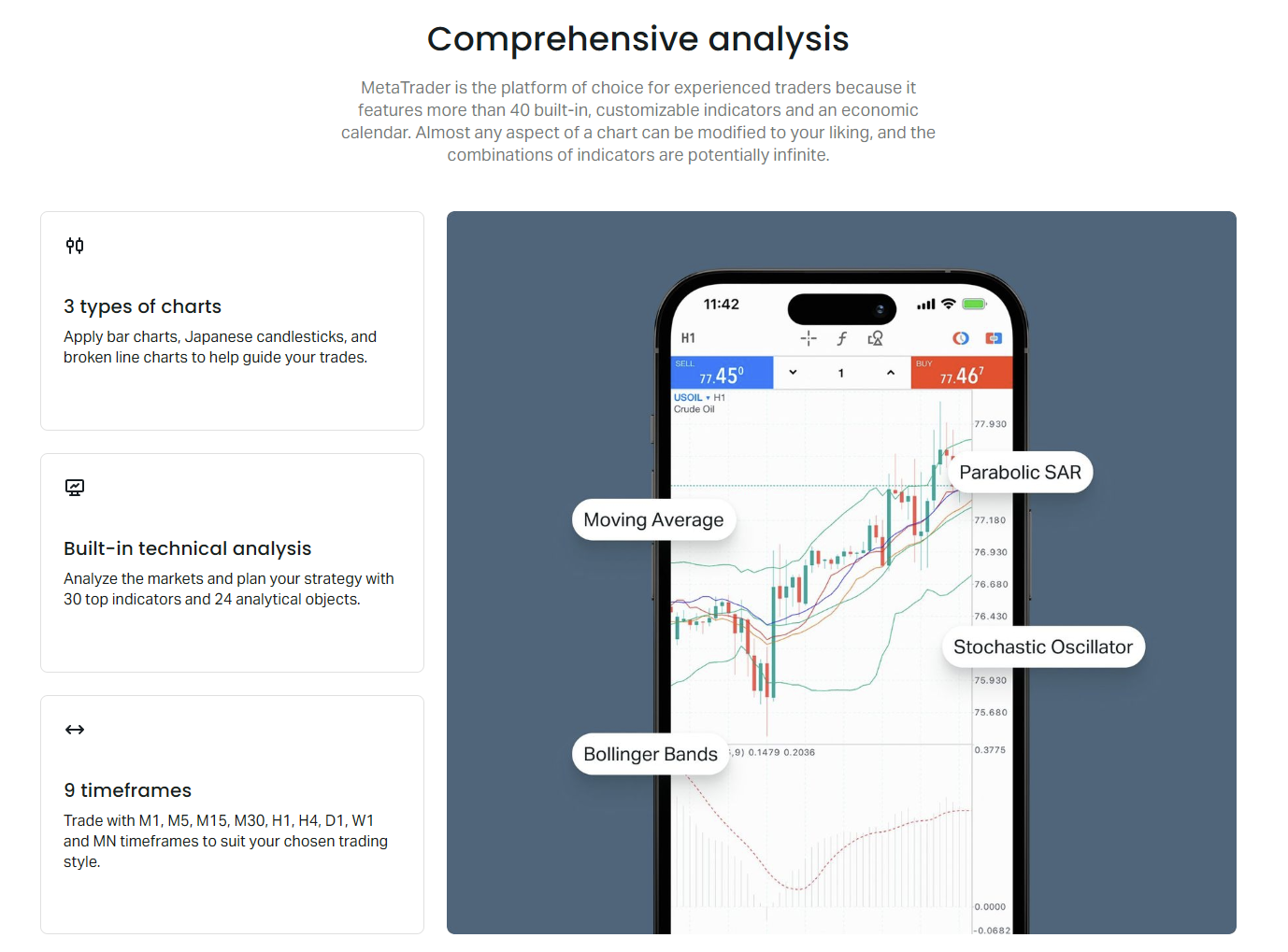
Mobile access transforms the calendar from a desktop planning tool into a real-time trading companion. The Exness mobile app (iOS and Android) includes full calendar functionality with touch-optimized controls. Swipe gestures navigate dates, long-press expands events, pull-to-refresh updates data. Push notifications arrive even when the app is backgrounded, critical for traders who cannot monitor screens continuously. The app also supports biometric authentication for quick access during fast-moving events.
Mobile-specific features enhance situational awareness. The today widget (iOS) and home screen widget (Android) display next high-impact event with countdown timer without opening the app. Apple Watch complication shows event countdown and impact level. Android Wear tiles provide similar glanceable information. These passive displays keep traders informed during meetings, commutes, or gym sessions — moments when high-impact events might otherwise catch them flat-footed.
The mobile calendar synchronizes filter presets, alert configurations, and display preferences with desktop via cloud settings. Changes made on one device propagate within seconds. This synchronization extends to the Exness Web Terminal — a trader can configure alerts on desktop, receive push on mobile, and execute on Web Terminal from any browser without software installation. The seamless device handoff supports modern trading workflows where analysis, monitoring, and execution occur across multiple contexts.
Offline caching ensures calendar access during connectivity interruptions. The app caches the next 7 days of events (including forecasts) for offline viewing. Actual results update automatically when connectivity restores. This feature proves valuable during travel or in regions with unstable internet. Traders should refresh the calendar before entering known dead zones (flights, subways, remote areas) to ensure cached data covers the expected offline period.
Final Assessment of Exness Economic Calendar
The Exness Economic Calendar delivers professional-grade fundamental data with broker-specific integration that streamlines the analysis-to-execution pipeline. Its strengths lie in real-time latency, platform-native access, customizable alerting, and synchronization across devices. For Exness clients, it eliminates the friction of external calendar management while providing sufficient depth for serious news-based trading. The historical database, revision tracking, and export capabilities support both discretionary and systematic approaches.
Limitations exist relative to terminal-based solutions like Bloomberg or Refinitiv Eikon. Historical depth covers roughly 5-10 years versus decades. Exotic currency coverage prioritizes Exness tradable pairs over comprehensive global coverage. Community features — forecast polls, analyst commentary threads, user sentiment — are absent or minimal compared to Forex Factory. Algorithmic traders requiring tick-level historical surprises or nowcasting models may need supplementary data sources. However, for the vast majority of retail and professional forex traders, these limitations rarely constrain practical decision-making.
The calendar's greatest value emerges when traders move beyond passive monitoring to active integration. Configuring session-specific filters, setting strategic alerts, exporting data for personal backtesting, and combining calendar events with technical levels and sentiment data creates a compound edge. Each component alone provides marginal improvement; together they form a coherent fundamental workflow embedded in the trading platform. Traders who invest time mastering this integration typically reduce avoidable event-risk losses and capture more news-driven opportunities.
Frequently Asked Questions
How do I access the Exness Economic Calendar?
The calendar is accessible through the Exness website, Exness Web Terminal, MetaTrader 4/5 platforms via the news tab, and the Exness mobile app for iOS and Android.
Does the calendar show revised economic data?
Yes, the Exness Economic Calendar displays both initial and revised values for indicators that undergo revisions, with clear flags indicating when data has been updated.
Can I set alerts for specific economic events?
Yes, you can configure push notifications, desktop alerts, and in-platform banners for individual events, currencies, or impact levels with customizable timing.
Is the Exness Economic Calendar free to use?
Yes, the calendar is free for all Exness account holders, including demo account users. No additional subscription is required.
What time zone does the calendar use?
The calendar automatically converts event times to your local time zone or server time (GMT+2/GMT+3), with manual override available in settings.
Can I export calendar data for analysis?
Yes, the calendar supports data export in CSV and JSON formats for offline analysis, backtesting, and integration with custom tools.
Does the calendar cover all global economic events?
The calendar covers 40+ major and emerging economies with focus on currencies tradable on Exness. Exotic or minor economy events may have limited coverage.