

Forex Trading Education
Exness Stop Out Levels and Margin Protection Explained
Learn how stop out works, calculate margin levels, and implement risk management strategies to avoid forced liquidation.

Forex Analyst
Forex Analyst specializing in currency markets, market trends, technical and fundamental analysis, and providing clear insights to help traders make informed decisions.
Stop out represents a critical risk management mechanism that automatically closes open positions when account equity falls below a specific percentage of used margin. For traders using Exness, understanding this process is essential for preserving capital and avoiding unexpected liquidation during volatile market conditions. The broker implements stop out levels that vary by account type, providing transparency about when the system will intervene to protect both the trader and the broker from excessive losses.
Contents
- What Is Stop Out in Forex Trading
- Exness Stop Out Levels by Account Type
- How Margin Level Triggers Stop Out
- Calculating Your Margin Level Before Stop Out
- Difference Between Margin Call and Stop Out
- Exness Negative Balance Protection
- Practical Steps to Avoid Stop Out
- Using Exness Trading Calculator for Risk Management
- Stop Out Behavior During High Volatility
- Account Types and Their Stop Out Thresholds
- Monitoring Margin Level in MetaTrader and Exness Terminal
- Recovering from Stop Out and Rebuilding
- Key Takeaways About Exness Stop Out
Many traders confuse stop out with margin call, but these are distinct events with different consequences. A margin call serves as an early warning that equity has dropped to a cautionary threshold, giving the trader time to add funds or reduce position size. Stop out, by contrast, triggers immediate forced closure of positions starting with the largest losing trade. Exness provides clear documentation of these thresholds, allowing traders to plan their risk parameters with precision.
The relationship between leverage, margin requirements, and stop out levels creates a framework that every trader must master. Higher leverage reduces the margin needed to open positions but also brings the stop out threshold closer to the current equity level. Exness offers leverage up to 1:2000 on certain accounts, which amplifies both potential returns and the speed at which stop out can occur. This article examines each component in detail, providing practical guidance for navigating these mechanics.
Beyond the technical definitions, successful traders develop habits that keep them comfortably above stop out levels even during adverse price movements. Position sizing, stop loss placement, and regular equity monitoring form the foundation of this discipline. Exness supports these practices with tools like the trading calculator, real-time margin indicators in MetaTrader 4 and 5, and negative balance protection that ensures losses never exceed deposited funds.
What Is Stop Out in Forex Trading
Stop out is an automated risk control mechanism that liquidates open positions when the margin level — the ratio of equity to used margin expressed as a percentage — falls to a broker-defined threshold. At Exness, this threshold varies by account type but generally ranges from 0% to 50%. When triggered, the system closes positions one by one, starting with the largest losing position, until the margin level rises above the stop out level again. This process happens instantly and without trader intervention, making it the final line of defense against negative account balances.
The concept exists because leveraged trading allows traders to control positions larger than their account equity. While this amplifies profits, it equally amplifies losses. Without stop out, a sustained adverse move could drive equity below zero, leaving the trader owing money to the broker. Stop out prevents this by forcibly reducing exposure before losses exceed the account balance. Exness enhances this protection with negative balance protection, ensuring that even in extreme market gaps or slippage events, the trader's liability is capped at zero.
- Stop out activates automatically when margin level reaches the account-specific threshold
- Positions close in descending order of floating loss, largest loser first
- The process continues until margin level recovers above the stop out level
- No manual approval or notification delay occurs during execution
- Negative balance protection caps maximum loss at the deposited amount
Exness Stop Out Levels by Account Type
Exness applies different stop out percentages across its account lineup, reflecting the varying risk profiles and target audiences of each account type. Standard and Standard Cent accounts typically feature a 0% stop out level, meaning positions remain open until equity reaches zero. Professional accounts — Pro, Raw Spread, and Zero — generally implement a 20% stop out level, providing an earlier intervention point. This differentiation allows traders to choose an account structure aligned with their risk tolerance and trading style.
Scroll horizontally to see all columns
| Account Type | Stop Out Level | Margin Call Level | Typical Leverage |
|---|---|---|---|
| Standard | 0% | Not applicable | Up to 1:2000 |
| Standard Cent | 0% | Not applicable | Up to 1:2000 |
| Pro | 20% | 40% | Up to 1:2000 |
| Raw Spread | 20% | 40% | Up to 1:2000 |
| Zero | 20% | 40% | Up to 1:2000 |
The 0% stop out on Standard accounts means the broker will not close positions until equity is fully depleted, though negative balance protection still applies. This gives traders maximum flexibility but also maximum risk of total account loss. Professional accounts with 20% stop out intervene earlier, preserving a portion of equity but potentially closing positions that might have recovered. Traders should select account types based on whether they prefer wider breathing room or earlier forced risk reduction.
How Margin Level Triggers Stop Out
Margin level is the real-time metric that determines stop out activation. It calculates as equity divided by used margin, multiplied by 100 to express as a percentage. Equity equals account balance plus floating profit or loss from open positions. Used margin represents the collateral locked to maintain those positions. As floating losses increase, equity decreases while used margin remains constant, causing margin level to fall. When it hits the account's stop out percentage, the system executes forced closures.

Consider a Standard account with $1,000 balance, 1:500 leverage, and a 1 lot EURUSD position requiring $200 margin. If the position moves against the trader by $800, equity drops to $200. Margin level becomes ($200 / $200) × 100 = 100%. Since Standard accounts have 0% stop out, no liquidation occurs yet. However, if losses reach $999, equity becomes $1, margin level hits 0.5%, and stop out triggers. On a Pro account with 20% stop out, the same position would be closed once equity fell to $40 (20% of $200 used margin).
- Margin Level = (Equity / Used Margin) × 100
- Equity = Balance + Floating P/L
- Used Margin = Position Size / Leverage
- Floating losses reduce equity and margin level simultaneously
- Stop out executes when margin level ≤ account stop out percentage
Calculating Your Margin Level Before Stop Out
Proactive margin monitoring prevents surprise stop outs. The Exness trading calculator, available in the Personal Area and as a web tool, lets traders input account type, leverage, instrument, and position size to see required margin, pip value, and projected margin levels at various price points. MetaTrader 4 and 5 also display margin level in real time within the terminal window, updating with every tick. Traders should develop the habit of checking margin level before opening new positions and during significant market moves.
Manual calculation reinforces understanding. For a 0.5 lot GBPUSD position on a Pro account with 1:1000 leverage, used margin equals 50,000 / 1000 = $50. With $500 equity, margin level starts at 1000%. A 100-pip adverse move on GBPUSD (approximately $500 for 0.5 lots) would wipe out equity entirely. At 20% stop out, liquidation begins when equity reaches $10 (20% of $50), corresponding to roughly a 98-pip move against the position. This calculation reveals how quickly high-leverage positions approach stop out.
Scroll horizontally to see all columns
| Scenario | Equity | Used Margin | Margin Level | Stop Out Status (Pro) |
|---|---|---|---|---|
| Initial position | $1,000 | $100 | 1000% | Safe |
| Moderate drawdown | $600 | $100 | 600% | Safe |
| Approaching margin call | $50 | $100 | 50% | Margin call (40%) |
| Stop out threshold | $20 | $100 | 20% | Stop out triggered |
| Below stop out | $10 | $100 | 10% | Positions closing |
Difference Between Margin Call and Stop Out
Margin call and stop out represent two distinct stages of margin deterioration. Margin call is a notification threshold — typically 40% on Exness professional accounts — alerting the trader that equity has fallen to a level requiring action. No positions close at margin call; it serves purely as a warning. Stop out, occurring at 20% on professional accounts, triggers mandatory liquidation. Standard and Standard Cent accounts do not have a formal margin call level since their stop out is 0%, though the platform may still display margin level warnings.
The gap between margin call and stop out provides a critical window for decision-making. At 40% margin call on a Pro account, the trader can deposit additional funds, close losing positions manually, or hedge exposure to raise margin level above 40%. If no action is taken and losses continue, the 20% stop out executes automatically. This two-tier system gives responsible traders opportunity to manage their risk while maintaining a hard backstop. Exness does not guarantee notification delivery during extreme volatility, so traders should not rely solely on alerts.
Margin call is your last chance to act; stop out is the market acting for you.
Exness Negative Balance Protection
Negative balance protection is a regulatory safeguard that ensures traders cannot lose more than their deposited funds. Even if stop out execution experiences slippage during extreme volatility — such as flash crashes, gap openings, or news events — the account balance will never go below zero. Exness applies this protection automatically to all retail client accounts across all account types. The broker absorbs any residual negative balance, resetting the account to zero rather than pursuing the trader for the deficit.
This protection became mandatory for European brokers under ESMA regulations in 2018 and has since been adopted by many reputable brokers globally, including Exness for its international entities. It applies per account, not per client; a trader with multiple accounts could theoretically have a negative balance in one while others remain positive, though Exness typically offsets across accounts. Professional clients who opt out of retail protections may forfeit this coverage, so account classification matters.
While negative balance protection eliminates the risk of owing the broker, it does not prevent total loss of deposited capital. A 0% stop out on Standard accounts combined with high leverage can still result in 100% account drawdown. Traders should view negative balance protection as a backstop against catastrophic debt, not as a substitute for proper position sizing and stop loss discipline. The protection activates only after stop out fails to prevent negative equity, which typically requires extreme market conditions.
Practical Steps to Avoid Stop Out
Avoiding stop out requires a combination of pre-trade planning and active position management. The most effective step is sizing positions so that a reasonable adverse move — such as 1-2% of account equity — does not approach the stop out threshold. For a $10,000 account on a Pro account with 20% stop out, risking $200 per trade (2%) with a stop loss that would reduce equity to $9,800 keeps margin level far above 20% unless many correlated positions lose simultaneously. Diversification across uncorrelated instruments further reduces this correlation risk.
- Risk no more than 1-2% of equity per trade
- Always use stop losses on every position
- Monitor margin level daily, hourly during volatile sessions
- Reduce position size before major economic releases
- Maintain a buffer: keep margin level above 200% on Pro accounts
- Avoid over-leveraging; 1:100 to 1:500 is sufficient for most strategies
- Close or hedge positions before weekends if holding risk is unacceptable
Active management includes scaling out of losing positions before they threaten margin level, rather than hoping for a reversal. Partial closure reduces used margin and raises margin level immediately. Hedging — opening an opposite position in the same instrument — locks in the current floating loss while eliminating further margin pressure from that exposure, though it doubles spread costs. Exness allows hedging on all account types. Traders should also be aware that swap charges on positions held overnight reduce equity incrementally, which can push margin level toward stop out over days or weeks.
Using Exness Trading Calculator for Risk Management
The Exness trading calculator is a free tool accessible from the Personal Area and the broker's website. It computes required margin, pip value, swap costs, and projected profit or loss for any instrument, position size, and leverage combination. By entering hypothetical entry and exit prices, traders can see exactly how margin level would change at different price levels, identifying the price at which stop out would trigger. This forward-looking analysis transforms stop out from a surprise into a calculated boundary.
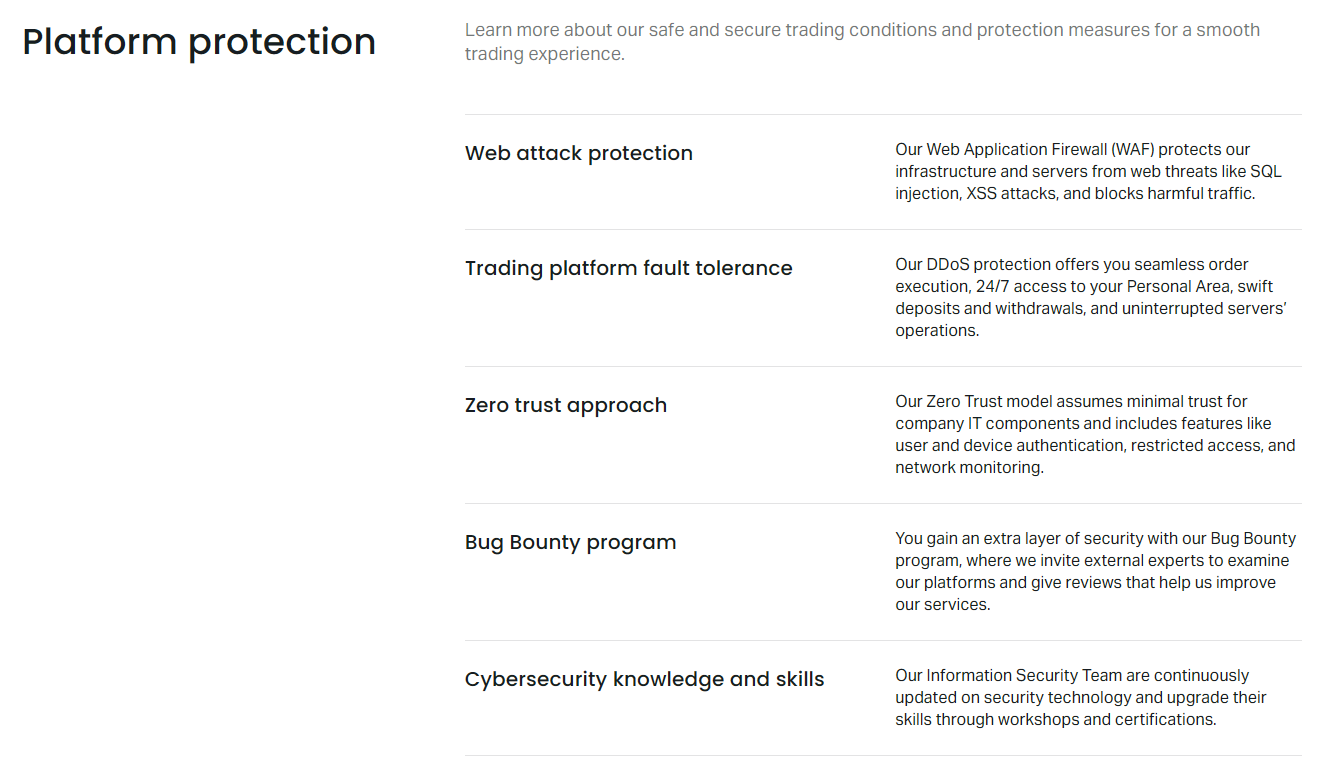
To use the calculator for stop out planning, select your account type, set leverage, choose the trading instrument, and input your intended position size. The tool displays required margin. Then calculate your current equity minus the maximum acceptable loss. Divide that remaining equity by required margin to get your projected margin level at maximum loss. If the result is near or below your account's stop out percentage, reduce position size until a comfortable buffer exists. Repeat this for each new trade or when adding to existing positions.
Scroll horizontally to see all columns
| Input Field | Purpose | Example Value |
|---|---|---|
| Account Type | Determines stop out % | Pro |
| Leverage | Sets margin requirement | 1:500 |
| Instrument | Defines contract size | EURUSD |
| Volume (lots) | Position size | 0.2 |
| Entry Price | Reference for P/L calc | 1.0850 |
| Stop Loss Price | Max adverse move | 1.0800 |
Stop Out Behavior During High Volatility
High volatility environments — major economic releases, central bank decisions, geopolitical events — create conditions where stop out risk escalates rapidly. Spreads widen, increasing the cost of opening and closing positions. Slippage can cause stop losses to fill at worse prices than expected, and margin level can drop faster than the platform updates. Exness provides stable spreads on major pairs even during news events for most account types, but extreme conditions can still produce gaps that bypass stop losses entirely, moving equity directly to stop out levels.
During such periods, the 20% buffer between margin call and stop out on professional accounts can vanish in seconds. Traders holding positions through events like NFP, CPI, or FOMC announcements should either reduce leverage significantly beforehand or close positions entirely. Exness offers a 'Trading Hours' schedule and economic calendar highlighting high-impact events. The calendar includes volatility expectations, helping traders decide whether to stay in or step out. Weekend gaps present similar risk; positions held over Friday close can reopen Sunday at vastly different prices.
Volatility does not cause stop out; insufficient margin for that volatility does.
Account Types and Their Stop Out Thresholds
Each Exness account type serves a different trader profile, and stop out levels reflect these design intentions. Standard and Standard Cent accounts target beginners and those testing strategies with small capital; the 0% stop out allows maximum learning room but also permits total loss. Pro accounts suit experienced traders who want raw spreads with commission; the 20% stop out enforces discipline. Raw Spread and Zero accounts cater to scalpers and high-frequency traders where commission-based pricing and tight spreads matter most, with the same 20% stop out providing consistent risk parameters.
Islamic (swap-free) accounts follow the same stop out rules as their standard counterparts — 0% for Standard Islamic, 20% for Pro Islamic. The absence of swap charges slightly improves long-term margin level for positions held overnight, but does not change the stop out threshold. Traders should note that Exness may adjust stop out levels for specific instruments or during exceptional market conditions, though such changes are communicated in advance. Always verify current levels in the Personal Area or contract specifications before trading.
Scroll horizontally to see all columns
| Account Category | Accounts Included | Stop Out | Best For |
|---|---|---|---|
| Standard | Standard, Standard Cent, Standard Islamic | 0% | Beginners, strategy testing, small capital |
| Professional | Pro, Raw Spread, Zero, Pro Islamic | 20% | Experienced traders, scalpers, EA users |
Monitoring Margin Level in MetaTrader and Exness Terminal
Real-time margin monitoring is available in every Exness trading platform. In MetaTrader 4 and 5, the Terminal window's Trade tab displays Balance, Equity, Margin, Free Margin, and Margin Level continuously. Margin Level appears as a percentage and changes color — typically green above 100%, yellow near margin call, red near stop out. The Exness Web Terminal and mobile app show the same metrics in a streamlined interface. Traders should keep this panel visible at all times and understand that Margin Level is the single most important number for stop out prevention.
The Exness Personal Area provides a portfolio-level view across all accounts, showing each account's margin level, equity, and free margin. This is useful for traders managing multiple accounts or strategies. Alerts can be configured in MetaTrader to notify when margin level crosses user-defined thresholds. Setting an alert at 200% on a Pro account (well above the 40% margin call and 20% stop out) provides ample time to act. Mobile push notifications ensure awareness even when away from the trading desk.
Recovering from Stop Out and Rebuilding
Experiencing a stop out is a significant emotional and financial event. The immediate aftermath leaves the account with reduced equity — potentially zero on Standard accounts or roughly 20% of used margin on Professional accounts. The first step is acknowledging the loss without revenge trading. Exness does not restrict new deposits after stop out; traders can fund the account again once they have analyzed what went wrong. Common causes include over-leveraging, missing stop losses, holding through high-impact news, or ignoring margin level warnings.
Rebuilding should start with reduced position sizes and lower leverage. A trader who stopped out with 1:2000 leverage might restart at 1:100 or 1:200, forcing stricter position sizing. The Exness demo account provides a risk-free environment to test revised strategies before committing real capital. Many successful traders treat stop out as a tuition fee that taught them risk management lessons no book could convey. The key is ensuring the same mistake does not repeat.
- Pause trading for 24-48 hours after stop out
- Review trade history to identify the root cause
- Reduce leverage by at least 50% for the next phase
- Trade on demo until new rules prove consistent
- Deposit only what you can afford to lose again
- Implement mandatory stop losses on every trade
A stop out is not a failure of the market; it is a failure of risk management. The market simply enforced the rules you ignored.
Key Takeaways About Exness Stop Out
Exness stop out mechanisms are designed to protect traders from negative balances while providing transparency about when forced liquidation occurs. Standard and Standard Cent accounts use a 0% stop out, allowing positions to run until equity is exhausted. Professional accounts — Pro, Raw Spread, and Zero — implement a 20% stop out with a 40% margin call warning, creating a structured risk framework. Negative balance protection applies to all retail accounts, capping maximum loss at deposited funds. The Exness trading calculator, real-time margin displays in MetaTrader and the Web Terminal, and the economic calendar are essential tools for staying ahead of stop out thresholds.
Successful traders treat stop out as a boundary they never approach, not a limit they test. Position sizing at 1-2% risk per trade, mandatory stop losses, leverage appropriate to strategy, and active margin monitoring during volatile periods form the practical defense. When stop out does occur, the path forward involves honest analysis, reduced risk parameters, and demo validation before returning to live markets. Exness provides the infrastructure; the trader provides the discipline.
Frequently Asked Questions
What is the stop out level for Exness Standard accounts?
Exness Standard and Standard Cent accounts have a 0% stop out level, meaning positions remain open until equity reaches zero, though negative balance protection prevents the account from going negative.
How does stop out differ from margin call on Exness?
Margin call at 40% (Pro accounts) is a warning notification only; no positions close. Stop out at 20% (Pro accounts) triggers automatic forced liquidation starting with the largest losing position until margin level recovers above 20%.
Can I lose more than my deposit due to stop out slippage?
No. Exness provides negative balance protection on all retail accounts, ensuring your balance never falls below zero even if stop out execution experiences extreme slippage during volatile conditions.
How can I calculate the price at which stop out will trigger?
Use the Exness trading calculator: input your account type, leverage, instrument, and position size to see required margin. Then calculate (Equity - Max Loss) / Used Margin × 100. When this equals your account's stop out percentage, that price is your stop out trigger.
Does Exness change stop out levels during high volatility?
Exness may adjust stop out levels for specific instruments during exceptional market conditions, but such changes are communicated in advance. Standard stop out levels remain constant under normal conditions.
What happens to my open orders when stop out triggers?
Stop out closes open positions only, starting with the largest floating loss. Pending orders (limit, stop) remain active unless manually cancelled, but with reduced equity they may not have sufficient margin to execute if triggered.
Is stop out level the same for Islamic accounts?
Yes. Standard Islamic accounts follow the 0% stop out of Standard accounts. Pro Islamic accounts follow the 20% stop out of Pro accounts. The swap-free feature does not alter stop out thresholds.
How do I set a margin level alert in MetaTrader?
In MT4/MT5, right-click the Margin Level cell in the Terminal > Trade tab, select 'Create Alert', set your desired percentage (e.g., 200%), and enable notifications. The platform will alert when margin level crosses that threshold.