

Trading Tools
Exness Calculator: Complete Guide to Trading Calculators
Master position sizing, risk management, and trade planning with Exness calculator tools.

Forex Analyst
Forex Analyst specializing in currency markets, market trends, technical and fundamental analysis, and providing clear insights to help traders make informed decisions.
The Exness calculator suite provides traders with a set of specialized tools designed to simplify the mathematics behind every trade. Whether you are calculating potential profit, required margin, pip value, or currency conversion rates, these calculators remove guesswork and help you make informed decisions before entering the market. This guide explores each calculator in detail, explains how to access them, and shows how to integrate them into a disciplined trading workflow.
Contents
- What Is the Exness Calculator Suite?
- Accessing the Exness Trading Calculator
- Profit Calculator: Estimating Potential Returns
- Margin Calculator: Managing Leverage Requirements
- Pip Calculator: Understanding Price Movements
- Currency Converter: Cross-Currency Calculations
- Lot Size Calculator: Position Sizing for Risk Control
- Swap Calculator: Overnight Financing Costs
- Using Calculators Across Account Types
- Integrating Calculators with MetaTrader Platforms
- Mobile Access: Exness App Calculator Features
- Practical Examples: Calculator Workflows for Traders
- Common Mistakes When Using Trading Calculators
- Advanced Tips for Calculator Power Users
- Calculator Limitations and When to Verify Manually
- Final Assessment of Exness Calculator Tools
Exness offers its calculators both on the web platform and within the Exness mobile app, ensuring that traders can perform quick calculations from any device. The tools cover the most common metrics needed for forex, metals, indices, energies, stocks, and cryptocurrencies. By using real-time pricing data and account-specific parameters such as leverage and base currency, the calculators deliver results that reflect your actual trading conditions.
Understanding how each calculator works is essential for effective risk management. A trader who knows exactly how much margin a position will require, what the pip value is in their account currency, and how swap fees accumulate overnight can plan entries, exits, and position sizes with precision. The following sections break down every calculator, provide practical examples, and highlight common pitfalls to avoid.
What Is the Exness Calculator Suite?
The Exness calculator suite is a collection of web-based and in-app tools that compute key trading metrics instantly. It includes a profit calculator, margin calculator, pip calculator, currency converter, lot size calculator, and swap calculator. Each tool is designed to work with the specific trading conditions offered by Exness, such as dynamic leverage, raw spreads, and commission structures across Standard, Pro, Raw Spread, and Zero accounts.
Unlike generic online calculators, the Exness versions pull live market prices and apply the exact contract specifications for each instrument. This means the margin requirement for EURUSD on a Raw Spread account with 1:2000 leverage will differ from the same pair on a Standard account with 1:100 leverage. The suite also respects the trader's account base currency, converting all results automatically so you never have to manually convert USD profits into EUR, NGN, or ZAR.
- Profit calculator: estimates net profit or loss after spreads, commissions, and swaps.
- Margin calculator: shows required margin for a given position size and leverage.
- Pip calculator: determines the monetary value of a single pip for any instrument.
- Currency converter: converts amounts between account currency and other currencies at current rates.
- Lot size calculator: helps find the optimal position size based on risk percentage and stop loss.
- Swap calculator: projects overnight financing costs for long and short positions.
The calculator suite is accessible directly from the Exness website under the Trading Tools section and from within the Exness Personal Area. No login is required for basic calculations, but signing in allows the tools to pre-fill your account leverage and base currency, saving time and reducing input errors.
Accessing the Exness Trading Calculator
Traders can reach the calculators through multiple entry points. The most direct method is visiting the Exness website, navigating to the Tools or Analytics menu, and selecting Trading Calculator. From there, a tabbed interface lets you switch between Profit, Margin, Pip, Currency, Lot Size, and Swap calculators. Each tab retains your last used settings, so switching between instruments does not reset your leverage or account type preferences.
Inside the Exness Personal Area, a dedicated Calculators link appears in the left-hand navigation. This version automatically detects your default trading account and applies its leverage, base currency, and commission schedule. If you manage multiple accounts, a dropdown lets you choose which account's parameters to use. The mobile app mirrors this functionality under the More tab, providing the same calculators with a touch-optimized layout.
Profit Calculator: Estimating Potential Returns
The profit calculator is the most frequently used tool in the suite. It takes the instrument, trade direction, entry price, exit price, volume in lots, account type, and leverage, then computes the gross profit, spread cost, commission, swap charges, and net result. For forex pairs, the calculator uses the current bid/ask spread; for other assets, it applies the typical spread displayed in the contract specifications.
A key advantage is the ability to model hypothetical scenarios without opening a demo trade. You can test how a 50-pip move on EURUSD with 2 lots on a Raw Spread account compares to the same move on a Standard account. The calculator also factors in the commission per lot for Raw Spread and Zero accounts, which is often overlooked in manual calculations.
Scroll horizontally to see all columns
| Input Field | Description |
|---|---|
| Instrument | Select from forex, metals, indices, energies, stocks, crypto |
| Direction | Buy or Sell |
| Entry Price | Planned opening price |
| Exit Price | Planned closing price |
| Volume (lots) | Position size |
| Account Type | Standard, Pro, Raw Spread, Zero |
| Leverage | Account leverage setting |
| Output: Gross Profit | Price difference × volume × contract size |
| Output: Spread Cost | Current spread × volume |
| Output: Commission | Per-lot commission × volume (if applicable) |
| Output: Swap | Estimated overnight fee for holding period |
| Output: Net Profit | Gross profit minus all costs |
Modeling trades with the profit calculator before execution turns speculation into a measured business decision.
Margin Calculator: Managing Leverage Requirements
The margin calculator tells you exactly how much free margin will be locked when you open a position. It uses the formula: Margin = (Contract Size × Volume × Asset Price) / Leverage. For forex, the asset price is the current market price of the base currency in account currency. For cross pairs and non-forex instruments, the calculator performs the necessary currency conversions automatically.
Dynamic leverage tiers are fully supported. If your account uses Exness dynamic leverage, the calculator applies the correct tier based on the total notional value of all open positions plus the new one. This prevents unexpected margin calls caused by underestimating the margin impact of adding to an existing exposure.
- Select instrument and volume.
- Choose account type to apply correct leverage tiers.
- View required margin in account currency.
- See margin as percentage of equity for quick risk assessment.
Pip Calculator: Understanding Price Movements
The pip calculator converts a one-pip price change into your account currency. For most forex pairs, a pip is 0.0001; for JPY pairs, it is 0.01. The calculator multiplies the pip value by the contract size (typically 100,000 units per standard lot) and divides by the current exchange rate if the quote currency differs from your account currency. This is vital for setting stop-loss and take-profit levels in monetary terms rather than abstract pips.
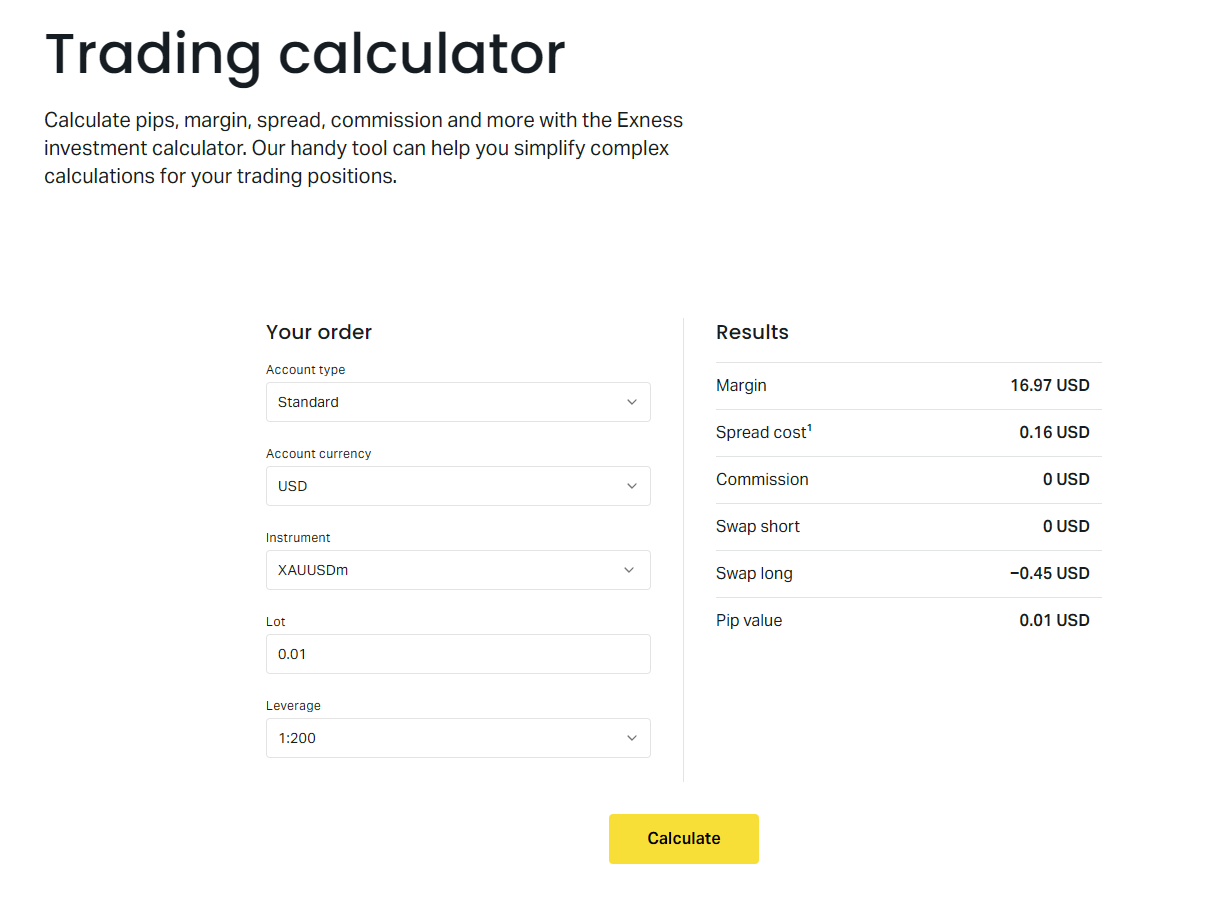
Traders often underestimate pip value when trading cross pairs or non-forex assets. For example, trading XAUUSD (gold) with a USD-denominated account yields a pip value of $1 per 0.01 lot, but trading EURGBP with a USD account requires converting GBP to USD at the current GBPUSD rate. The Exness pip calculator handles this automatically, displaying the exact dollar value per pip for the selected volume.
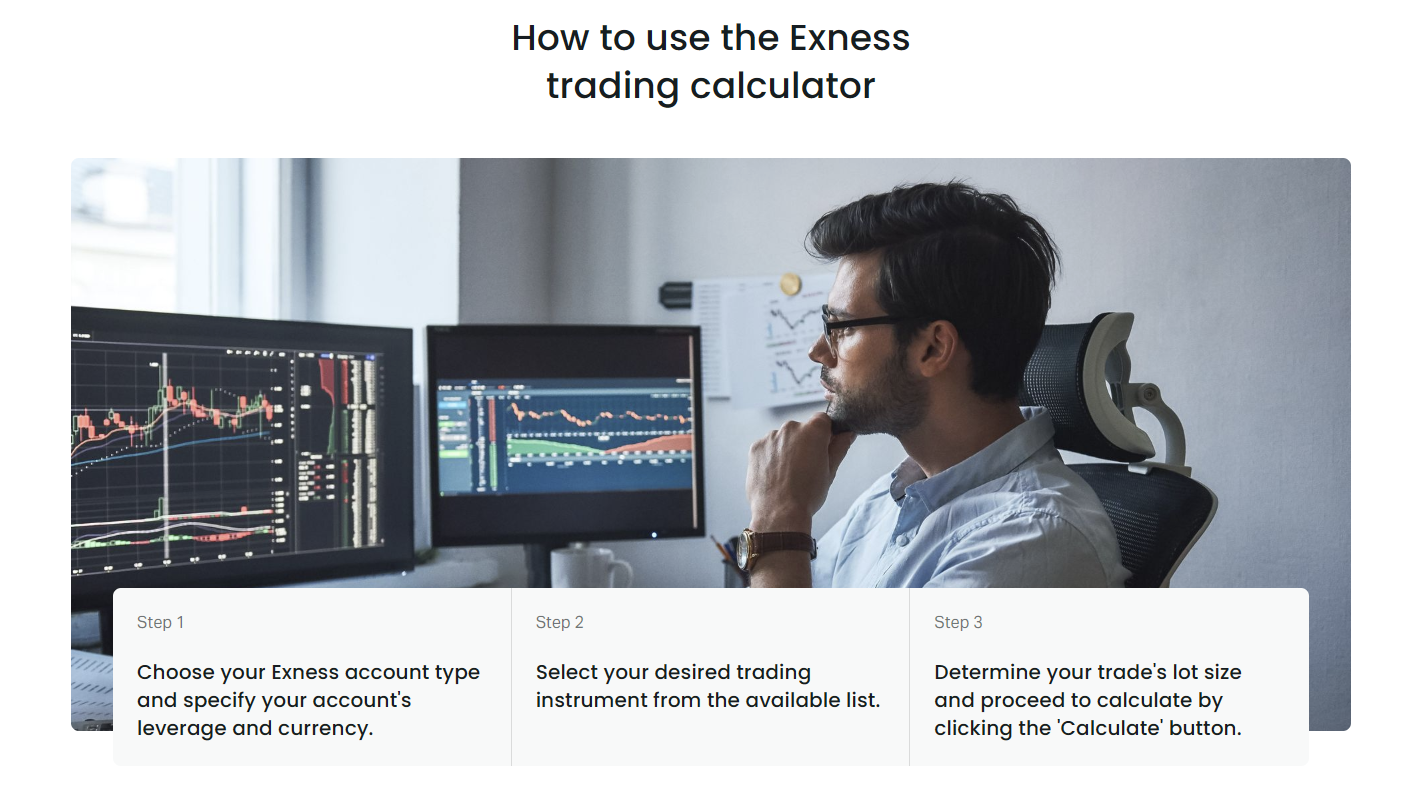
The tool also supports fractional pip (pipette) calculations for brokers that quote five decimal places. Simply enter the desired pip increment, and the calculator scales the result accordingly. This precision is useful for scalpers and high-frequency strategies where every fraction of a pip matters.
Currency Converter: Cross-Currency Calculations
The currency converter is a standalone tool that converts any amount between two currencies at the current Exness rate. It is especially handy for traders who deposit in one currency but trade instruments quoted in another, or for those who want to know the exact value of a withdrawal in their local currency. The converter uses the same pricing engine as the trading platform, so rates match what you see in the terminal.
Unlike public converters that show mid-market rates, the Exness converter reflects the broker's bid/ask spread. This means the converted amount is what you would actually receive or pay when moving funds between currency wallets in your Personal Area. The tool supports all currencies available for Exness accounts, including major, minor, and exotic pairs.
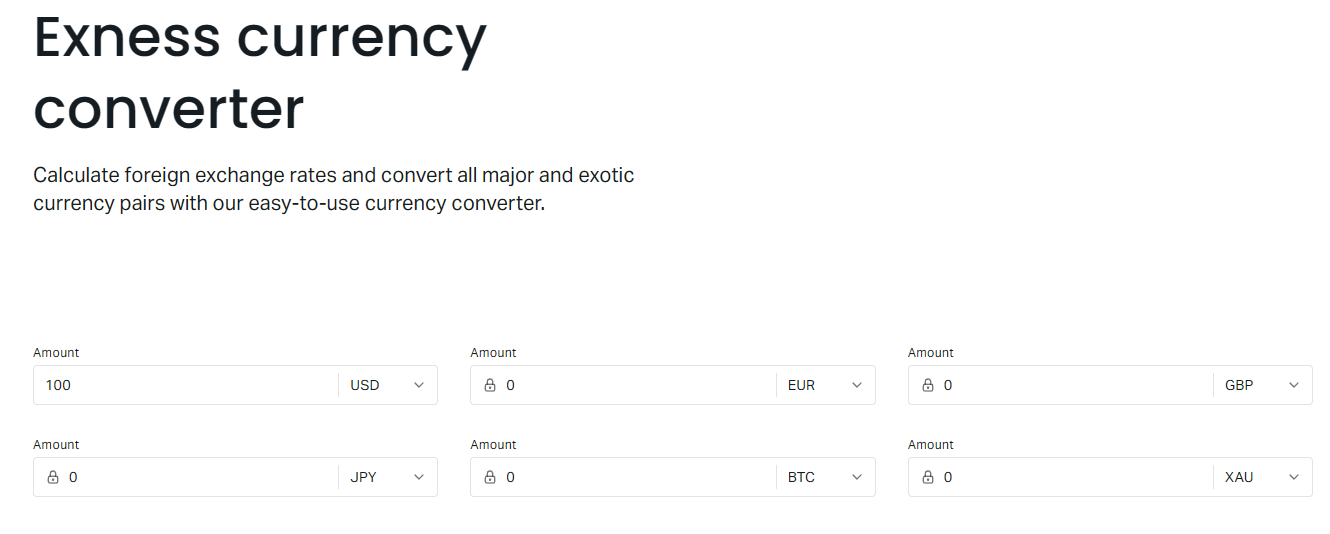
You can also use the converter to plan multi-currency portfolios. For instance, if you hold positions in USDJPY, EURUSD, and GBPUSD, you can convert each position's unrealized profit into your base currency to see the aggregate portfolio performance in real time.
Lot Size Calculator: Position Sizing for Risk Control
The lot size calculator is the risk management centerpiece. It answers the question: how many lots can I trade if I want to risk exactly 2% of my equity on this setup? You input your account equity, risk percentage, stop-loss distance in pips, and the instrument. The calculator then outputs the maximum volume that keeps your risk within the defined limit, accounting for pip value and margin requirements.
This tool enforces discipline by preventing oversizing. Many traders intuitively choose round numbers like 1.00 lot, which may represent 10% risk on a small account. The lot size calculator forces you to confront the true risk of each trade. It also respects the minimum and maximum lot sizes for each instrument, as well as the step size (e.g., 0.01 lot increments).
Scroll horizontally to see all columns
| Step | Action |
|---|---|
| 1 | Enter account equity (or balance) |
| 2 | Set risk percentage (e.g., 1-2%) |
| 3 | Define stop loss in pips from entry |
| 4 | Select instrument and account type |
| 5 | Read suggested volume in lots |
| 6 | Verify margin requirement is acceptable |
| 7 | Adjust risk or stop loss if margin too high |
Position sizing is the only aspect of trading you fully control; the lot size calculator makes that control precise.
Swap Calculator: Overnight Financing Costs
The swap calculator projects the cost or credit of holding a position overnight. Swap rates differ for long and short positions and vary by instrument. Exness updates swap values daily to reflect interbank interest rate differentials and the broker's markup. The calculator multiplies the swap points by the volume and converts the result to your account currency.
For swing traders and carry trade strategies, swap can be a significant profit source or a drag on returns. The calculator lets you compare swap costs across account types; for example, Raw Spread accounts may have different swap points than Standard accounts due to commission structures. You can also estimate the total swap for a planned holding period by multiplying the daily swap by the number of nights, remembering that Wednesday-to-Thursday rollover typically charges triple swap.
- Check swap direction: positive means you earn, negative means you pay.
- Note triple swap on Wednesdays for forex and metals.
- Compare swap across account types for the same instrument.
- Factor swap into profit calculator for multi-day trades.
Using Calculators Across Account Types
Exness provides several account types, each with distinct trading conditions. The calculators adapt to these differences automatically when you select the account type. Standard and Standard Cent accounts are commission-free with wider spreads; Pro accounts offer tighter spreads with no commission; Raw Spread and Zero accounts charge commission per lot but provide the tightest spreads. The profit calculator includes commission only for Raw Spread and Zero accounts, while the margin calculator applies the specific leverage tiers for each account type.
Cent accounts deserve special mention. They denominate balance in cents, so 1 USD = 100 US cents. The calculators handle this by showing results in the account currency (USC), which can be confusing if you think in dollars. Always verify the currency label on the output. The lot size on cent accounts is also different: 1 lot = 1,000 units instead of 100,000, so the pip value is 100 times smaller.
Scroll horizontally to see all columns
| Feature | Standard | Pro | Raw Spread | Zero |
|---|---|---|---|---|
| Commission | None | None | Per lot | Per lot |
| Typical Spread EURUSD | ~1.0 pip | ~0.5 pip | ~0.0 pip | ~0.0 pip |
| Leverage Tiers | Dynamic | Dynamic | Dynamic | Dynamic |
| Min Lot | 0.01 | 0.01 | 0.01 | 0.01 |
| Swap-Free Option | Yes | Yes | Yes | Yes |
Integrating Calculators with MetaTrader Platforms
While the web calculators are convenient, many traders prefer to stay within MetaTrader 4 or 5. Exness does not embed the calculators directly into MT4/MT5, but you can run the web calculator side-by-side or use the Exness mobile app for quick checks. Some traders create custom Excel sheets that pull Exness API data for automated calculations, though this requires programming knowledge.
A practical workflow is to keep the calculator open in a browser window on a second monitor or tablet. Before placing an order in MT5, switch to the calculator, input the planned entry, stop loss, and volume, and verify the margin requirement and risk percentage. This two-step process adds only seconds but catches sizing errors that could lead to margin calls.
Mobile Access: Exness App Calculator Features
The Exness mobile app includes the full calculator suite under the More menu. The interface is optimized for touch: dropdowns become modal pickers, numeric inputs use a custom keypad, and results are displayed in large, readable fonts. All calculators work offline for the last cached rates, but a live internet connection refreshes prices and swap values automatically.
Mobile calculators are invaluable when you are away from your desk and need to assess a trade signal quickly. For example, a push notification alerts you to a breakout on GBPJPY. You open the app, run the lot size calculator with your current equity and a 30-pip stop loss, and instantly know the maximum position size. You can then place the order directly from the app's trading terminal.
Having institutional-grade calculators in your pocket levels the playing field for retail traders on the move.
Practical Examples: Calculator Workflows for Traders
Consider a day trader with a $5,000 Pro account (leverage 1:2000) who wants to scalp EURUSD with a 5-pip stop loss and risk 1% per trade. The lot size calculator inputs: equity $5,000, risk 1%, stop loss 5 pips, instrument EURUSD, account Pro. The result: 10 lots. The margin calculator confirms required margin: (100,000 × 10 × 1.0800) / 2000 = $540, well within free margin. The profit calculator shows a 5-pip target yields $500 gross, minus ~$10 spread = $490 net.
A swing trader with a €10,000 Raw Spread account plans to buy XAUUSD at 2350 with a 100-pip stop loss and hold for two weeks. Lot size calculator: equity €10,000, risk 2%, stop loss 100 pips (gold pip = 0.01), instrument XAUUSD, account Raw Spread. Result: 0.40 lots. Margin calculator: (100 × 0.40 × 2350) / 2000 = $470 ≈ €435. Swap calculator: long swap -0.50 points per lot per night × 0.40 lots × 14 nights = -2.80 points ≈ -$2.80. Profit calculator with 300-pip target: 300 × 0.40 × $1 = $120 gross, minus commission $3.50 per lot × 0.40 = $1.40, minus swap $2.80 = $115.80 net.
- Day trader: high leverage, tight stops, many trades → use lot size and profit calculators daily.
- Swing trader: moderate leverage, wider stops, hold days → add swap calculator to workflow.
- Carry trader: positive swap pairs, long hold → compare swap calculator across instruments.
- Portfolio manager: multiple positions → use currency converter to aggregate P&L in base currency.
Common Mistakes When Using Trading Calculators
Even with accurate tools, traders make errors that undermine their risk management. The most frequent mistake is forgetting to update the leverage setting after changing it in the Personal Area. The calculator defaults to the last used leverage, which may not match your current account configuration. Always verify the leverage field before calculating margin.
Another error is using the wrong account type. If you have a Raw Spread account but leave the calculator on Standard, the profit calculation will omit commissions and use wider spreads, overstating net profit. Similarly, cent account users must ensure the calculator shows USC as the currency; otherwise, pip values and margin will appear 100 times larger than reality.

- Stale leverage setting leads to incorrect margin.
- Wrong account type omits commissions or uses wrong spreads.
- Ignoring cent account denomination distorts all monetary outputs.
- Forgetting triple swap on Wednesdays underestimates holding costs.
- Using mid-market rates instead of broker rates for currency conversion.
- Not accounting for stop-out level when checking free margin.
Advanced Tips for Calculator Power Users
Experienced traders can extract more value by combining calculators in sequence. Start with the lot size calculator to determine maximum volume for your risk tolerance. Feed that volume into the margin calculator to confirm it fits within your free margin buffer. Then use the profit calculator with your target and stop-loss prices to see the risk-reward ratio in monetary terms. Finally, run the swap calculator if the trade may extend beyond the daily rollover.
For multi-leg strategies like hedging or grid trading, calculate the combined margin of all legs before execution. The margin calculator accepts only one position at a time, so sum the individual margins manually or use a spreadsheet. Remember that hedged positions on Exness may have reduced margin requirements depending on the regulation entity; check the specific margin policy for your jurisdiction.
Chaining calculators transforms isolated numbers into a coherent trade plan with defined risk, reward, and cost structure.
Calculator Limitations and When to Verify Manually
The calculators are highly accurate for standard scenarios but have limitations. They assume the spread at the moment of calculation remains constant, which is rarely true during news events. They do not model slippage, requotes, or partial fills. For instruments with variable contract sizes (e.g., some stock CFDs), the calculator uses the standard contract size; always cross-check the contract specification page for the exact lot definition.
During high volatility, the dynamic leverage tiers may shift mid-calculation if your total notional value crosses a threshold. The calculator applies the tier based on the snapshot you provide, but the actual margin at order execution could differ if other positions change. For critical sizing decisions, recalculate immediately before sending the order.
- Spreads widen during news → profit calculator underestimates cost.
- Slippage not modeled → entry/exit prices may differ.
- Contract size variations for stocks/ETFs → verify on specification page.
- Dynamic leverage tier changes → recalculate before execution.
- Swap rates change daily → refresh for multi-day hold estimates.
Frequently Asked Questions
Do I need an Exness account to use the calculators?
No, the web calculators are free to use without logging in. However, signing in pre-fills your account leverage and base currency for more accurate results.
Are the calculator results guaranteed to match actual trading outcomes?
Results are based on current market prices and your selected parameters. Actual outcomes may differ due to spread changes, slippage, commission adjustments, and swap rate updates.
Can I use the calculators for instruments not offered by Exness?
The calculators only support instruments available on Exness. For other assets, you would need a generic calculator with manual input of contract specifications.
How often are swap rates updated in the calculator?
Swap rates are updated daily to reflect the latest interbank rates and Exness markup. The calculator pulls the current values each time you open or refresh the swap tab.
Does the lot size calculator consider the stop-out level?
The lot size calculator only computes volume based on risk percentage and stop loss. You must separately ensure the resulting margin leaves enough free margin above the stop-out threshold (typically 0% or 20% depending on entity).
Can I calculate margin for hedged positions?
The margin calculator handles one position at a time. For hedged positions, calculate each leg separately and apply Exness hedged margin rules for your regulation entity, which may reduce the total margin requirement.
Is there a calculator for position sizing based on Kelly criterion or volatility?
The built-in lot size calculator uses fixed fractional risk (percentage of equity). Advanced models like Kelly or volatility-based sizing require external tools or custom spreadsheets.
Do the calculators work on the Exness MT4/MT5 desktop platforms?
The calculators are web and mobile app tools only. They are not embedded in MT4 or MT5. Use them alongside the platform for pre-trade analysis.
Final Assessment of Exness Calculator Tools
The Exness calculator suite stands out for its integration with live broker data, support for all account types, and coverage of every essential trading metric. By automating the math behind margin, profit, pip value, swap, and position sizing, it lets traders focus on strategy rather than arithmetic. Consistent use of these tools before every trade builds a habit of quantified risk management, which is the hallmark of professional trading. Whether you are a scalper on a Raw Spread account or a swing trader on a Standard Cent account, the calculators adapt to your conditions and provide the numbers you need to trade with confidence.