

Trading Tools
Exness Profit Calculator: Complete Guide for Traders
Master trade planning with accurate profit projections and risk management tools

Forex Analyst
Forex Analyst specializing in currency markets, market trends, technical and fundamental analysis, and providing clear insights to help traders make informed decisions.
The Exness profit calculator stands as an essential tool for traders who want to estimate potential outcomes before committing capital. This web-based utility helps users model trades across forex pairs, stocks, indices, commodities, and cryptocurrencies by factoring in spreads, commissions, swap rates, and leverage. Whether you are a beginner learning position sizing or an experienced trader refining risk parameters, the calculator provides transparent projections that support disciplined decision-making.
Contents
- How the Exness Profit Calculator Works
- Supported Instruments and Markets
- Calculating Forex Trade Profits
- Stock and Index Profit Calculations
- Crypto and Commodity Profit Estimates
- Understanding Spreads, Commissions, and Swaps
- Risk Management with the Profit Calculator
- Leverage and Margin Impact on Profits
- Using the Calculator for Trade Planning
- Mobile Access and Platform Integration
- Common Calculation Mistakes to Avoid
- Advanced Features and Customization
- Final Assessment of Exness Profit Calculator
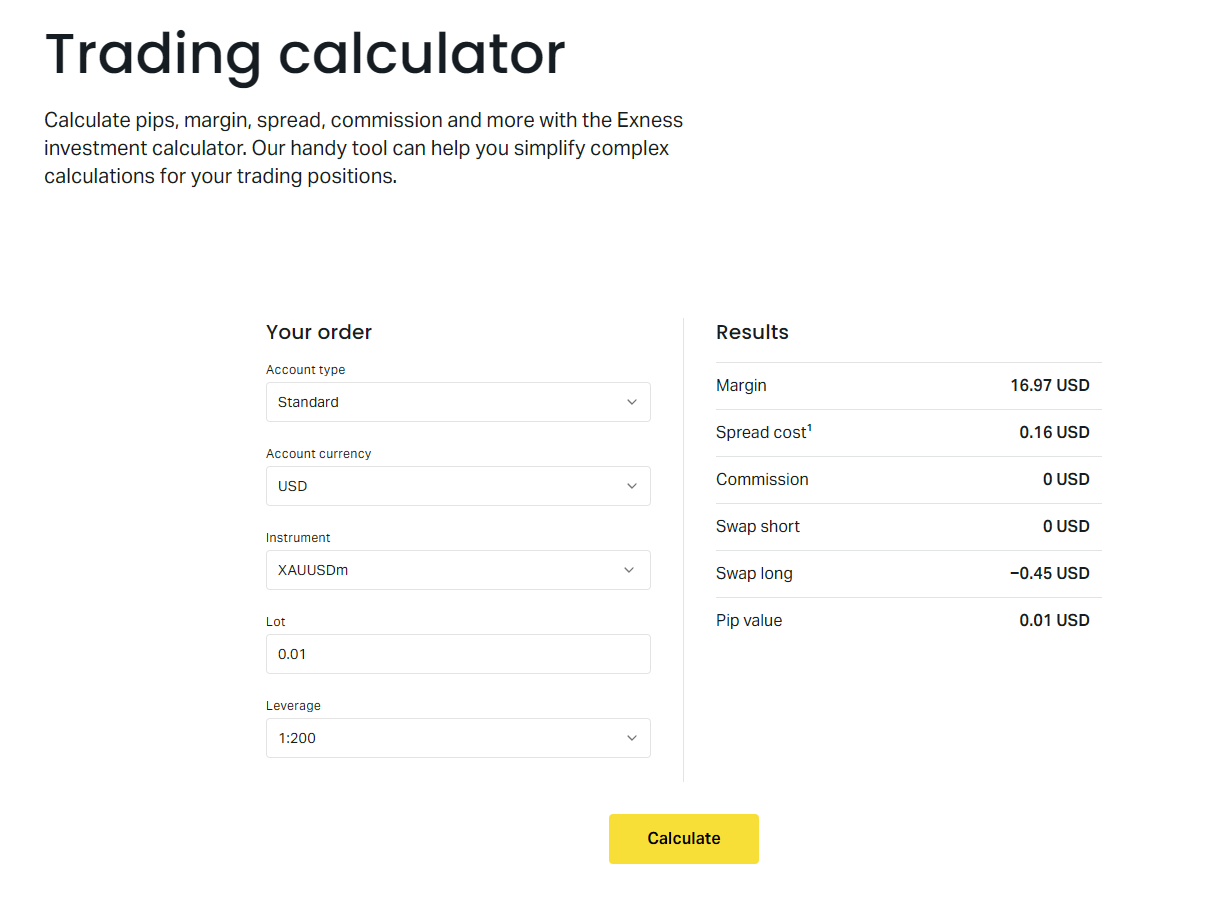
Trading without a clear profit and loss estimate often leads to unexpected results. The calculator removes guesswork by applying real-time market conditions to your hypothetical trade parameters. You enter the instrument, account type, trade direction, volume, and entry or exit prices, and the tool returns projected profit or loss in your account currency. This immediate feedback loop helps traders align position sizes with risk tolerance and avoid margin surprises.
Exness integrates the calculator directly into its trading ecosystem, making it accessible from the personal area, web terminal, and mobile app. The interface adapts to each asset class, displaying relevant fields such as pip value for forex, contract specifications for CFDs, and overnight financing for leveraged positions. This article explores every aspect of the calculator, from basic operation to advanced scenario modeling, so you can incorporate it into your daily trading routine.
How the Exness Profit Calculator Works
The calculator operates on a straightforward principle: it applies the broker's current trading conditions to your input parameters and computes the financial result. When you open the tool, you select an account type — Standard, Standard Cent, Pro, Raw Spread, or Zero — because each carries different spread and commission structures. Next, you choose the trading instrument from a searchable list that covers major and minor forex pairs, global indices, popular stocks, metals, energies, and cryptocurrencies.
- Account type determines spread markup and commission schedule
- Instrument selection loads contract size, tick value, and swap rates
- Trade direction (buy or sell) affects swap calculation
- Volume in lots defines position size and pip or point value
- Open and close prices establish gross price movement
- Leverage setting influences required margin but not profit directly
After entering these values, the calculator displays several key outputs. Gross profit shows the raw price difference multiplied by contract size and volume. Spread cost reflects the bid-ask spread at the moment of calculation. Commission appears for Raw Spread and Zero accounts where applicable. Swap charges or credits account for overnight financing based on the instrument's long and short swap rates. The net result combines all components into a single figure denominated in your account currency.
Supported Instruments and Markets
The calculator covers the full range of instruments available on Exness platforms. Forex pairs include majors like EURUSD and GBPUSD, minors such as EURGBP and AUDJPY, and exotics with wider spreads. Each pair uses a standard lot of 100,000 base currency units, though cent accounts scale this to 1,000 units. Stock CFDs represent shares of companies listed on major exchanges, with contract sizes typically set at one share per lot. Index CFDs track benchmarks like the US30, US500, and USTEC, while commodity CFDs cover gold, silver, crude oil, and natural gas.
Scroll horizontally to see all columns
| Category | Typical Lot Size | Quote Currency | Swap Applied |
|---|---|---|---|
| Forex Majors | 100,000 base units | Counter currency | Daily |
| Forex Minors | 100,000 base units | Counter currency | Daily |
| Stock CFDs | 1 share per lot | Stock currency | Daily |
| Index CFDs | Index points per lot | Index currency | Daily |
| Metals (Gold, Silver) | 100 oz / 5,000 oz | USD | Daily |
| Energies (Oil, Gas) | 1,000 barrels / 10,000 MMBtu | USD | Daily |
| Cryptocurrencies | 1 coin per lot | USD | Daily |
Cryptocurrency CFDs have gained prominence, with Bitcoin, Ethereum, and other major coins available for trading. These instruments often carry higher spreads and swap rates due to volatility and liquidity considerations. The calculator automatically adjusts for each asset's unique specifications, ensuring that profit estimates reflect actual trading conditions rather than generic assumptions.
Calculating Forex Trade Profits
Forex profit calculation follows a consistent formula: (close price - open price) × contract size × volume for long positions, reversed for short positions. The result is expressed in the quote currency and then converted to your account currency at the prevailing rate. For example, a 1-lot EURUSD long trade opened at 1.0850 and closed at 1.0900 yields 50 pips × $10 per pip = $500 gross profit before costs. The calculator performs this conversion instantly, showing both the quote-currency amount and the account-currency equivalent.
Pip value varies by pair and account currency. On a USD-denominated account, EURUSD pip value is $10 per standard lot, while USDJPY pip value fluctuates with the exchange rate. The calculator handles these conversions automatically. It also accounts for the spread at the time of calculation — tighter spreads on major pairs during peak hours reduce costs, while wider spreads during news events or rollover periods increase them. This dynamic spread display helps traders time entries for optimal cost efficiency.
Stock and Index Profit Calculations
Stock and index CFDs differ from forex in contract structure. Each stock lot typically represents one share, so a 10-lot position on Apple equals 10 shares. Profit equals (exit price - entry price) × number of shares for long positions. Index CFDs use a point value defined in the contract specification — for instance, US500 might assign $1 per index point per lot. A 5-lot long position gaining 20 points produces $100 gross profit. The calculator presents these mechanics transparently, letting you see how point values and contract sizes translate to monetary outcomes.
Dividend adjustments affect stock CFD positions held through ex-dividend dates. Long positions receive a credit; short positions incur a debit. The calculator does not automatically model dividend events, so traders should consult the economic calendar and adjust expectations manually. Index CFDs may also reflect constituent dividend impacts. Understanding these nuances prevents surprises when holding positions across corporate action dates.
Crypto and Commodity Profit Estimates
Cryptocurrency CFDs on Exness allow speculation on price movements without owning the underlying assets. Each lot represents one coin for major cryptocurrencies like Bitcoin and Ethereum. Profit calculation mirrors forex: (close - open) × volume for longs. However, crypto spreads are typically wider, and swap rates can be significant due to 24/7 market operation and funding costs. The calculator displays these costs prominently, helping traders evaluate whether potential moves justify the carrying expense.
- Wider spreads increase breakeven distance for crypto trades
- Overnight swaps accumulate rapidly on leveraged crypto positions
- Weekend trading incurs three-day swap charges on Fridays
- Volatility can cause slippage beyond calculated estimates
- Leverage limits for crypto are often lower than for forex majors
Commodity CFDs such as gold (XAUUSD) and silver (XAGUSD) use troy ounce contract sizes — 100 ounces per lot for gold, 5,000 ounces for silver. Oil (USOIL, UKOIL) contracts represent 1,000 barrels per lot. Natural gas uses 10,000 MMBtu per lot. These large contract sizes mean small price movements generate substantial profit or loss. The calculator's precise pip or tick value display is critical for position sizing in these markets.
Understanding Spreads, Commissions, and Swaps
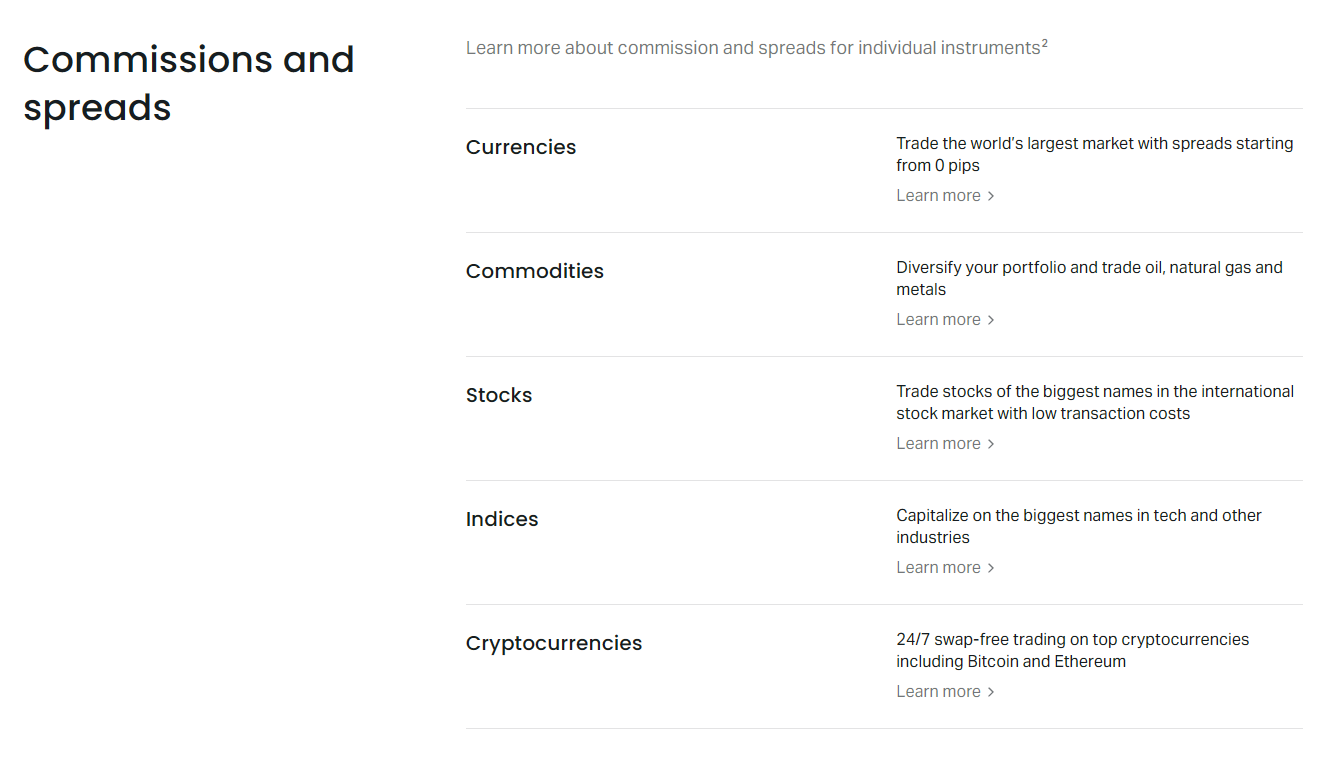
Trading costs directly reduce net profit, and the calculator itemizes each component. Spreads represent the difference between bid and ask prices at trade entry and exit. Exness offers floating spreads that vary with market conditions. Standard and Standard Cent accounts include all costs in the spread with no separate commission. Pro accounts feature lower spreads with no commission. Raw Spread and Zero accounts charge a per-lot commission on top of raw interbank spreads. The calculator applies the correct cost model based on your selected account type.
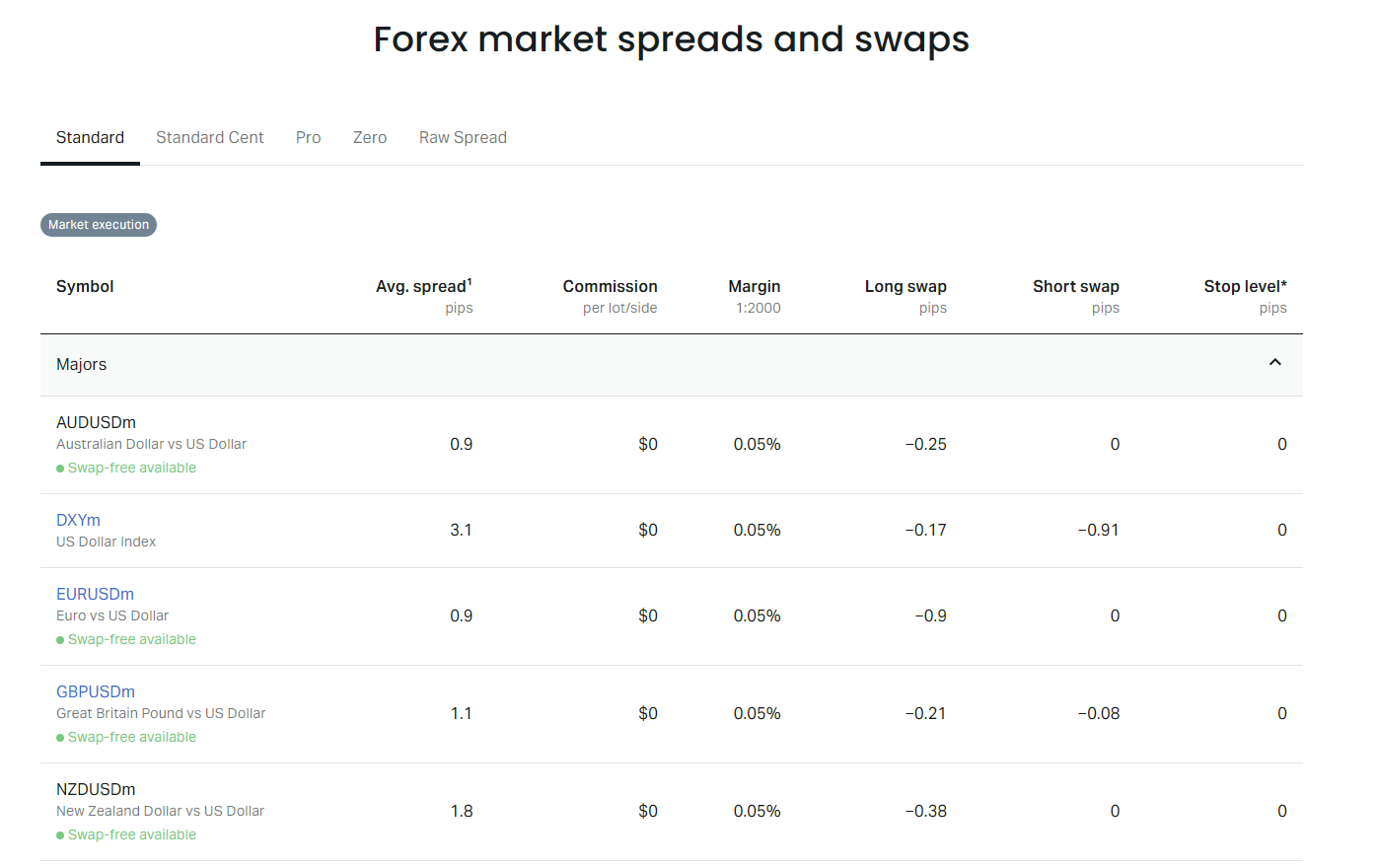
Swaps, also known as rollover fees, apply to positions held past 23:59 server time. Each instrument has distinct long and short swap rates expressed in points or percentage terms. Positive swaps credit your account; negative swaps debit it. The calculator multiplies the applicable swap rate by your position size and the number of nights held. For Wednesday-to-Thursday rollovers, triple swap applies to account for weekend settlement. This feature helps swing traders estimate carrying costs over multi-day horizons.
Scroll horizontally to see all columns
| Account Type | Typical Spread | Commission per Lot | Best For |
|---|---|---|---|
| Standard | 1.0 - 1.2 pips | None | Beginners, low volume |
| Standard Cent | 1.0 - 1.2 pips | None | Micro trading, testing |
| Pro | 0.4 - 0.6 pips | None | Experienced traders |
| Raw Spread | 0.0 - 0.2 pips | $3.50 per side | Scalpers, high volume |
| Zero | 0.0 pips (fixed) | $3.50 per side | Algorithmic trading |
Risk Management with the Profit Calculator
Effective risk management begins with knowing your maximum acceptable loss per trade. The calculator supports this by letting you work backward from a risk amount to determine appropriate position size. Enter your account balance, risk percentage (commonly 1-2%), and stop-loss distance in pips or points. The tool then computes the maximum lot size that keeps loss within your limit. This reverse-engineering approach ensures consistent risk exposure across different instruments and market conditions.
The calculator also reveals the reward-to-risk ratio for any trade setup. Input your entry, stop-loss, and take-profit levels to see the projected profit versus potential loss. A ratio of 2:1 or higher is generally considered favorable, though win rate must also be factored. By modeling multiple scenarios — conservative, base, and aggressive — you can assess whether a trade aligns with your strategy's statistical edge.

Leverage and Margin Impact on Profits
Leverage amplifies both gains and losses by allowing larger positions with less margin. Exness offers dynamic leverage up to 1:2000 on forex for eligible accounts, with lower caps on other instruments. The calculator shows required margin for your chosen leverage and volume, but it does not change the profit calculation — profit depends on price movement and position size, not leverage. However, higher leverage reduces the buffer before margin call or stop-out, increasing the risk of involuntary liquidation.
Margin calls occur when equity falls below a threshold (typically 50% of used margin), and stop-outs close positions automatically at a lower level (often 0% for Exness). The calculator's margin display helps you monitor this buffer. For example, a 1-lot EURUSD position at 1:500 leverage requires approximately $200 margin. If your account holds $1,000, a 400-pip adverse move triggers stop-out. Understanding this relationship prevents overleveraging, a common cause of account depletion.
Using the Calculator for Trade Planning
Integrating the calculator into your pre-trade routine creates a structured planning process. Before entering any position, run the numbers to confirm that potential reward justifies risk, costs are acceptable, and margin requirements fit your account. This habit reduces impulsive decisions and enforces consistency. The calculator also supports journaling — save screenshots or record inputs and outputs for later review, building a database of planned versus actual outcomes.
- Define trade thesis and key levels (entry, stop, target)
- Select account type and instrument in calculator
- Input planned volume and verify margin requirement
- Check net profit at target and net loss at stop
- Confirm reward-to-risk ratio meets strategy minimum
- Review swap costs if holding beyond intraday
- Adjust volume or levels until all criteria align
- Execute trade only after calculator validation
Scenario analysis strengthens planning further. Model best-case, worst-case, and most-likely outcomes by varying exit prices. This reveals the probability-weighted expectancy of your setup. If the calculator shows a negative expectancy after costs, the trade lacks statistical merit regardless of conviction. Over time, this quantitative filter improves trade selection and eliminates low-quality setups that erode capital.
Mobile Access and Platform Integration
The Exness profit calculator is fully functional on mobile devices through the Exness Trade app and mobile web terminal. The responsive interface adapts to smaller screens, preserving all input fields and output displays. Traders can run calculations on the go, whether reacting to news, adjusting positions during a commute, or reviewing setups away from the desk. The mobile version syncs with your account settings, so default account type and currency persist across devices.
Having the calculator in your pocket means every trade decision can be validated by math, not emotion, no matter where you are.
Platform integration extends to the web terminal and MetaTrader 4/5 via the Exness personal area. While MT4 and MT5 have built-in calculators, the Exness version reflects broker-specific conditions — exact spreads, commissions, and swap rates — ensuring consistency. Some traders keep the calculator open in a browser tab alongside their charting platform for rapid scenario testing during live market hours.
Common Calculation Mistakes to Avoid
Even with a reliable tool, user errors can distort projections. One frequent mistake is confusing lot size conventions — standard lots versus cent lots versus crypto lots. Another is neglecting swap costs for multi-day trades, which can turn a profitable setup into a loss. Traders also sometimes use outdated spread assumptions; the calculator pulls live data, but manual estimates based on historical averages may mislead during volatile sessions.
- Using standard lot values for cent account calculations
- Ignoring triple swap on Wednesday rollovers
- Assuming fixed spreads during high-impact news
- Forgetting commission on Raw Spread and Zero accounts
- Mismatching account currency and profit currency conversion
- Overlooking dividend adjustments on stock CFDs
- Applying forex pip values to index or commodity points
A subtle but costly error involves leverage assumptions. The calculator shows margin required for your selected leverage, but if your account hits a leverage tier limit (e.g., reduced leverage above certain equity thresholds), actual margin may differ. Always verify current leverage tiers in your personal area. Additionally, hedged positions on Exness may have reduced margin requirements, which the calculator reflects only when you specify hedged volume correctly.
Advanced Features and Customization
Beyond basic profit estimation, the calculator supports advanced modeling for algorithmic traders and portfolio managers. You can input multiple legs of a strategy — such as a correlated hedge or spread trade — and aggregate the results. The tool also allows custom entry and exit prices for backtesting historical setups against current cost structures. This helps validate whether a strategy that worked in the past remains viable under today's spreads and commissions.
Scroll horizontally to see all columns
| Feature | Description | Use Case |
|---|---|---|
| Multi-leg modeling | Combine multiple positions in one calculation | Hedge funds, pairs trading |
| Historical price input | Test past setups with current costs | Strategy validation |
| Account currency conversion | Automatic FX rate application | Multi-currency accounts |
| Swap projection | Estimate carrying cost over N days | Swing trading planning |
| Margin tier display | Shows leverage steps by equity | Large account management |
For developers, Exness provides API access to trading conditions data, enabling custom calculator integrations. This allows proprietary trading firms to embed real-time cost modeling into their own risk systems. The API delivers spreads, swaps, contract specs, and margin rules programmatically, ensuring that automated strategies always evaluate trades with current parameters.
Final Assessment of Exness Profit Calculator
The Exness profit calculator delivers on its core promise: transparent, accurate trade modeling that reflects real broker conditions. Its strength lies in specificity — every output accounts for the exact spread, commission, and swap structure of your chosen account and instrument. This precision eliminates the gap between theoretical profit and net result, a gap that silently erodes many traders' returns. The tool's integration across web, mobile, and desktop platforms ensures accessibility whenever a trading decision arises.
For risk-conscious traders, the calculator transforms abstract position sizing into concrete numbers. Seeing the exact margin requirement, swap cost, and breakeven distance before clicking buy or sell enforces a discipline that separates consistent performers from gamblers. The ability to reverse-engineer position size from a fixed risk amount is particularly valuable for maintaining steady equity curves. Combined with the economic calendar and market news available in the Exness ecosystem, the calculator becomes a command center for evidence-based trading.
No calculator can predict market direction, and the Exness tool makes no such claim. It quantifies the mechanics of a trade, not its probability of success. Traders must still supply sound analysis, valid setups, and emotional control. But by removing computational uncertainty, the calculator lets you focus entirely on the quality of your decisions. In a profession where edges are measured in fractions of a pip, that clarity is a competitive advantage worth cultivating.
Frequently Asked Questions
Does the Exness profit calculator use real-time spreads and swap rates?
Yes, the calculator pulls current trading conditions from Exness servers, including live floating spreads, account-specific commissions, and up-to-date swap rates for each instrument.
Can I calculate profits for hedged positions using the calculator?
The calculator models single-leg positions. For hedged trades, calculate each leg separately and combine results manually, noting that Exness applies reduced margin for fully hedged positions.
Is the calculator available on the Exness mobile app?
Yes, the profit calculator is fully functional in the Exness Trade app and mobile web terminal with the same features as the desktop version.
How does the calculator handle currency conversion for non-USD accounts?
Profit is calculated in the instrument's quote currency, then converted to your account currency at the current exchange rate. The conversion happens automatically in the results display.
Does the calculator account for dividend adjustments on stock CFDs?
No, dividend credits or debits are not modeled automatically. Traders should check the economic calendar for ex-dividend dates and adjust expectations manually.
Can I use the calculator for backtesting historical strategies?
Yes, you can input historical entry and exit prices to test how a strategy would perform under current cost structures, though past spreads and swaps may have differed.
What is the maximum leverage reflected in the calculator's margin calculation?
The calculator applies your account's current leverage tier, which can reach 1:2000 for forex on eligible accounts, with lower caps for other instruments and higher equity brackets.