

Forex Trading Education
Exness Demo Account: Complete Guide to Practice Trading
Step-by-step registration, platform setup, trading competitions, and transition to live trading

Forex Analyst
Forex Analyst specializing in currency markets, market trends, technical and fundamental analysis, and providing clear insights to help traders make informed decisions.
An Exness demo account provides a risk-free environment where traders can explore financial markets using virtual funds. This practice account mirrors live market conditions including real-time spreads, execution speeds, and platform functionality without putting actual capital at risk. Whether you are new to forex and CFD trading or an experienced trader testing a new strategy, the demo account serves as an essential tool for building confidence and competence before committing real money.
Contents
- What Is an Exness Demo Account
- How to Open an Exness Demo Account
- Exness Demo Account on MT4 and MT5
- Features and Trading Conditions
- Exness Demo Trading Competitions
- Managing Your Demo Account
- Transitioning from Demo to Live Trading
- Common Challenges and Solutions
- Advanced Demo Trading Techniques
- Exness Demo Account for Specific Trading Styles
- Regional Considerations and Accessibility
- Final Assessment of Exness Demo Account
Exness offers demo accounts across all its trading platforms including MetaTrader 4, MetaTrader 5, the Exness Web Terminal, and the Exness Trade mobile app. Each demo account comes with a generous virtual balance that can be reset or replenished, allowing unlimited practice sessions. The registration process takes only a few minutes and requires no identity verification, making it accessible to anyone interested in learning how the markets work.
Beyond basic practice, Exness enhances the demo experience with regular trading competitions where participants can win real cash prizes. These contests add a competitive dimension that simulates the psychological pressure of live trading while keeping financial risk at zero. Understanding how to leverage these features effectively can significantly accelerate your learning curve and prepare you for the realities of live market participation.
What Is an Exness Demo Account
The Exness demo account is a simulated trading environment that replicates the broker's live trading conditions using virtual currency. It provides access to the same asset classes available on live accounts including forex pairs, metals, energies, indices, stocks, and cryptocurrencies. Pricing, spreads, swap rates, and execution models match those found on corresponding live account types, giving traders an authentic preview of what to expect when they transition to real funds.
Unlike some brokers that offer limited demo functionality, Exness provides full access to all platform features including technical indicators, graphical objects, automated trading via Expert Advisors, and the complete suite of analytical tools. The demo account also supports hedging and netting modes on MT5, allowing traders to test different position management approaches. There are no time limits on demo usage, and accounts remain active as long as they are accessed periodically.
- Virtual funds up to $100,000 or equivalent in other currencies
- Real-time market data and live spreads
- Full platform functionality including EAs and custom indicators
- Access to all tradable instruments offered by Exness
- No registration verification required
- Unlimited account resets and balance replenishment
- Compatible with MT4, MT5, Web Terminal, and mobile apps
The demo account serves multiple purposes throughout a trader's journey. Beginners use it to learn platform navigation, order types, and basic risk management. Intermediate traders test new strategies, indicator combinations, or automated systems. Advanced traders validate complex algorithms or practice high-frequency approaches. Even professional traders periodically return to demo environments when exploring unfamiliar asset classes or testing broker-specific execution characteristics.
How to Open an Exness Demo Account
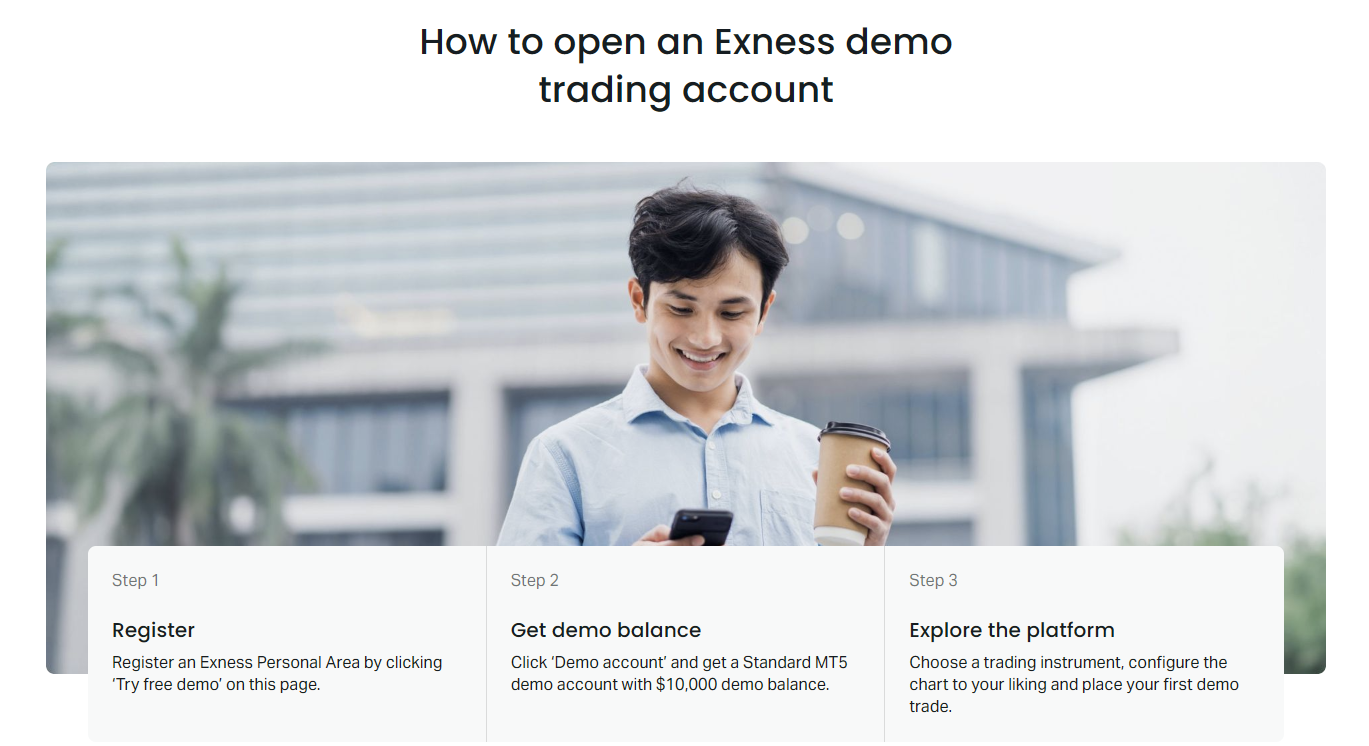
Opening an Exness demo account follows a streamlined process designed to get you trading within minutes. The registration requires only basic information and does not involve identity verification, credit checks, or funding obligations. This frictionless approach reflects Exness's commitment to lowering barriers for traders at all experience levels who want to evaluate their services.
- Visit the Exness website and click the demo account registration button
- Enter your email address and create a secure password
- Select your preferred account currency from the available options
- Choose your desired virtual balance amount
- Select the trading platform: MT4, MT5, or Web Terminal
- Complete the registration and receive your login credentials instantly
- Download the platform or launch Web Terminal to begin trading
During registration, you can specify the account type you wish to simulate. Exness offers demo versions of Standard, Standard Cent, Pro, Raw Spread, and Zero accounts. Each replicates the specific trading conditions of its live counterpart including spreads, commissions, and leverage limits. This allows you to evaluate which account type aligns best with your trading style before committing real capital. The Standard Cent demo is particularly useful for beginners as it denominates balances in cents, making position sizing more intuitive.
After registration, your demo credentials are displayed on screen and sent via email. The login consists of an account number (login), password, and server name. For MT4 and MT5, you will need to download the platform from the Exness website or official MetaQuotes sources, then enter these credentials in the login dialog. The Web Terminal requires no download — simply log in through your browser using the same credentials. Mobile app users can download the Exness Trade app or the official MetaTrader apps from their device's app store.
Exness Demo Account on MT4 and MT5
MetaTrader 4 and MetaTrader 5 remain the most popular platforms for Exness demo trading, each offering distinct advantages. MT4 provides a familiar, lightweight interface optimized for forex trading with extensive community support for custom indicators and Expert Advisors. MT5 expands on this foundation with additional timeframes, more order types, an integrated economic calendar, and support for exchange-traded instruments like stocks. Both platforms are available as desktop applications, web versions, and mobile apps for iOS and Android.
When creating a demo account, you select either MT4 or MT5 as your platform. The credentials are platform-specific — an MT4 demo login will not work on MT5 and vice versa. However, you can maintain multiple demo accounts simultaneously, allowing you to test strategies on both platforms side by side. Exness also offers a multi-terminal feature for MT4 that enables managing multiple demo accounts from a single interface, useful for testing portfolio allocation approaches.
The Exness Web Terminal provides a browser-based alternative that requires no installation. It offers a modern, responsive interface with charting capabilities, technical indicators, and one-click trading. While not as feature-rich as the desktop MetaTrader platforms, the Web Terminal is ideal for quick market checks, managing positions on the go, or trading from devices where software installation is restricted. Demo credentials work seamlessly across all platform variants.
Scroll horizontally to see all columns
| Feature | MT4 Demo | MT5 Demo | Web Terminal Demo |
|---|---|---|---|
| Timeframes | 9 | 21 | Multiple |
| Order Types | 4 pending | 6 pending | Market, Limit, Stop |
| Technical Indicators | 30 built-in | 38 built-in | 20+ built-in |
| Expert Advisors | Full support | Full support | Not supported |
| Economic Calendar | External only | Integrated | Integrated |
| Market Depth | Not available | Available | Not available |
| Mobile App | MT4 app | MT5 app | Exness Trade app |
Features and Trading Conditions
Exness demo accounts replicate the trading conditions of their live counterparts with high fidelity. This includes the same spreads, commission structures, swap rates, leverage limits, and execution models. The broker's market execution model ensures orders are filled at the best available price without requotes, and this behavior is mirrored in the demo environment. Traders can evaluate how spreads widen during news events, how slippage occurs during volatile periods, and how margin requirements change across instruments.
The demo environment supports all order types available on live accounts including market orders, pending orders (buy limit, sell limit, buy stop, sell stop, and on MT5: buy stop limit, sell stop limit), stop loss, and take profit. One-click trading functionality is enabled, allowing rapid order placement directly from charts. Trailing stops function identically to live accounts, providing a realistic test of automated exit strategies. The platform's strategy tester works with demo data, enabling backtesting of Expert Advisors against historical price action.
- Spreads from 0.0 pips on Raw Spread and Zero account demos
- Commission-free trading on Standard and Standard Cent demos
- Leverage up to 1:2000 depending on account type and equity
- Negative balance protection simulated in demo environment
- Stop out level at 0% for most account types
- Swap-free conditions available on Islamic demo accounts
- Instant execution on Standard accounts, market execution on Pro
One notable difference between demo and live trading is the psychological dimension. Demo trading eliminates the emotional impact of real financial risk, which can lead to overconfidence or reckless position sizing. Exness addresses this partially through its demo competitions, which introduce real stakes in the form of cash prizes. However, traders should consciously practice proper risk management on demo accounts — treating virtual funds as if they were real — to develop habits that transfer effectively to live trading.
Exness Demo Trading Competitions
Exness runs regular trading competitions on demo accounts that offer real cash prizes to top performers. These contests typically run for defined periods — weekly, monthly, or quarterly — and rank participants by percentage return, absolute profit, or other metrics. The competition format adds meaningful stakes to demo trading, simulating the competitive pressure of live markets while keeping your own capital safe. Prize pools vary but often range from hundreds to thousands of dollars distributed among top finishers.
Participation usually requires registering for the specific competition through the Exness Personal Area or a dedicated contest page. Once registered, a special demo account is created or your existing demo account is linked to the contest. Trading activity during the contest period is tracked on a leaderboard visible to all participants. Winners receive prizes credited to their live Exness accounts, which can be withdrawn or used for live trading. These competitions are open to traders worldwide, subject to regional regulations.
- No entry fee required for most Exness demo competitions
- Multiple contests may run simultaneously with different formats
- Leaderboards update in real-time during contest hours
- Prizes credited to live accounts, withdrawable after verification
- Competitions often have specific instrument or strategy restrictions
- Historical contest data available for strategy analysis
- Some contests offer non-cash prizes like funded accounts or VPS
The competitive environment reveals aspects of trading psychology that standard demo trading cannot. The desire to climb the leaderboard can trigger overtrading, excessive risk-taking, or deviation from tested strategies — behaviors that also plague live traders. Observing your own reactions under competitive pressure provides valuable self-knowledge. Many traders use these contests as a bridge between casual demo practice and live trading, treating them as low-stakes dress rehearsals for real market participation.

Demo competitions simulate the emotional intensity of live trading without financial ruin. They are the closest thing to a flight simulator with real consequences for performance.
Managing Your Demo Account
Effective demo account management involves more than placing random trades. Treat your demo account as a structured learning environment with defined objectives, consistent tracking, and periodic review. Exness provides tools within the Personal Area and trading platforms to monitor performance, analyze trade history, and reset accounts when needed. Developing a systematic approach to demo management accelerates skill acquisition and produces more meaningful performance data.
The Exness Personal Area allows you to create multiple demo accounts, each with different settings. You might maintain one demo for testing a trend-following strategy on MT5, another for scalping practice on MT4, and a third for competition participation. Each account's balance can be reset independently, and you can adjust leverage settings to match the live account type you intend to use. The Personal Area also shows detailed statistics including profit factor, win rate, average win/loss, and maximum drawdown.
- Create separate demo accounts for different strategies or purposes
- Reset balance periodically to simulate fresh account conditions
- Adjust leverage to match your intended live account setup
- Export trade history for external analysis in Excel or trading journals
- Use the strategy tester for automated system validation
- Monitor swap costs for positions held overnight
- Track correlation between demo instruments to avoid concentration risk
Demo accounts that remain inactive for extended periods may be archived by the system. Exness typically preserves demo accounts with recent login activity, but accounts untouched for 90 days or more may be removed. Archived accounts can usually be restored through support, but any trade history may be lost. To maintain continuity, log in at least once per month even if you are not actively trading. This also ensures your credentials remain current and you stay familiar with any platform updates.
When you are ready to transition from demo to live trading, the process is seamless. From the Personal Area, you can open a live account of the same type as your demo, complete the verification process, and fund it using any of Exness's supported payment methods. Your platform settings, custom indicators, Expert Advisors, and chart templates transfer directly — you simply log in with your new live credentials. This continuity minimizes friction during the critical transition phase.
Transitioning from Demo to Live Trading
Moving from demo to live trading represents a significant psychological milestone. The technical process is straightforward — open a live account, verify identity, deposit funds, and log in with new credentials — but the mental shift requires preparation. Many traders who perform well on demo struggle initially with live accounts due to emotional responses to real financial risk. Understanding this gap and preparing for it improves the odds of a successful transition.
Before going live, establish a track record on demo that demonstrates consistency. A common benchmark is at least three months of profitable trading with a defined strategy, though the quality of trades matters more than duration. Your demo performance should show disciplined risk management: consistent position sizing, adherence to stop losses, and controlled drawdowns. If you cannot achieve this on demo where emotions are muted, live trading will likely amplify the same weaknesses.
Start live trading with a position size significantly smaller than what you used on demo. Even if your demo account had $10,000 and you traded 1 lot positions, begin live with 0.01 or 0.1 lots on a $100-$500 account. The goal is to experience real emotions — fear, greed, hope — at a financial scale you can afford to lose while maintaining your strategy discipline. Gradually increase position size only after demonstrating consistent live performance at each level. This incremental approach, sometimes called the "stepping stone" method, bridges the psychological gap more effectively than jumping directly to full size.
The best demo traders often make the worst live traders initially because they have never learned to manage the emotional weight of real losses. Demo success builds skill; live trading builds character.
Common Challenges and Solutions
Traders frequently encounter specific challenges when using Exness demo accounts. Understanding these issues and their solutions prevents frustration and keeps your practice productive. The most common problems relate to platform connectivity, data discrepancies, account expiration, and the psychological trap of demo complacency.
- Login failures: Verify server name matches platform (MT4/MT5), check credentials for typos, ensure internet connection stable
- Platform freezes: Clear cache, restart platform, check for updates, reduce chart count or indicator load
- Spread differences: Demo spreads match live but may not reflect extreme news volatility perfectly
- Execution speed: Demo uses same servers but without real order queue pressure
- Account archived: Log in monthly to maintain activity, contact support for restoration
- Balance reset needed: Use Personal Area to replenish virtual funds instantly
- EA not trading: Check Allow Live Trading button, verify strategy tester settings, review journal logs
A subtle but important challenge is the difference in market depth and liquidity simulation. Demo accounts do not interact with the real order book — your orders do not affect prices or consume liquidity. In live markets, large orders can move prices, especially in less liquid instruments or during off-hours. This means slippage and fill quality on demo may be more favorable than live conditions for larger position sizes. Test your strategy with position sizes proportional to your intended live account to minimize this discrepancy.
Advanced Demo Trading Techniques
Beyond basic practice, Exness demo accounts support advanced trading techniques that can significantly enhance your preparation for live markets. These approaches leverage the platform's full capabilities and the broker's specific features to create more realistic and rigorous testing environments. Traders who invest time in these methods often transition to live trading with greater confidence and fewer surprises.
Forward testing — running a strategy on live market data in real-time without risking capital — is the gold standard for strategy validation. Unlike backtesting, which uses historical data and can suffer from curve-fitting, forward testing exposes your strategy to unknown future price action. Run your Expert Advisor or manual strategy on demo for at least 50-100 trades before considering live deployment. Track metrics including profit factor, Sharpe ratio, maximum consecutive losses, and recovery factor. Exness's stable spreads and reliable execution make it well-suited for this purpose.
- Forward test EAs on demo for minimum 50 trades before live deployment
- Simulate news trading by placing straddle orders before major releases
- Practice correlation hedging across forex pairs and commodities
- Test partial close and scale-in/scale-out position management
- Validate risk-reward ratios across different market regimes
- Use strategy tester optimization walk-forward analysis
- Simulate account growth with compounding position sizing
Another advanced technique involves simulating specific adverse scenarios. Use the demo account to practice recovery from drawdowns, manage margin call situations, and execute emergency liquidation procedures. While these events are unpleasant to consider, rehearsing them in a risk-free environment builds the muscle memory needed to act decisively under pressure. Exness's negative balance protection means you cannot lose more than your account balance, but experiencing a simulated stop-out teaches valuable lessons about position sizing and risk limits.
Scroll horizontally to see all columns
| Test Phase | Duration | Key Metrics | Go/No-Go Criteria |
|---|---|---|---|
| Backtesting | 1-5 years data | Profit factor, drawdown, win rate | PF > 1.3, DD < 20% |
| Forward Testing | 2-3 months / 50+ trades | Consistency, Sharpe, recovery | Positive expectancy, stable equity curve |
| Stress Testing | News events, high volatility | Slippage, spread widening, fills | Strategy survives extreme conditions |
| Live Micro | 1 month, minimal size | Psychology, execution, costs | Emotional control, plan adherence |
Exness Demo Account for Specific Trading Styles
Different trading styles benefit from tailored demo approaches. Scalpers need to evaluate execution speed, spread stability during high-frequency trading, and the impact of commissions on Raw Spread or Zero accounts. Swing traders should focus on swap costs, weekend gap risk, and the platform's ability to maintain charts and alerts over extended periods. Algorithmic traders require thorough Expert Advisor testing including strategy optimization, walk-forward analysis, and VPS connectivity verification.
Day traders can use the demo to refine their daily routine: pre-market analysis, identifying key levels, setting alerts, managing intraday risk, and post-market review. The Exness Web Terminal and mobile app are particularly useful for day traders who need to monitor positions away from their primary workstation. Practice the complete workflow from market open to close, including journaling each trade with screenshots and notes. This routine-building is as valuable as the technical practice itself.
- Scalpers: Test on Raw Spread/Zero demo, measure fill quality at high frequency
- Day traders: Build complete daily routine including journaling and review
- Swing traders: Verify swap rates, practice weekend position management
- Position traders: Test long-term carry strategies, rollover costs
- Algo traders: Validate EAs on MT4/MT5, test VPS latency from demo
- Copy traders: Evaluate signal providers on demo before allocating live funds
- News traders: Practice straddle/breakout strategies around economic calendar events
A demo account tailored to your trading style reveals friction points that generic practice misses. The best preparation mirrors your intended live workflow in every detail.
Regional Considerations and Accessibility
Exness demo accounts are accessible globally with minimal restrictions, reflecting the broker's broad international presence. Traders from most countries can register and use demo accounts without limitation. However, certain jurisdictions may restrict access to Exness services entirely, including demo functionality, due to local financial regulations. The broker maintains compliance with regulatory requirements in each region it operates, and the website typically redirects users from restricted regions to appropriate notices.
For traders in regions where Exness operates through specific regulatory entities, the demo account conditions align with the rules applicable to that entity. This includes leverage caps, product availability, and investor protection measures. For example, traders under European regulation may see leverage limited to 1:30 on major forex pairs even on demo, while traders under other jurisdictions may access up to 1:2000. The demo experience accurately reflects the live conditions you would encounter under your applicable regulatory framework.
Language support on the Exness platform and in the Personal Area covers over 15 languages, making demo registration and navigation accessible to a global audience. Customer support for demo account issues is available through the same channels as live accounts — live chat, email, and phone — though priority may be given to live account holders. The help center contains extensive documentation covering demo-specific topics including platform setup, troubleshooting, and competition rules.
Frequently Asked Questions
Does Exness have a demo account for free?
Yes, Exness offers completely free demo accounts with virtual funds up to $100,000. No deposit, credit card, or identity verification is required to open or use a demo account.
How do I open an Exness demo account on MT5?
Register on the Exness website, select MT5 as your platform during signup, download MetaTrader 5 from the Exness site or MetaQuotes, then log in with the provided credentials (login, password, server).
Can I reset my Exness demo account balance?
Yes, you can reset or replenish your demo account balance at any time through the Exness Personal Area. There is no limit to how many times you can reset the virtual funds.
Do Exness demo accounts expire?
Demo accounts do not have a fixed expiration date, but accounts inactive for 90 days or more may be archived. Logging in at least once per month keeps the account active.
Are Exness demo trading competitions free to enter?
Most Exness demo competitions are free to enter. Participants trade on demo accounts and compete for real cash prizes credited to live accounts after verification.
Can I use Expert Advisors on Exness demo accounts?
Yes, both MT4 and MT5 demo accounts fully support Expert Advisors, custom indicators, and automated trading. The strategy tester is also available for backtesting.
Is Exness demo execution the same as live execution?
Exness demo execution closely mirrors live conditions including spreads, swaps, and order types. However, demo orders do not interact with real market liquidity, so fill quality for large orders may be more favorable on demo.
How do I switch from Exness demo to live account?
Open a live account from your Personal Area, complete identity verification, make a deposit, then log in to your trading platform using the new live credentials. Your platform settings transfer automatically.
Final Assessment of Exness Demo Account
The Exness demo account stands out as a comprehensive practice environment that goes beyond basic simulation. Its fidelity to live trading conditions, support for all major platforms, absence of time limits, and integration with competitive events create a uniquely valuable learning ecosystem. Traders who approach the demo account with structure — defining objectives, tracking metrics, testing specific scenarios, and treating virtual capital with the same discipline as real money — extract maximum value from this free resource.
The transition from demo to live trading remains the critical test. No demo environment can fully replicate the psychological weight of real financial risk, but Exness bridges this gap better than most through its demo competitions and seamless account upgrade path. The broker's transparent conditions, reliable execution, and global accessibility make its demo account a credible starting point for anyone serious about developing trading competence. Whether your goal is to learn platform mechanics, validate a complex algorithm, or prepare for funded trading challenges, the Exness demo account provides the tools and conditions to do so effectively.