

Trading Tools and Calculators
Exness Margin Calculator: Complete Guide for Traders
Master margin requirements, leverage calculations, and stop-out levels with the Exness trading calculator.

Forex Analyst
Forex Analyst specializing in currency markets, market trends, technical and fundamental analysis, and providing clear insights to help traders make informed decisions.
The Exness margin calculator is a dedicated tool that helps traders determine the exact margin required to open and maintain positions across all available instruments. Whether you trade major forex pairs, precious metals, energy commodities, stock indices, or cryptocurrencies, understanding margin requirements before entering a trade is essential for effective risk management. This calculator eliminates guesswork by providing real-time margin figures based on current market prices, your chosen leverage, and the specific contract specifications of each instrument.
Contents
- How the Exness Margin Calculator Works
- Margin Requirements Across Exness Account Types
- Instrument-Specific Margin Calculations
- Forex Pairs
- Precious Metals
- Energies and Commodities
- Indices and Stocks
- Cryptocurrencies
- Using the Calculator for Position Sizing
- Margin Level, Margin Call, and Stop Out Mechanics
- Currency Conversion and Account Base Currency Effects
- Dynamic Leverage and Margin Tier Transitions
- Comparing Margin Across Brokers
- Practical Workflow: From Analysis to Execution
- Mobile Access and Platform Integration
- Common Mistakes and How to Avoid Them
- Advanced Features: Profit and Pip Calculators
- Final Assessment of Exness Margin Calculator
Margin represents the collateral a broker requires to keep a leveraged position open. It is not a fee or transaction cost; rather, it is a portion of your account equity set aside as a deposit. The Exness margin calculator automates the mathematical process that would otherwise require manual computation involving contract size, current price, leverage ratio, and account currency conversion. By using this tool, traders can plan position sizes that align with their risk tolerance and avoid unexpected margin calls or stop-outs during volatile market conditions.
Exness offers the margin calculator as part of its broader trading calculator suite, accessible directly from the broker's website and within the Personal Area. The tool supports all account types — Standard, Standard Cent, Pro, Raw Spread, and Zero — each with distinct leverage conditions and margin rules. It also accommodates the unique margin treatment of different asset classes, such as the fixed margin requirements for certain indices or the dynamic margin tiers applied to cryptocurrency positions. This comprehensive coverage makes it a reliable companion for both novice and experienced traders.
How the Exness Margin Calculator Works
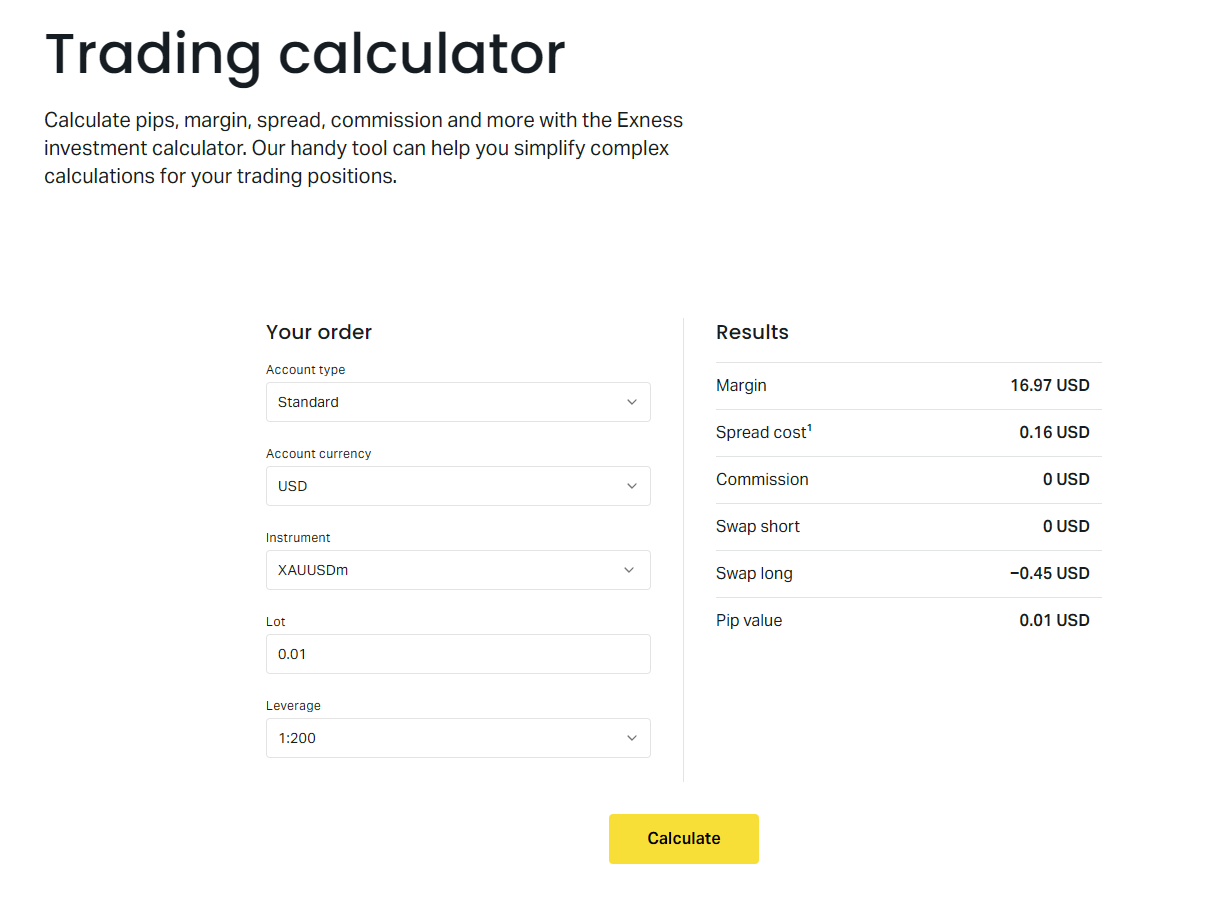
The calculator operates on a straightforward input-output model. You select the trading instrument, specify the position volume in lots, choose your account leverage, and indicate your account base currency. The tool then instantly displays the required margin in your account currency. Behind the scenes, the calculation follows the standard formula: margin equals contract size multiplied by volume multiplied by current market price, divided by leverage. For currency pairs where the account currency differs from the quote currency, an automatic conversion applies using the prevailing exchange rate.
One of the calculator's strengths is its handling of instrument-specific nuances. Forex pairs typically use the standard formula, but metals like gold and silver may have different contract sizes (100 troy ounces for gold, 5,000 troy ounces for silver). Indices and energies often have fixed margin requirements per lot regardless of price fluctuations, while cryptocurrencies employ tiered margin systems where larger positions attract higher margin percentages. The Exness margin calculator incorporates all these rules automatically, ensuring accuracy across the full product range.
- Select instrument from the complete Exness product list
- Enter position volume in standard lots or cent lots
- Choose account leverage from 1:1 up to 1:2000 (where available)
- Specify account base currency for accurate margin display
- View instant results including margin, pip value, and swap estimates
The calculator also provides supplementary data that enhances trade planning. Alongside the required margin, it shows the pip value for the selected position size, which helps quantify potential profit or loss per price movement. Swap rates for long and short positions are displayed, allowing traders to factor overnight financing costs into their strategy. For positions held over weekends, the calculator reflects the triple-swap charge applied on Wednesdays for forex and metals, or Fridays for indices and energies, depending on the instrument's rollover schedule.
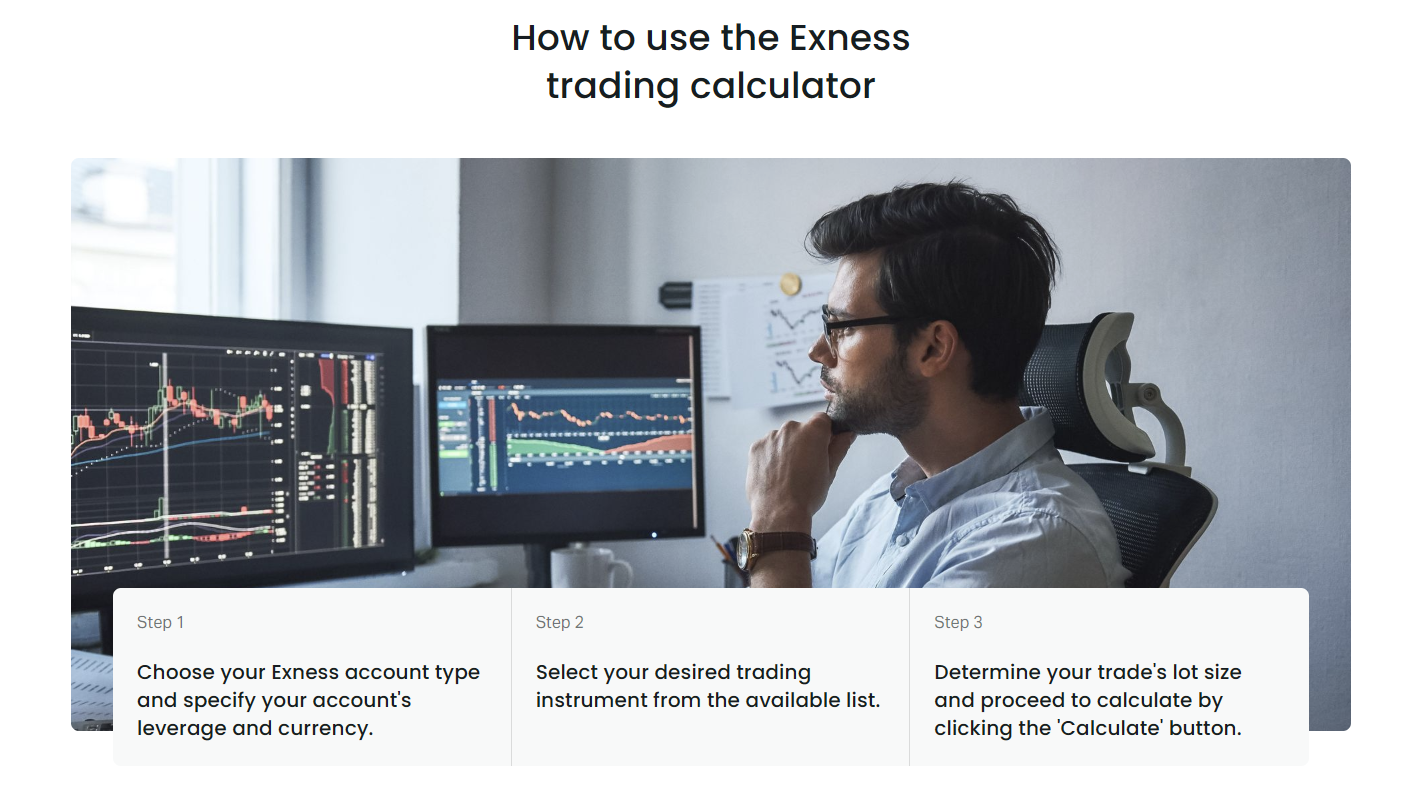
Accessing the calculator is simple. From the Exness website, navigate to the Trading Tools section and select Trading Calculator. Within the Personal Area, the calculator appears under the Analytics or Tools menu. No login is required for basic use, though logged-in users benefit from pre-filled account settings such as default leverage and base currency. The tool is fully responsive and works on desktop, tablet, and mobile browsers without requiring a separate app download.
Margin Requirements Across Exness Account Types
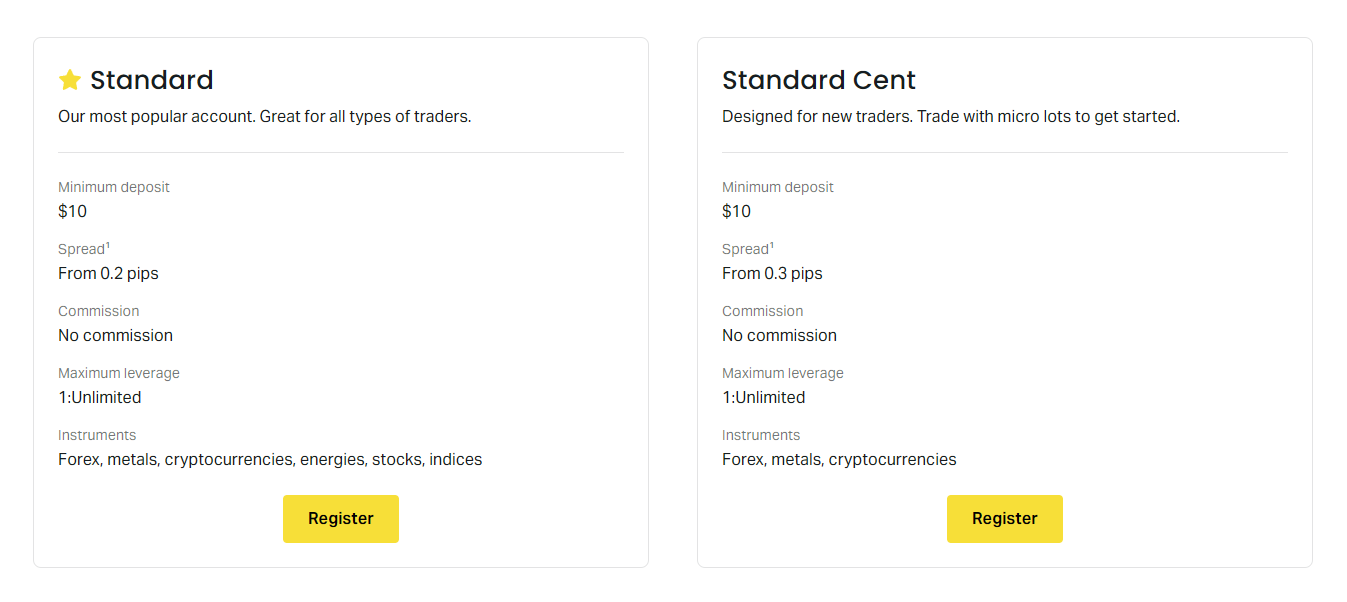
Exness offers five primary account types, each with distinct margin and leverage characteristics. The Standard and Standard Cent accounts provide access to unlimited leverage (up to 1:2000) for equity below certain thresholds, with margin requirements scaling down as equity grows. Professional accounts — Pro, Raw Spread, and Zero — feature more restrictive leverage caps (typically 1:200 maximum) but compensate with tighter spreads and commission-based pricing. The margin calculator automatically applies the correct leverage limits based on the account type selected.
Standard Cent accounts deserve special mention because they denominate positions in cent lots rather than standard lots. One cent lot equals 0.01 standard lots, or 1,000 units of base currency. The margin calculator handles this conversion transparently: when you select a Standard Cent account, the volume input expects cent lots, and the resulting margin reflects the smaller contract size. This makes the tool equally useful for micro-account traders who need precise margin figures for small position sizes.
Scroll horizontally to see all columns
| Account Type | Max Leverage | Margin Call Level | Stop Out Level | Typical Use Case |
|---|---|---|---|---|
| Standard | 1:2000 (unlimited < $999) | 60% | 0% | General retail trading |
| Standard Cent | 1:2000 (unlimited < $999) | 60% | 0% | Micro position sizing |
| Pro | 1:200 | 80% | 50% | Experienced traders, lower spreads |
| Raw Spread | 1:200 | 80% | 50% | Scalpers, commission-based |
| Zero | 1:200 | 80% | 50% | Zero spread on majors, commission |
The table above summarizes key margin parameters. Margin call and stop-out levels differ between Standard and Professional accounts. Standard accounts trigger a margin call at 60% margin level and stop out at 0%, meaning positions close only when equity reaches zero. Professional accounts use stricter thresholds: margin call at 80% and stop out at 50%. These levels are critical for risk planning, and the calculator helps you monitor how close a planned position brings you to these thresholds.
Instrument-Specific Margin Calculations
Different asset classes follow distinct margin methodologies. The Exness margin calculator encodes these variations so traders receive accurate figures without needing to memorize contract specifications. Understanding these differences helps explain why margin requirements can vary significantly even for positions of equal notional value across different instruments.
Forex Pairs
Forex margin follows the standard formula: (contract size × volume × price) ÷ leverage. For major pairs like EURUSD, the contract size is 100,000 units of base currency. At 1:100 leverage, a 1-lot EURUSD position at 1.0800 requires $1,080 margin. The calculator applies real-time bid/ask prices, so margin fluctuates intraday. Cross pairs and exotics use the same formula but may have wider spreads and different liquidity profiles that affect execution rather than margin calculation.
Precious Metals
Gold (XAUUSD) and silver (XAGUSD) have unique contract sizes: 100 troy ounces per lot for gold, 5,000 troy ounces per lot for silver. This means a 1-lot gold position at $2,000 per ounce represents $200,000 notional value. At 1:100 leverage, the margin would be $2,000. The calculator handles these large notional values seamlessly. Platinum and palladium, where available, follow similar precious-metal conventions with their own contract specifications.
Energies and Commodities
Crude oil (USOIL, UKOIL) typically uses 1,000 barrels per lot. Natural gas (NGAS) uses 10,000 MMBtu per lot. These contracts often have fixed margin requirements per lot rather than pure leverage-based calculations, especially during periods of extreme volatility. The Exness margin calculator reflects the current margin policy for each energy instrument, which may switch between dynamic and fixed modes based on market conditions.
Indices and Stocks
Index CFDs like US30, US500, and USTEC usually employ fixed margin per lot. For example, US500 might require $500 margin per lot regardless of the index level. Stock CFDs follow a similar fixed-margin model, often expressed as a percentage of the position value (e.g., 5% or 10% margin requirement). The calculator displays the exact margin for each index or stock, accounting for any corporate actions like stock splits that adjust contract sizes.
Cryptocurrencies
Cryptocurrency CFDs use a tiered margin system. The first tier (smaller positions) may require 10% margin (1:10 leverage), the second tier 20% (1:5), and the third tier 50% (1:2). As position size grows, the blended margin requirement increases. The Exness margin calculator automatically applies the correct tiered calculation, showing the total margin for the full position size entered. This is particularly important for crypto traders who may scale into larger positions.
The calculator also accounts for the margin treatment of hedged positions. When you hold equal long and short positions in the same instrument, Exness applies a 50% margin reduction on the hedged portion for most account types. This means if you are long 1 lot and short 1 lot EURUSD, the margin for the hedged 1 lot is halved. The calculator reflects this when you input offsetting positions, though the web version calculates per position rather than netting a portfolio view.
Understanding instrument-specific margin rules prevents the common mistake of assuming uniform leverage across all markets. A 1-lot position in gold requires vastly different margin than 1 lot in EURUSD, even at identical leverage.
Using the Calculator for Position Sizing
Position sizing is the practical application of margin calculation. Instead of asking "how much margin for this lot size?" the trader asks "what lot size fits my risk parameters?" The Exness margin calculator supports this reverse workflow: you decide the maximum margin you are willing to allocate — often a percentage of account equity — and then adjust the volume input until the displayed margin matches your target. This iterative approach is fast and intuitive.
A common risk management rule limits margin usage to 10–20% of account equity per trade, leaving ample buffer for adverse price movements. For a $10,000 account risking 2% per trade with a 50-pip stop loss on EURUSD, the position size calculation involves pip value, stop distance, and risk amount. The calculator provides the pip value instantly, enabling you to solve for volume: risk amount ÷ (stop loss in pips × pip value per lot) = volume in lots. Once you have the volume, the calculator confirms the margin requirement.
- Determine account equity and maximum risk percentage per trade
- Set stop loss distance in pips based on technical analysis
- Use calculator pip value to compute maximum position volume
- Verify resulting margin fits within your margin usage limit
- Adjust leverage or volume if margin exceeds comfort threshold
The calculator also aids in evaluating the impact of leverage changes. Higher leverage reduces required margin, freeing equity for other trades or increasing the buffer before margin call. However, it also amplifies both gains and losses. By toggling leverage in the calculator, you can instantly see how margin requirements shift and decide whether the additional risk is justified. This is especially relevant for Standard account holders who have access to leverage up to 1:2000 but must weigh the benefits against the increased stop-out risk.
Margin Level, Margin Call, and Stop Out Mechanics
The margin calculator provides the static margin required to open a position, but dynamic account health depends on margin level — the ratio of equity to used margin expressed as a percentage. Margin level = (equity ÷ used margin) × 100%. As floating profits or losses accumulate, equity changes, and so does margin level. Monitoring this metric is essential for avoiding forced liquidation.
Exness defines two critical thresholds. A margin call is a warning notification sent when margin level falls to the account-type-specific level (60% for Standard, 80% for Professional). It does not close positions but alerts you to add funds or reduce exposure. Stop out is the automatic closure of positions when margin level reaches the stop-out threshold (0% for Standard, 50% for Professional). Positions are closed starting with the largest losing position until margin level recovers above the threshold.

Scroll horizontally to see all columns
| Margin Level | Standard Accounts | Professional Accounts | Action Required |
|---|---|---|---|
| Above 100% | Safe | Safe | No action needed |
| 80–100% | Safe | Margin call zone | Monitor closely (Pro) |
| 60–80% | Margin call zone | Stop out zone | Reduce risk or add funds |
| 50–60% | Margin call active | Stop out active | Positions closing (Pro) |
| Below 50% | Approaching stop out | Stop out active | Immediate action required |
| 0% | Stop out triggered | Already stopped out | All positions closed |
The calculator helps you estimate the price move required to reach these thresholds. By knowing your used margin and account equity, you can calculate the adverse price movement (in pips or points) that would trigger a margin call or stop out. For example, with $10,000 equity and $2,000 used margin, your margin level is 500%. A drop to 60% (Standard margin call) requires a $8,800 equity decline. Dividing by the position's pip value gives the pip buffer. This "distance to margin call" is a valuable risk metric the calculator indirectly supports.
Margin level is the vital sign of a leveraged account. The calculator gives you the starting margin; your stop loss and position size determine how much room the account has to breathe.
Currency Conversion and Account Base Currency Effects
When your account base currency differs from the instrument's quote currency, the margin calculator performs an automatic currency conversion. For instance, a EUR-denominated account trading USDJPY requires converting the JPY-denominated margin into EUR at the current EURJPY rate. This conversion introduces an additional variable: margin requirements fluctuate not only with the traded pair's price but also with the cross-rate between your account currency and the margin currency.
Exness supports a wide range of base currencies including USD, EUR, GBP, CHF, JPY, AUD, CAD, NZD, SGD, HKD, and others. The calculator uses real-time interbank rates for conversion, ensuring the displayed margin reflects the actual amount that will be reserved from your equity. This is particularly important for traders in regions where local currency accounts are offered, as margin can vary daily due to FX movements even if the traded instrument's price is unchanged.
- Margin calculated in instrument quote currency first
- Converted to account base currency at current FX rate
- Conversion uses interbank mid-price, not retail spread
- Margin fluctuates with both trade pair and conversion pair
- Calculator updates conversion in real time
For multi-currency portfolios, the total used margin is the sum of all individual position margins converted to the account currency. The calculator does not aggregate across multiple positions in its basic view, but the Personal Area dashboard provides a consolidated margin summary. Traders managing diverse portfolios should use the calculator for each planned position and then sum the results to estimate total margin consumption.
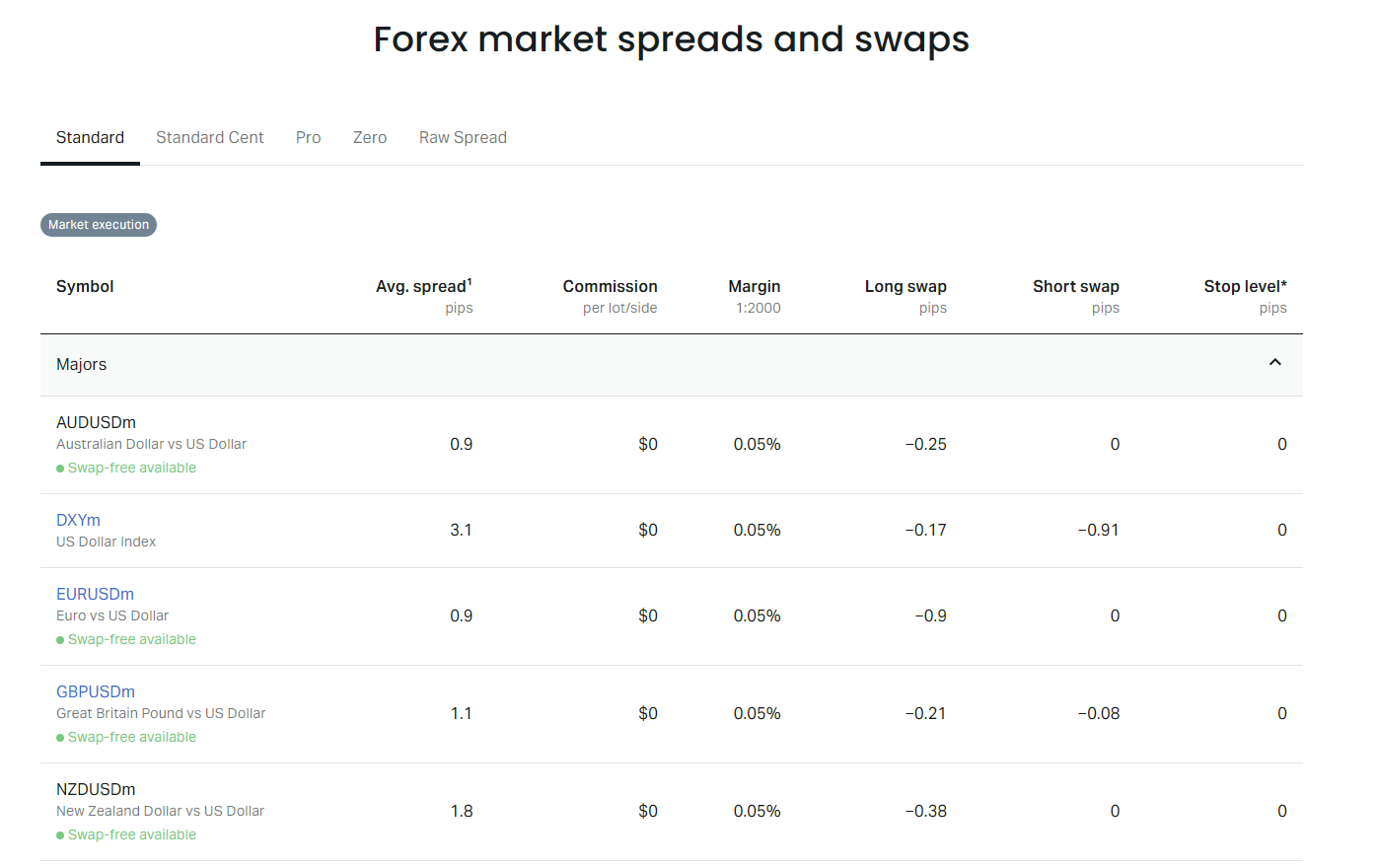
Swap rates, also shown in the calculator, are similarly affected by account currency. A positive swap on a long position in a foreign-currency pair gets converted to your base currency. Over time, accumulated swaps can meaningfully affect equity and thus margin level. The calculator displays swap points per lot per night, allowing you to estimate weekly or monthly carry costs or income and factor them into long-term margin planning.
Dynamic Leverage and Margin Tier Transitions
Exness implements dynamic leverage tiers on Standard and Standard Cent accounts. As account equity crosses predefined thresholds, the maximum available leverage steps down. This means the margin required for the same position size can increase automatically when your equity grows — or decrease if equity falls. The calculator respects the current equity tier, but traders must anticipate tier transitions when planning long-term position holding.
The leverage tiers are: up to $999 equity — 1:2000 (unlimited); $1,000–$4,999 — 1:2000; $5,000–$29,999 — 1:1000; $30,000–$99,999 — 1:500; $100,000–$199,999 — 1:200; $200,000+ — 1:100. These tiers apply per account, not per position. If you have multiple accounts, each has its own equity and leverage tier. The calculator uses the leverage you select, but the dropdown only shows leverage options valid for your current equity tier.
Comparing Margin Across Brokers
While the Exness margin calculator is tailored to Exness trading conditions, the underlying mathematics is universal. Traders comparing brokers can use the calculator to benchmark margin requirements for identical positions. Key variables to compare include maximum leverage, margin call and stop-out levels, contract specifications, and whether hedged margin relief is offered. Exness stands out for its 0% stop-out on Standard accounts, unlimited leverage at low equity, and 50% hedged margin reduction.
Some brokers use higher stop-out levels (e.g., 20% or 30%) which trigger forced closures earlier. Others restrict hedged margin relief or apply it only to specific instruments. The Exness calculator's transparency about these parameters — visible in the account specifications and trading conditions pages — allows for informed broker selection. However, margin alone should not drive broker choice; execution quality, regulation, spreads, and withdrawal reliability are equally important.
Scroll horizontally to see all columns
| Feature | Exness Standard | Typical Broker A | Typical Broker B |
|---|---|---|---|
| Max Leverage | 1:2000 | 1:500 | 1:30 (retail EU) |
| Stop Out Level | 0% | 20% | 50% |
| Margin Call Level | 60% | 50% | 80% |
| Hedged Margin Relief | 50% | 0–50% | 0% |
| Cent Account Option | Yes | Rare | No |
| Dynamic Leverage Tiers | Yes | Sometimes | Fixed |
The comparison table illustrates typical differences. Regulatory constraints in certain jurisdictions (e.g., ESMA in the EU, FCA in the UK, ASIC in Australia) cap retail leverage at 1:30 for major forex and 1:20 for minors, with 50% stop-out mandatory. Exness offers these restricted conditions only to clients onboarded under those specific regulatory entities. Traders in other regions access the full leverage range. The calculator adapts to the regulatory framework applicable to your account.
Practical Workflow: From Analysis to Execution
Integrating the margin calculator into your trading routine creates a disciplined pre-trade checklist. Before every trade, run the numbers: confirm the instrument, decide the stop loss, calculate the position size that matches your risk percentage, verify the required margin, and check that the resulting margin level leaves sufficient buffer. This workflow transforms margin calculation from a reactive chore into a proactive risk control step.
- Identify trade setup and invalidation level (stop loss)
- Open calculator, select instrument and account type
- Enter planned stop loss distance in pips
- Calculate position size: risk ÷ (pips × pip value)
- Input volume, confirm margin requirement
- Check margin level impact on account dashboard
- Execute only if all parameters align with plan
For algorithmic traders or those using Expert Advisors on MT4/MT5, the calculator's logic can be replicated in MQL4/MQL5 using the AccountMargin() and MarketInfo() functions. This allows automated position sizing that respects real-time margin constraints. Exness provides API access for institutional clients, enabling programmatic margin queries for large-scale portfolio management. The web calculator remains the primary tool for discretionary traders.
A trade planned with the margin calculator is a trade planned with respect for leverage. The tool does not guarantee profit, but it guarantees you know the cost of admission before you commit.
Mobile Access and Platform Integration
The Exness margin calculator is fully accessible on mobile devices through the responsive web version. The Exness Trade app includes a built-in calculator with the same functionality, allowing on-the-go position sizing. For traders using MetaTrader 4 or 5 mobile apps, the calculator is not embedded, but the web version works in any mobile browser. The Exness Terminal web platform also provides quick access to the calculator from the trading interface.
Mobile usability is critical for traders who monitor positions away from their desk. The calculator's touch-friendly inputs — dropdowns for instrument and leverage, numeric keypad for volume — work well on small screens. Results display clearly with large fonts for margin, pip value, and swap. No data is saved locally, so each session starts fresh, but logged-in users see their account defaults pre-selected.
The Exness Go app, designed for simplified mobile trading, also incorporates calculator functions for quick margin checks. While not as feature-rich as the full web calculator, it covers the essential inputs: instrument, volume, leverage. This consistency across platforms ensures that whether you trade from desktop Terminal, MT5 desktop, mobile MT5, Exness Trade app, or Exness Go, the margin math remains identical.
Common Mistakes and How to Avoid Them
Even with a reliable calculator, traders make predictable errors. The most frequent is confusing margin with risk. Margin is the deposit required; risk is the potential loss defined by stop loss. A position with $100 margin can lose $500 if the stop loss is wide and leverage high. Always calculate risk separately using the pip value from the calculator multiplied by stop loss distance.
Another mistake is ignoring swap costs for multi-day holds. A position with a negative daily swap of $10 per lot accumulates $70 per week. Over a month, that's $300 — potentially exceeding the initial margin on a small position. The calculator shows swap rates; use them to estimate total holding cost and adjust position size or time horizon accordingly.
- Equating margin with maximum loss — they are unrelated
- Forgetting swap charges on overnight positions
- Using maximum leverage instead of risk-based sizing
- Neglecting currency conversion on non-USD accounts
- Overlooking dynamic leverage tier changes
- Assuming hedged positions require zero margin
- Not checking margin level before adding to winners
A subtle error involves the treatment of pending orders. Pending orders (limit, stop) do not consume margin until triggered. However, if you have multiple pending orders that could trigger simultaneously, the combined margin requirement could exceed your free margin. The calculator helps by letting you compute the margin for each potential position. Sum them to assess worst-case margin demand if all orders fill at once.
Advanced Features: Profit and Pip Calculators
The Exness trading calculator suite includes complementary tools: a profit calculator and a pip calculator. The profit calculator estimates potential profit or loss for a given price target and stop loss, factoring in spread, commission, and swap. The pip calculator shows the monetary value of one pip for any instrument at any volume. Together, these three calculators form a complete pre-trade analysis toolkit.
The profit calculator is especially useful for risk-reward assessment. Input your entry price, take profit, stop loss, and volume. The tool outputs gross profit at take profit, gross loss at stop loss, and the risk-reward ratio. It also deducts estimated commission (for Raw Spread and Zero accounts) and swap for the expected holding period. This holistic view prevents the common oversight of focusing only on margin while ignoring total trade cost.
Scroll horizontally to see all columns
| Calculator | Primary Inputs | Key Outputs | Best Used For |
|---|---|---|---|
| Margin Calculator | Instrument, volume, leverage, currency | Required margin, pip value, swap | Position sizing, margin planning |
| Profit Calculator | Entry, TP, SL, volume, account type | Profit, loss, R:R, net after costs | Trade evaluation, risk-reward analysis |
| Pip Calculator | Instrument, volume, account currency | Pip value in account currency | Quick risk per pip, scaling calculations |
Switching between calculators is seamless — they share the same instrument list and account context. A typical workflow: use the pip calculator to know the value per pip, use that to size the position for your risk target, verify margin with the margin calculator, then evaluate the full trade economics with the profit calculator. This three-step process takes under a minute and dramatically improves trade discipline.
Frequently Asked Questions
Does the Exness margin calculator work for all account types?
Yes, the calculator supports Standard, Standard Cent, Pro, Raw Spread, and Zero accounts. Select your account type to apply the correct leverage limits and margin rules.
How often does the calculator update margin requirements?
The calculator uses real-time market prices and current leverage tiers. Margin updates continuously as prices move, and leverage tiers adjust automatically when account equity crosses threshold levels.
Can I calculate margin for hedged positions?
The web calculator computes margin per position. For hedged positions, Exness applies a 50% margin reduction on the overlapping volume. Calculate each leg separately, then apply 50% to the smaller leg's margin for the hedged portion.
What happens if my margin level hits the stop-out level?
Exness automatically closes positions starting with the largest losing position until margin level recovers above the stop-out threshold (0% for Standard, 50% for Professional accounts).
Does the calculator include commission in margin?
No, margin is separate from commission. Commission is charged at open and close for Raw Spread and Zero accounts. The profit calculator includes commission; the margin calculator shows only the deposit required.
Can I use the calculator offline or in MT4/MT5?
The calculator is web-based and requires internet. MT4/MT5 show used and free margin in the terminal but do not include a pre-trade calculator. Use the web tool before placing orders.
How does account currency affect margin calculation?
Margin is calculated in the instrument's quote currency, then converted to your account base currency at the current interbank rate. The calculator performs this conversion automatically.
Is there a difference between demo and live calculator results?
No, the calculator uses the same pricing and margin logic for both demo and live accounts. Results are identical for the same inputs.
Final Assessment of Exness Margin Calculator
The Exness margin calculator is a robust, accurate, and accessible tool that serves traders across all experience levels. Its strength lies in instrument-specific precision, real-time pricing, multi-currency support, and seamless integration with the Exness ecosystem. By automating the complex mathematics of leveraged margin across forex, metals, energies, indices, stocks, and cryptocurrencies, it removes a significant source of error from trade planning. Traders who incorporate it into their pre-trade routine gain a clear view of capital commitment, risk parameters, and account health projections. While no calculator replaces sound risk management, the Exness margin calculator provides the factual foundation upon which disciplined trading decisions are built.