

Trading Tools
Exness Trading Calculator: Complete Guide for Traders
Master position sizing and risk management with Exness built-in calculation tools

Forex Analyst
Forex Analyst specializing in currency markets, market trends, technical and fundamental analysis, and providing clear insights to help traders make informed decisions.
The Exness trading calculator stands as one of the most practical tools available to traders who need quick, accurate calculations before entering positions. Whether you trade forex pairs, stock CFDs, indices, commodities, or cryptocurrencies, understanding your potential margin requirements, pip values, and profit scenarios can significantly improve your decision-making process. This comprehensive guide explores every aspect of the calculator, from basic access to advanced applications across different account types and trading platforms.
Contents
- What Is the Exness Trading Calculator
- Key Features of the Exness Calculator
- How to Access the Calculator on Exness
- Margin Calculator Explained
- Pip Value Calculator for Forex Pairs
- Profit and Loss Calculator Usage
- Swap Calculator for Overnight Positions
- Currency Converter Tool
- Using the Calculator for Different Account Types
- Calculator Integration with MT4 and MT5
- Mobile App Calculator Features
- Practical Examples and Use Cases
- Risk Management with the Exness Calculator
- Common Calculation Mistakes to Avoid
- Advanced Calculator Techniques
- Calculator Limitations and Considerations
- Key Takeaways for Exness Trading Calculator Users
Many traders overlook calculation tools, relying instead on rough estimates or platform defaults. This approach often leads to unexpected margin calls, miscalculated position sizes, or surprise swap charges. The Exness calculator eliminates guesswork by providing real-time calculations based on current market conditions, your specific account settings, and the exact instrument you plan to trade. Learning to use it effectively transforms it from a simple utility into a core component of your risk management workflow.
Exness has integrated the calculator directly into its Personal Area and web terminal, making it accessible without leaving your trading environment. The tool supports all account types offered by the broker, including Standard, Standard Cent, Pro, Raw Spread, and Zero accounts. Each account type carries different commission structures, spread profiles, and leverage limits, all of which factor into the calculations. Understanding these nuances helps you choose the right account for your strategy and avoid costly surprises.
What Is the Exness Trading Calculator
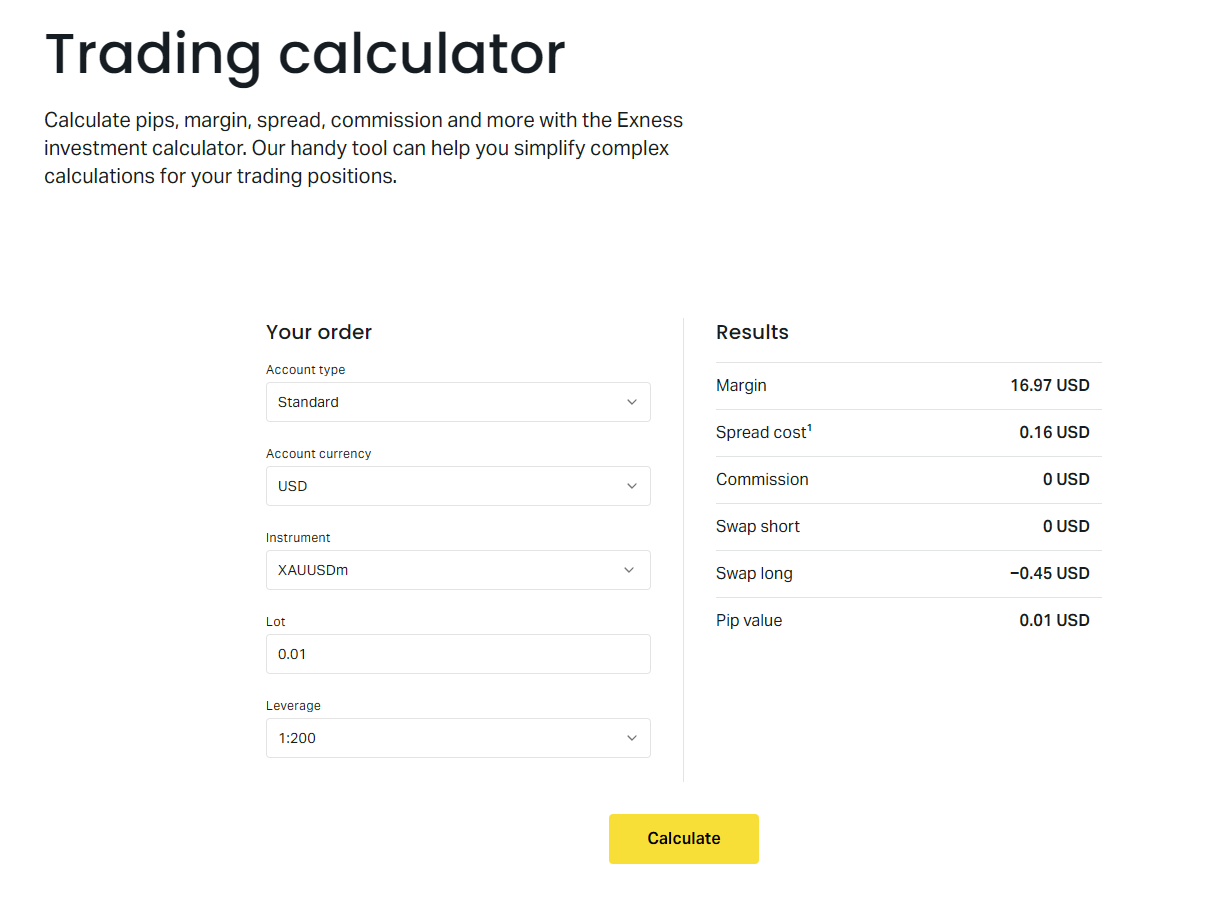
The Exness trading calculator is a multi-function computational tool designed to help traders determine key trade parameters before execution. It combines several distinct calculators into a single interface: margin calculator, pip value calculator, profit and loss calculator, swap calculator, and currency converter. Each function addresses a specific question traders face when planning positions, from how much margin a trade will require to what a pip movement means in account currency terms.
Unlike standalone calculators found on third-party websites, the Exness version pulls live data from the broker's pricing engine. This means spreads, swap rates, and contract specifications reflect current market conditions rather than static assumptions. The calculator also respects your account's specific leverage setting, which can vary by instrument and account type. For example, forex majors might offer up to 1:2000 leverage on certain accounts, while exotic pairs and CFDs on stocks typically have lower maximum leverage.
The calculator requires minimal input to generate results. You select the account type, trading instrument, position size in lots, and optionally the entry and exit prices for profit calculations. The tool then computes required margin, pip value, potential profit or loss, and overnight swap charges. This streamlined workflow encourages traders to verify their numbers before committing capital, reinforcing disciplined trading habits.
Key Features of the Exness Calculator
The calculator's feature set covers the full spectrum of pre-trade analysis needs. The margin calculator determines how much free margin a position will consume, factoring in the instrument's margin requirement, your account leverage, and the current price. This helps you avoid overleveraging and ensures you maintain sufficient free margin to withstand normal market fluctuations without triggering a stop out.
The pip value calculator translates price movements into monetary terms. For forex pairs, it shows the value of a one-pip move in your account currency for the selected position size. This is essential for setting stop-loss and take-profit levels that align with your risk tolerance. A trader risking two percent of a ten thousand dollar account on a EURUSD trade needs to know exactly how many pips equal two hundred dollars at their chosen lot size.
The profit and loss calculator projects potential outcomes based on hypothetical entry and exit prices. You can model best-case, worst-case, and breakeven scenarios before placing a trade. This function also accounts for spreads and commissions specific to your account type, providing a net profit figure rather than a gross estimate. For Raw Spread and Zero accounts where commissions apply per lot, this distinction matters significantly for scalpers and high-frequency traders.
The swap calculator estimates overnight financing costs or credits for positions held past the daily rollover time. Swap rates vary by instrument and direction (long or short), and they can change daily based on interest rate differentials. The calculator displays both the daily swap amount and the cumulative cost for a specified holding period. This feature is particularly valuable for swing traders and carry trade strategies where swap accumulation forms a meaningful portion of total returns.
The currency converter allows quick conversion between your account base currency and other currencies at current rates. This helps when analyzing instruments denominated in different currencies or when planning withdrawals. The converter uses Exness internal rates, which include the broker's conversion spread, giving you a realistic picture of conversion costs.
The calculator interface presents all functions in a clean, tabbed layout. Each tab focuses on one calculation type while sharing common inputs like account type and instrument. This design reduces repetitive data entry when switching between margin, pip, and profit calculations for the same trade idea. The tool also remembers your last used settings within a session, speeding up repeated analysis.
How to Access the Calculator on Exness
Accessing the Exness trading calculator requires a registered Exness account. Once logged into your Personal Area, navigate to the Tools or Analytics section where the calculator link appears. The tool opens in a new browser tab or modal window, allowing you to keep your trading dashboard visible. No additional software installation or plugin is needed; the calculator runs entirely in the browser using JavaScript.
For traders who prefer the web terminal, the calculator is also accessible from the platform's toolbar. This integration lets you calculate parameters while viewing charts and order books without context switching. The web terminal version offers the same functionality as the Personal Area version, with the added convenience of pre-filling the instrument field based on the currently selected chart symbol.
Mobile users can access the calculator through the Exness Trade app. The app includes a dedicated calculator section under the Tools menu, optimized for touch interaction. All desktop features are present, including account type selection, instrument search, and real-time rate updates. The mobile version is particularly useful for traders who manage positions on the go and need to verify margin requirements before adjusting stops or adding to positions.
First-time users should verify their account type is correctly selected in the calculator. The Personal Area defaults to your primary account, but if you hold multiple accounts (for example, a Standard account for swing trading and a Raw Spread account for scalping), you must manually choose the relevant one. Using the wrong account type produces inaccurate margin and commission figures, potentially leading to poor position sizing decisions.
Margin Calculator Explained
The margin calculator is the most frequently used function, as it directly answers whether you have sufficient free margin for a planned trade. Margin requirement equals the notional value of the position divided by the leverage, adjusted for the instrument's specific margin rate. Exness applies different margin rates to different asset classes: forex majors typically require 0.5 percent margin at 1:200 leverage, while cryptocurrency CFDs may require 10 percent or more due to higher volatility.
To use the margin calculator, select your account type, choose the trading instrument, and enter the position size in lots. The calculator displays the required margin in your account currency. For example, trading one lot of EURUSD on a Standard account with 1:2000 leverage at a price of 1.0850 requires approximately 54.25 USD margin (100,000 units times 1.0850 divided by 2000). The same position on a Pro account with 1:100 leverage would require 1,085 USD margin.
The calculator also shows the margin as a percentage of your current equity if you provide your account balance. This helps you visualize the trade's impact on your margin level. A margin level below 100 percent triggers a margin call, and below 50 percent triggers stop out on most Exness accounts. Keeping individual trades below 10-20 percent of equity is a common risk management guideline the calculator helps you enforce.
For hedged positions, Exness applies a reduced margin requirement. When you hold equal long and short positions in the same instrument, the margin for the hedged portion is significantly lower (often 50 percent or less of the standard requirement). The calculator accounts for this automatically when you indicate a hedged position, though the web terminal version may require manual selection of the hedge option.
- Select account type to apply correct leverage and commission structure
- Choose instrument from searchable list covering all Exness markets
- Enter position size in standard lots (1 lot = 100,000 units for forex)
- Review required margin in account currency and as percentage of equity
- Adjust lot size until margin fits your risk management rules
Pip Value Calculator for Forex Pairs
Pip value calculation is fundamental to forex risk management. A pip represents the smallest standardized price move for a currency pair, typically the fourth decimal place (0.0001) for most pairs and the second decimal place (0.01) for JPY pairs. The pip value in your account currency depends on the pair's quote currency, the current exchange rate, and your position size. The Exness calculator handles these conversions automatically.
For a standard lot (100,000 units) of EURUSD with USD as the account currency, each pip equals 10 USD. For a mini lot (10,000 units), each pip equals 1 USD. For a micro lot (1,000 units), each pip equals 0.10 USD. These values hold when the quote currency matches your account currency. When they differ, the calculator converts using the current rate. For example, trading EURGBP with a USD account requires converting the GBP pip value to USD at the current GBPUSD rate.
The calculator displays pip value for both standard and fractional pip (pipette) pricing. Exness uses five-decimal pricing for most pairs (0.00001), meaning a pipette is one-tenth of a pip. Some traders prefer setting stops in pipettes for precision. The calculator shows both values, letting you work in whichever unit your strategy demands. This granularity matters for tight stop-loss strategies where a few pipettes difference changes the risk-reward ratio.
Cross pairs and exotic pairs often have wider spreads and different pip value dynamics. The calculator accounts for the current spread when you use the profit calculator tab, but the pip value tab shows the raw per-pip value independent of spread. Understanding this distinction helps you separate the cost of trading (spread) from the market movement measurement (pip value). For pairs like USDTRY or EURZAR, pip values can be substantially different from majors due to exchange rate levels.
Scroll horizontally to see all columns
| Currency Pair | Account Currency | Pip Value | Notes |
|---|---|---|---|
| EURUSD | USD | 10.00 USD | Quote currency matches account currency |
| EURGBP | USD | Variable | Converted via GBPUSD rate |
| USDJPY | USD | Variable | Converted via USDJPY rate, 0.01 pip |
| GBPUSD | EUR | Variable | Converted via EURUSD rate |
| AUDUSD | AUD | 10.00 AUD | Quote currency matches account currency |
Profit and Loss Calculator Usage
The profit and loss calculator projects the financial outcome of a trade based on your entry and exit price assumptions. This function goes beyond simple pip counting by incorporating the full cost structure: spread at entry, spread at exit, commission (if applicable), and swap charges for the expected holding period. The result is a net profit or loss figure that reflects what you would actually see in your account after closing the position.
To use this calculator, enter your planned entry price, exit price, position size, and direction (buy or sell). The calculator computes the gross price difference in pips, converts to monetary value using the pip value for your position size, then subtracts costs. For Raw Spread and Zero accounts, the commission is calculated as a fixed amount per lot per side (open and close). For Standard and Pro accounts, the cost is embedded in the spread, so no separate commission line appears.
The calculator also supports partial profit scenarios. You can model closing half your position at one target and the remainder at another, seeing the blended result. This is useful for traders who scale out of positions. Additionally, you can input a stop-loss price to see the maximum loss scenario, helping you verify that the risk aligns with your account risk limits before entering the trade.
For instruments with significant swap rates, the holding period input becomes important. A position held for two weeks accumulates fourteen days of swap charges (or credits). The calculator multiplies the daily swap rate by the number of nights held and adds this to the profit calculation. Weekend swaps (triple swap on Wednesdays for forex) are automatically factored in when you enter a holding period that spans a weekend.
Swap Calculator for Overnight Positions
The swap calculator addresses a cost that many intraday traders ignore but swing traders must account for: overnight financing. When you hold a position past the daily rollover time (typically 22:00 or 23:00 server time), you either pay or receive a swap charge based on the interest rate differential between the two currencies in a forex pair, or the financing cost for CFDs on other assets. The Exness calculator shows both the daily rate and the cumulative cost for your planned holding period.
Swap rates are expressed in points (pipettes) per lot per night. A positive swap means you receive credit; a negative swap means you pay. For forex pairs, the direction matters: going long a high-yield currency against a low-yield currency typically earns positive swap, while the opposite direction pays negative swap. The calculator displays separate long and short swap rates for each instrument, updated daily from Exness liquidity providers.
The triple swap Wednesday rule applies to forex pairs to account for weekend settlement. Positions held overnight from Wednesday to Thursday incur three times the normal daily swap. The calculator automatically applies this when your holding period includes a Wednesday night. For example, a five-night hold from Monday to Friday actually incurs seven nights of swap (Monday, Tuesday, Wednesday x3, Thursday, Friday).
For non-forex instruments like stock CFDs, indices, and commodities, swap is typically a financing charge based on a benchmark rate plus a markup. Long positions pay financing; short positions may receive financing (though often at a reduced rate or with a markup). The calculator shows the exact daily cost for your position size, letting you evaluate whether a multi-week trade remains profitable after financing costs.
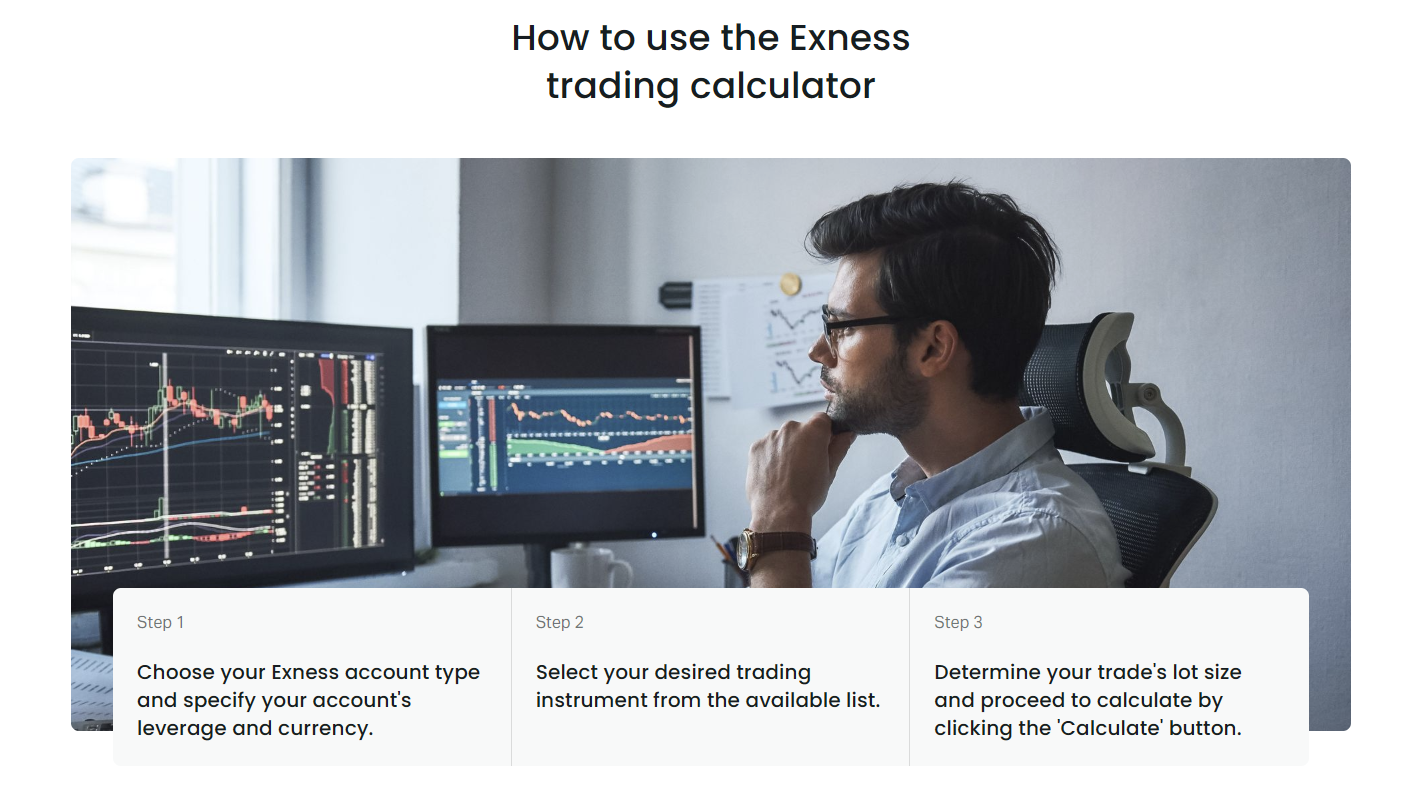
Traders using carry trade strategies rely heavily on the swap calculator to identify pairs with favorable interest rate differentials. The calculator lets you compare swap earnings across multiple pairs quickly. However, carry trades carry exchange rate risk that can far exceed swap gains. The calculator helps quantify the swap component, but you must separately assess the price risk using technical or fundamental analysis.
Currency Converter Tool
The built-in currency converter simplifies cross-currency analysis and withdrawal planning. Exness supports multiple account base currencies including USD, EUR, GBP, CHF, JPY, AUD, CAD, and others. When you trade instruments denominated in a different currency, profits and losses are converted at the current rate. The converter shows the exact rate Exness applies, which includes a small conversion spread.
To use the converter, select the source and target currencies and enter an amount. The tool displays the converted amount and the effective exchange rate. This is particularly useful when you hold a USD-denominated account but want to withdraw to a EUR bank account, or when analyzing a GBP-denominated stock CFD while your account is in USD. The converter uses the same rates applied to actual trade settlements and withdrawals.
The converter also helps when comparing instruments across different quote currencies. For instance, if you trade both EURUSD and USDJPY, your pip values are in USD and JPY respectively. Converting the JPY pip value to USD lets you compare risk directly across both positions. This cross-currency risk normalization is essential for portfolio-level risk management.
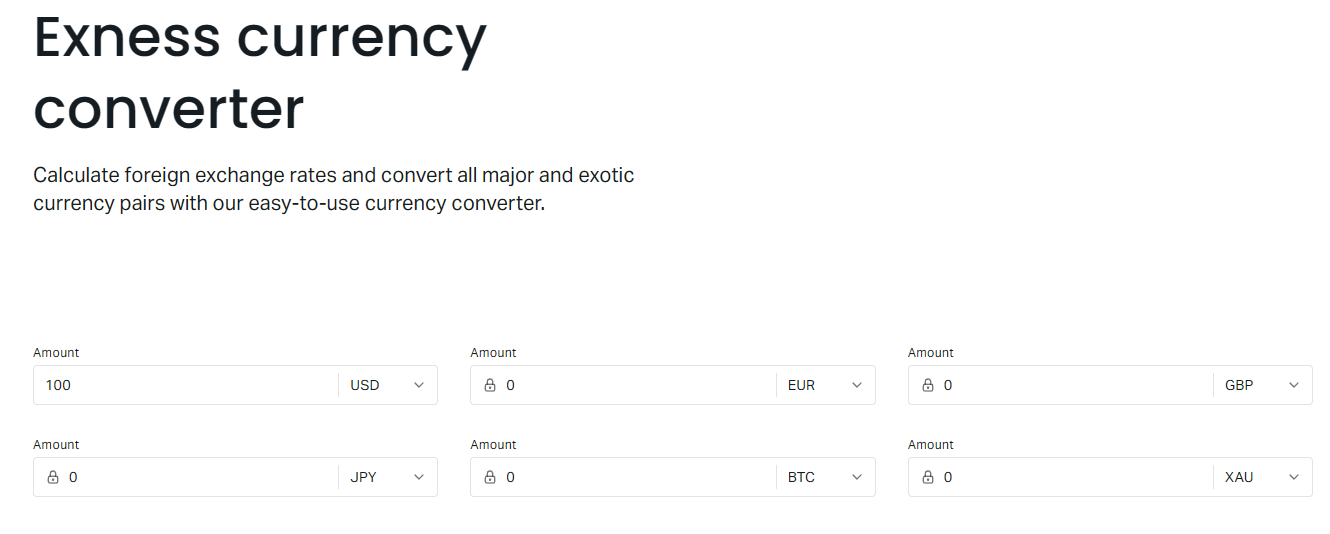
Conversion rates update in real-time during market hours. The spread on conversions is typically small for major currency pairs but wider for exotic currencies. The calculator shows the all-in rate, so there are no hidden fees. For large conversions, consider that Exness may apply tiered pricing or require manual processing; the calculator reflects standard retail rates.
Using the Calculator for Different Account Types
Exness offers several account types, each with distinct trading conditions that affect calculator outputs. The Standard and Standard Cent accounts use spread-only pricing with no commissions. The Pro account offers tighter spreads with no commission. The Raw Spread and Zero accounts charge commissions per lot but provide the tightest spreads, often starting from zero pips on majors. The calculator automatically applies the correct cost structure based on your account selection.
Standard Cent accounts deserve special attention. These accounts denominate balance in cents rather than dollars (1 USD = 100 cents). A 1,000 USD deposit shows as 100,000 cents. The calculator handles this automatically when you select Standard Cent as the account type, displaying margin, pip value, and profit in cents. This allows micro-lot trading with precise risk control, popular among beginners and strategy testers.
Professional accounts (Pro, Raw Spread, Zero) have higher minimum deposit requirements and different leverage tiers. Leverage on these accounts may be capped at lower levels for certain instruments compared to Standard accounts. The calculator respects these caps. For example, while a Standard account might offer 1:2000 on EURUSD, a Raw Spread account might be limited to 1:500. This difference dramatically changes required margin for the same position size.
Islamic (swap-free) accounts replace overnight swaps with a fixed commission per lot held overnight. The calculator adjusts the swap tab to show this commission instead of the standard swap rate. The commission varies by instrument and is typically charged after a grace period (often three to seven days). This structure makes the calculator essential for Islamic account holders to project holding costs accurately.
Scroll horizontally to see all columns
| Account Type | Pricing Model | Commission | Typical Leverage | Calculator Notes |
|---|---|---|---|---|
| Standard | Spread only | None | Up to 1:2000 | Costs embedded in spread |
| Standard Cent | Spread only | None | Up to 1:2000 | Values shown in cents |
| Pro | Tight spreads | None | Up to 1:2000 | Lower spreads than Standard |
| Raw Spread | Raw spreads + commission | Per lot per side | Up to 1:500 | Commission added in profit calc |
| Zero | Zero spreads + commission | Per lot per side | Up to 1:500 | Fixed commission on majors |
| Islamic | Spread + fixed fee | Overnight fee | Varies by type | Swap replaced by daily fee |
Calculator Integration with MT4 and MT5
While the Exness calculator is a web-based tool, its outputs directly inform trading on MetaTrader 4 and MetaTrader 5 platforms. MT4 and MT5 display margin requirements, pip values, and profit in real-time for open positions, but they lack a pre-trade calculator for hypothetical scenarios. Traders typically use the Exness web calculator for planning, then execute on MT4 or MT5. The values match because both systems use the same underlying pricing and contract specifications.
MT4 and MT5 show used margin, free margin, and margin level in the terminal window. These figures update with every price tick. The Exness calculator lets you preview these numbers before opening a position. For example, you can calculate that a two-lot EURUSD position will use 108.50 USD margin on a Standard account with 1:2000 leverage. When you open the position on MT5, the used margin column will reflect this exact amount (subject to minor price changes between calculation and execution).
Expert Advisors (EAs) and custom indicators on MT4/MT5 can programmatically access margin and pip value calculations, but they cannot access the Exness web calculator directly. Some traders build their own calculators within MQL4/MQL5 using the same formulas. The Exness calculator serves as a reference implementation to verify custom tool accuracy. Discrepancies usually stem from outdated swap rates or incorrect contract specifications in the custom tool.
The Exness web terminal (browser-based platform) includes a more integrated calculator experience. When you click New Order, a simplified calculator appears in the order window showing estimated margin and pip value for the selected volume. This mini-calculator pulls the same data as the full web version but focuses on the immediate order parameters. It's a convenient sanity check before clicking Buy or Sell.
Mobile App Calculator Features
The Exness Trade mobile app includes a fully functional calculator optimized for smartphone screens. Accessible from the main menu under Tools, the mobile calculator offers the same five functions: margin, pip value, profit, swap, and currency conversion. The touch interface uses dropdown selectors for account type and instrument, with numeric keypads for lot size and price inputs. Results display in large, readable fonts with color coding for profit (green) and loss (red).
Mobile-specific features include haptic feedback on input fields and the ability to save calculation presets. You can save a frequently used configuration (for example, Standard account, EURUSD, 0.1 lot) as a preset for one-tap access. This speeds up repeated analysis for traders who focus on a few core instruments. Presets sync across devices if you use the same Exness account on multiple phones or tablets.
The mobile calculator also integrates with the app's push notification system. You can set alerts based on calculator outputs, such as notifying you when the margin level for a hypothetical position would drop below a threshold given current prices. This bridges the gap between planning and monitoring, letting you track risk conditions for trades you're considering but haven't yet entered.
Offline functionality is limited. The calculator requires an internet connection to fetch live rates, swap values, and instrument specifications. However, the last successful calculation caches locally, so you can review recent results without connectivity. For active trading, a stable data connection is recommended to ensure calculations reflect current market conditions.
Practical Examples and Use Cases
Consider a day trader planning a EURUSD scalp on a Raw Spread account. They intend to risk 50 USD with a 10-pip stop-loss. Using the pip value calculator, they determine that 0.5 lots yields 5 USD per pip, so a 10-pip stop equals 50 USD risk. The margin calculator shows this requires 27.13 USD margin at 1:2000 leverage (50,000 units times 1.0850 divided by 2000). The profit calculator confirms a 10-pip target yields 50 USD gross profit, minus 3.50 USD commission (0.5 lots times 3.5 USD per lot per side times two sides), netting 46.50 USD. The risk-reward is slightly below 1:1 after costs, prompting the trader to adjust the target to 12 pips.
A swing trader holding GBPJPY for two weeks on a Standard account uses the swap calculator. The long swap is -12.5 points per lot per night. For 0.2 lots over 14 nights (including triple Wednesday), the cost is 0.2 times 12.5 times 14 times 0.01 (pipette to pip) times the GBPJPY pip value in USD. The calculator performs this chain automatically, showing a total swap cost of approximately 18.50 USD. The trader compares this to the expected profit target to ensure the trade remains viable.
A portfolio manager with a USD account trading both US30 (Dow Jones index) and XAUUSD (gold) uses the currency converter and pip value calculator to normalize risk. US30 pip value is in USD directly. XAUUSD pip value is also in USD (10 USD per pip per lot). However, the margin requirements differ: US30 might require 5 percent margin while XAUUSD requires 1 percent. The calculator shows that 1 lot of US30 at 34,000 requires 1,700 USD margin, while 1 lot of XAUUSD at 2,000 requires 200 USD margin. The manager allocates capital to equalize margin usage rather than lot count.
A beginner on a Standard Cent account with 50,000 cents (500 USD) wants to risk 2 percent (1,000 cents) per trade. They trade EURUSD with a 20-pip stop. The pip value calculator shows 0.01 lots (1,000 units) yields 0.10 USD per pip, which is 10 cents per pip. A 20-pip stop risks 200 cents, well within the 1,000 cent limit. They can increase to 0.05 lots for a 1,000 cent risk (50 cents per pip times 20 pips). The margin calculator confirms 0.05 lots requires 271 cents margin at 1:2000 leverage, leaving ample free margin.
The calculator transforms abstract risk percentages into concrete lot sizes, making position sizing a mechanical process rather than a guessing game.
Risk Management with the Exness Calculator
Effective risk management requires consistent position sizing based on account equity, stop-loss distance, and risk per trade. The Exness calculator enables this by linking pip value, margin, and profit calculations in one workflow. A disciplined trader defines risk as a percentage of equity (commonly 1-2 percent), determines the stop-loss in pips based on technical analysis, then uses the calculator to derive the exact lot size that matches these parameters.
The workflow proceeds as follows: first, check current equity in the Personal Area. Second, decide risk percentage and calculate risk amount in account currency. Third, determine stop-loss distance in pips from your entry plan. Fourth, use the pip value calculator to find the lot size where pip value times stop pips equals risk amount. Fifth, verify the required margin using the margin calculator fits within your free margin with comfortable buffer. Sixth, use the profit calculator to confirm the reward target provides an acceptable risk-reward ratio after costs.
This systematic approach removes emotional position sizing. Without the calculator, traders often round lot sizes to convenient numbers (0.1, 0.5, 1.0) regardless of the actual risk. The calculator supports fractional lots down to 0.01 (micro lots) on Standard accounts and 0.001 on Cent accounts, enabling precise risk alignment. For a 10,000 USD account risking 1 percent (100 USD) with a 15-pip stop on EURUSD, the exact lot size is 0.67 lots (100 USD divided by 15 pips divided by 10 USD per pip per lot). Rounding to 0.7 lots increases risk to 105 USD; rounding to 0.6 lots reduces it to 90 USD.
The calculator also supports portfolio-level risk management. By calculating margin requirements for all planned concurrent positions, you can ensure total used margin stays within a safe threshold of equity (commonly 20-30 percent maximum). This prevents overcommitment during correlated market moves. For example, holding long EURUSD, long GBPUSD, and long AUDUSD simultaneously concentrates USD-short exposure. The calculator helps you see the combined margin impact and adjust sizes to maintain diversification.
- Define risk per trade as fixed percentage of current equity
- Calculate stop-loss distance in pips from technical levels
- Use pip value calculator to derive exact lot size for risk target
- Verify margin requirement leaves sufficient free margin buffer
- Check profit target yields minimum 1.5:1 risk-reward after costs
- Aggregate margin for all planned positions to avoid overconcentration
- Recalculate after each equity change (profit or loss)
Common Calculation Mistakes to Avoid
Even with a reliable calculator, traders make errors that lead to unexpected outcomes. One common mistake is using the wrong account type in the calculator. If you have both a Standard and a Raw Spread account but select Standard while trading on Raw Spread, your margin calculation will be wrong (different leverage) and your profit calculation will miss commissions. Always verify the account selector matches your active trading account.
Another frequent error is confusing lots with units. Exness uses standard lots (100,000 units for forex) as the base unit in the calculator. Some traders think in mini lots (10,000) or micro lots (1,000) and enter 1 when they mean 0.1 or 0.01. The calculator accepts decimal lots, so 0.1 equals one mini lot and 0.01 equals one micro lot. Entering 1 instead of 0.1 multiplies margin, pip value, and profit by ten, potentially causing a margin call or oversized risk.
Ignoring swap charges on multi-day trades distorts profit projections. A swing trader targeting 100 pips profit on a pair with -15 points daily swap per lot holds for ten days. The swap cost is 150 points (15 pips) per lot, reducing the net gain to 85 pips. On a 2-lot position, that's 30 USD per pip times 15 pips = 450 USD in swap costs. The profit calculator includes this only if you enter the holding period. Many traders leave it blank, seeing inflated profit estimates.
Failing to account for spread widening during news events or low-liquidity hours leads to stop-losses triggering prematurely. The calculator uses current spread for cost estimates, but spreads can widen 3-10 times normal during major announcements (NFP, CPI, central bank decisions). A 1-pip stop on EURUSD during NFP is virtually guaranteed to fill at a worse price. The calculator cannot predict future spreads, so you must manually adjust your risk assumptions for known volatility events.
A calculator is only as good as the inputs you provide. Garbage in, garbage out applies equally to trading math as to programming.
Advanced Calculator Techniques
Experienced traders use the calculator for scenario analysis beyond single-trade planning. One technique is stress-testing a portfolio against adverse price moves. By entering hypothetical price levels for multiple positions simultaneously, you can estimate the combined margin impact and potential stop-out risk. For instance, if you hold long positions on three USD pairs, calculate the margin required if USD drops 200 pips across the board. This reveals whether your free margin buffer is adequate for correlated drawdowns.
Another advanced use is comparing account types for a specific strategy. A scalper making 50 trades per day on EURUSD can calculate total daily commission on a Raw Spread account versus the spread cost on a Standard account. If Raw Spread charges 3.5 USD per lot per side (7 USD round trip) and the average spread is 0.1 pips (1 USD per lot), while Standard has 0.8 pips spread (8 USD per lot) with no commission, the Raw Spread account saves 1 USD per lot per trade. Over 50 trades of 1 lot each, that's 50 USD daily savings, or roughly 1,000 USD monthly. The calculator makes this comparison straightforward.
Traders optimizing leverage usage can model the same position across different leverage tiers. Exness offers dynamic leverage that decreases as position size increases. The calculator reflects these tiers automatically. For example, the first 10 lots might enjoy 1:2000 leverage, the next 20 lots 1:1000, and beyond 30 lots 1:500. By entering increasing lot sizes, you can see the marginal margin cost of scaling up and identify the leverage tier boundaries. This informs position sizing for large accounts where leverage steps matter.
The calculator also aids in tax planning for jurisdictions where trading profits are taxable. By projecting annual profit across expected trade frequency, position sizes, and win rates, you can estimate tax liability. While the calculator doesn't compute taxes directly, the profit outputs feed into your tax model. Some traders export calculator results to spreadsheets for detailed record-keeping and tax preparation.
Scroll horizontally to see all columns
| Metric | Raw Spread Account | Standard Account | Difference |
|---|---|---|---|
| EURUSD Spread | 0.1 pips | 0.8 pips | 0.7 pips tighter |
| Commission (round trip) | 7.00 USD per lot | 0.00 USD | 7.00 USD cost |
| Effective Cost per Lot | 8.00 USD | 8.00 USD | Equal at current rates |
| Cost at 0.5 pip Spread | 12.00 USD | 5.00 USD | Standard cheaper |
| Best For | High volume, tight spreads | Lower volume, wider spreads | Depends on conditions |
Calculator Limitations and Considerations
While the Exness trading calculator is comprehensive, it has limitations traders should understand. The calculator assumes instant execution at the prices you input. In reality, slippage occurs during volatile markets or low liquidity, meaning your actual entry and exit prices may differ. The calculator cannot model slippage probability or magnitude. Traders should add a slippage buffer to stop-loss and take-profit calculations for instruments prone to gaps.
The calculator uses current swap rates, which can change daily. Central bank rate decisions, interbank liquidity shifts, and broker markup adjustments all affect swap values. A position held for a month may experience different swap rates each week. The calculator shows today's rate multiplied by the holding period, not a forecast of future rates. For long-term positions, monitor swap rates periodically and recalculate.
Margin requirements can change without notice during extreme volatility. Exness, like all brokers, reserves the right to increase margin requirements for specific instruments or across the board during events like elections, referendums, or market crashes. The calculator reflects current requirements but cannot predict future changes. Traders holding positions through known risk events should maintain extra free margin as a buffer against potential margin requirement increases.
The calculator does not account for partial fills or order queue position. If you place a large order that fills in multiple chunks at different prices, your average entry price differs from the single price used in the calculator. This affects both profit calculation and margin usage (since margin is based on the actual filled price). For large positions, consider using the calculator with a weighted average price estimate or breaking the calculation into tranches.
No calculator replaces market awareness. The best risk management combines precise calculation with respect for market unpredictability.
Key Takeaways for Exness Trading Calculator Users
The Exness trading calculator is an indispensable tool for traders who approach the markets with discipline and precision. It consolidates margin, pip value, profit, swap, and currency conversion calculations into a single interface that reflects real-time broker conditions. By integrating directly with Exness account specifications, it eliminates the discrepancies that plague third-party calculators using generic assumptions.

Mastering the calculator means more than knowing which buttons to click. It means understanding how account type, leverage, instrument specifications, and market conditions interact to determine the true cost and risk of every trade. The calculator makes these interactions visible and quantifiable, turning abstract concepts like leverage and swap into concrete numbers that guide position sizing decisions.
Traders who incorporate the calculator into their pre-trade routine consistently avoid common pitfalls: oversized positions that trigger margin calls, ignored swap costs that erode swing trade profits, mismatched risk across correlated instruments, and unrealistic profit targets that don't account for commissions and spreads. The few minutes spent calculating before each trade pay dividends in avoided mistakes and improved risk consistency.
The calculator's availability across Personal Area, web terminal, and mobile app ensures you can verify your numbers wherever you trade. Whether you're at a desktop analyzing multiple timeframes or on a phone managing a position during a commute, the same accurate calculations are at your fingertips. This consistency reinforces good habits regardless of your trading environment.
Frequently Asked Questions
How do I access the Exness trading calculator?
Log into your Exness Personal Area, navigate to the Tools or Analytics section, and click the trading calculator link. It's also available in the Exness web terminal toolbar and the Exness Trade mobile app under Tools.
Does the calculator work for all Exness account types?
Yes, the calculator supports Standard, Standard Cent, Pro, Raw Spread, Zero, and Islamic accounts. Select your account type from the dropdown to apply the correct leverage, spreads, commissions, and swap rates.
Can I use the calculator for cryptocurrency CFDs?
Yes, the calculator covers all instruments offered by Exness including cryptocurrency CFDs like BTCUSD, ETHUSD, and others. Margin requirements and pip values for crypto differ from forex and are calculated automatically.
Why does my calculated margin differ from MT4/MT5?
Minor differences can occur due to price changes between calculation and execution. Ensure your MT4/MT5 contract specifications match the calculator (right-click symbol, select Specification). Large discrepancies may indicate an outdated platform version.
How are swap charges calculated for weekend holding?
Forex positions held overnight from Wednesday to Thursday incur triple swap (three nights in one). The calculator automatically applies this when your holding period includes a Wednesday night. For example, a 5-night hold Monday to Friday calculates as 7 swap nights.
Does the calculator include commission costs in profit calculations?
Yes, for Raw Spread and Zero accounts, the profit calculator adds the round-trip commission (per lot per side times two) to the cost. For Standard and Pro accounts, costs are embedded in the spread and no separate commission appears.
Can I save calculator presets on the mobile app?
Yes, the Exness Trade app allows saving calculation presets for frequently used account-instrument-lot size combinations. Presets sync across devices logged into the same Exness account.
What should I do if the calculator shows insufficient margin?
Reduce your position size, increase leverage (if available for your account type), deposit additional funds, or close existing positions to free up margin. The calculator helps you find the maximum lot size that fits your available free margin.